


Participant
September 10, 2024
Question

Reg: Adding Project Preset using API

  • September 10, 2024
  • 1 reply
  • 235 views

Hi everyone,

I'm working with the Substance Painter API, and I'm trying to add both a project preset and output templates during startup of the application. While I've successfully added the output templates using the API, I haven't been able to find a way to add the project preset template. Ideally, the project preset would appear in the dropdown list as per the image below.

We are aware of other methods that can add preset while creating a project with mesh & adding to user's preset's folder but we are looking for a way to have this setup centrally so that all users on our network can pick it up from the same location rather than having to set it up for each user.
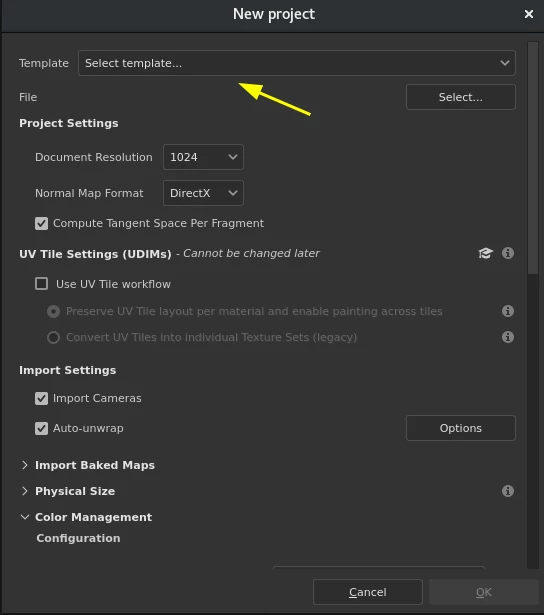
 

Is there any specific API method I might be missing, or is this functionality currently unsupported? I'd appreciate any guidance or suggestions.


Thanks in advance!

This topic has been closed for replies.

1 reply

Léna Piquet Froyok
Adobe Employee
Adobe Employee
September 17, 2024

You can create project templates by simply saving them from an existing project, which is available via the project submodule (see substance_painter.project.save_as_template() in the API).


Then I think the simplest solution in this case would be to load a Shelf/Library location which contains those project templates and export presets in it.


In the Python API you can define this new location very easily via the Resource submodule (see substance_painter.resource.Shelves.add() in the documentation). Note that you will need to load/specify this new location via Python at each startup.


Another solution is to specify that Library location in a more hardcoded manner, see: https://helpx.adobe.com/substance-3d-painter/pipeline-and-integration/resource-management/adding-resource-paths-by-editing-preferences-manually.html