


RAMWolff54
Inspiring
May 11, 2023
Answered

Saved project not remembering brush settings

  • May 11, 2023
  • 1 reply
  • 1057 views

Not sure why this is an issue with such an industry standard program.  Maybe there is a setting that keeps this sort of thing in memory to load with the project with the next session but it's quite annoying.  I'm working on some vascularity stuff for my current project and went to errase some of the veins I put on the wrist to replace with other veins that will look more to what I wanted.  I kept errasing and nothing happened.  I eventually realized that height and normal were turned back off.  WHY?  If I save out my project with those bits enabled they should be kept on until **I** turn them off.  


If I'm wrong then please inform me about how to save out a project correctly so my brush and erraser settings are loaded up with the next session of the project.  


Thanks

Richard 
 

This topic has been closed for replies.
Correct answer RAMWolff54

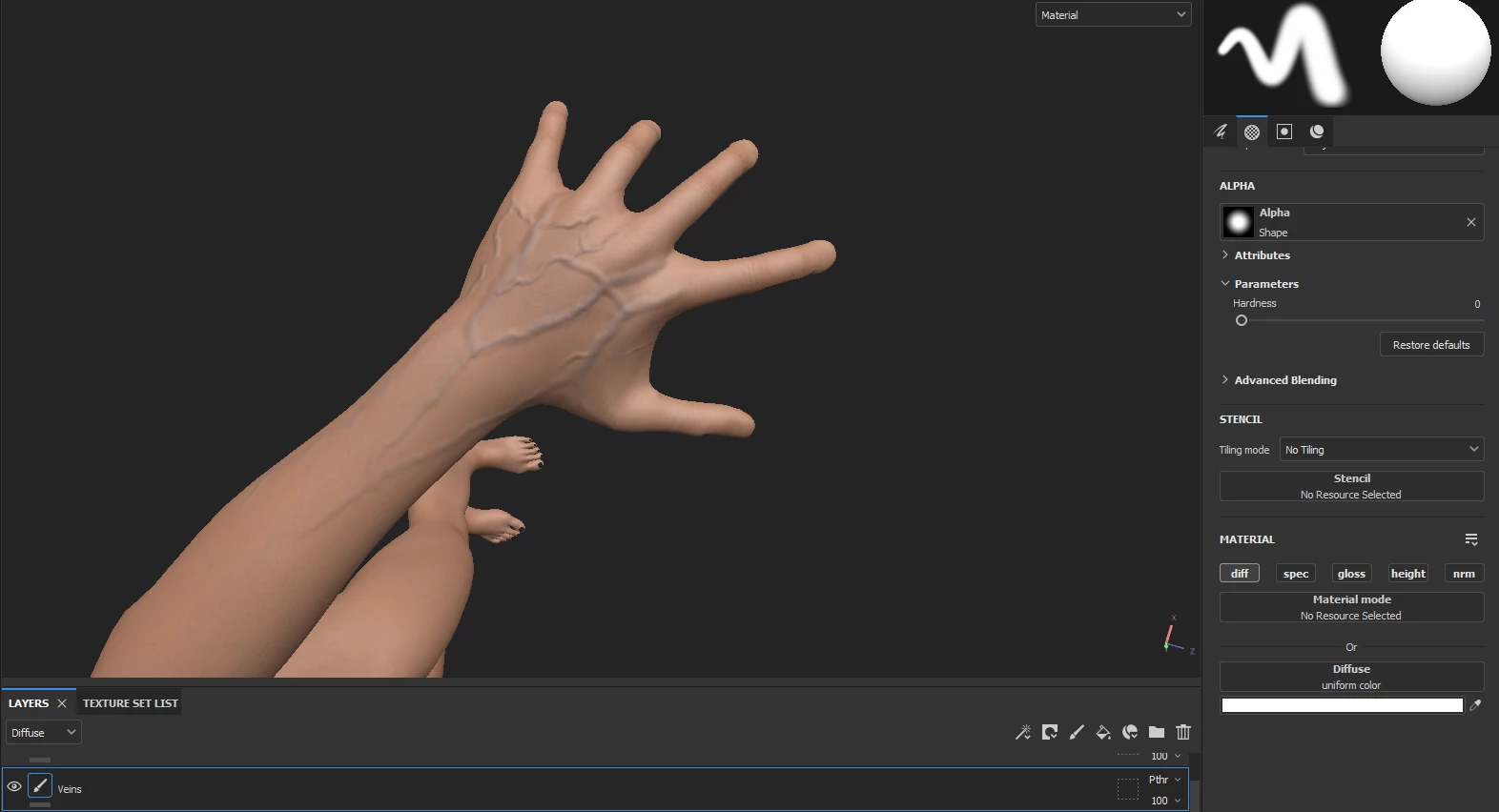
I guess you guys are thinking this is solved.  It is not.  As I stated there should be a way to have these settings saved for regular fill layers as well.  Think about it.  One of the only layers that can make use of the Brush, Smudge and Eraser tools but doesn't save out with the last used settings applied to this layer.  Nor are the various nodes like Height, Normal or Specular.  Not only that the color swatch I last used is now set back to white.  So why would you think this is solved?  See my screen shot below.  


I did figure out a way around all this.  I created a Tool Brush Presets so I don't have keep second guessing what my settings were between sessions!  

1 reply

Cyril Dellenbach
Community Manager
Community Manager
May 11, 2023

Hi @RAMWolff54,


Thanks for the message.


You're right, Substance 3D Painter doesn't save the tool properties between the sessions. With that being said, the tools have natively all the channels turned on (to avoid the issue you had).


Some sort of workaround would be to work with Fill Layers and masks. This way, the Fill Layers will keep their properties and the workflow will be non-destructive.


Best regards,


Cyril Dellenbach (Micro) | QA Support Artist | Adobe
RAMWolff54
Inspiring
May 11, 2023

I am using Layers for both the Veins and the Skin seperately.  I realize these are not Fill layers since I can't use brushes with those but I see no reason not to extend that in the program to save those settings as well.  Starting this entire project over to go with the programs lacking is not on the table.  I've gone too far.  

RAMWolff54
Inspiring
May 12, 2023

I guess you guys are thinking this is solved.  It is not.  As I stated there should be a way to have these settings saved for regular fill layers as well.  Think about it.  One of the only layers that can make use of the Brush, Smudge and Eraser tools but doesn't save out with the last used settings applied to this layer.  Nor are the various nodes like Height, Normal or Specular.  Not only that the color swatch I last used is now set back to white.  So why would you think this is solved?  See my screen shot below.