Inspiring
March 28, 2023
Answered

Script to create a Paint layer with all channels set to Pass through

  • March 28, 2023
  • 1 reply
  • 906 views

Does anyone know if the current API for Substance Painter supports setting all channels in a paint layer to Passthrough.  I do this a lot (when using the clone brush)  and it would be a time saver to not have to switch to each channel and switch the mode from it's default to "passthrough".   I have been wanting to get my feet wet in scripting with SP (scripting in 3ds Max has been a huge part of customizing and improving my workflow) but I could not find support in the API simply creating a new paint layer and setting each channel to passthrough.  Actually,  while texture sets are supported, I could not find any support for Layers or blendmodes at all.  Probably I am just not looking in the right place, so if anyone can point me in the right diredtion I would appreciate it.


In pseudo code, my desired simple script would be something like:


Create New Paint Layer

for each existing channel in New Paint layer  set blendmode to Passthrough


Any help would be greatly appreciated.  Thanks in advance.

This topic has been closed for replies.
Correct answer Cyril Dellenbach

Hello David,


I hope you're doing well.


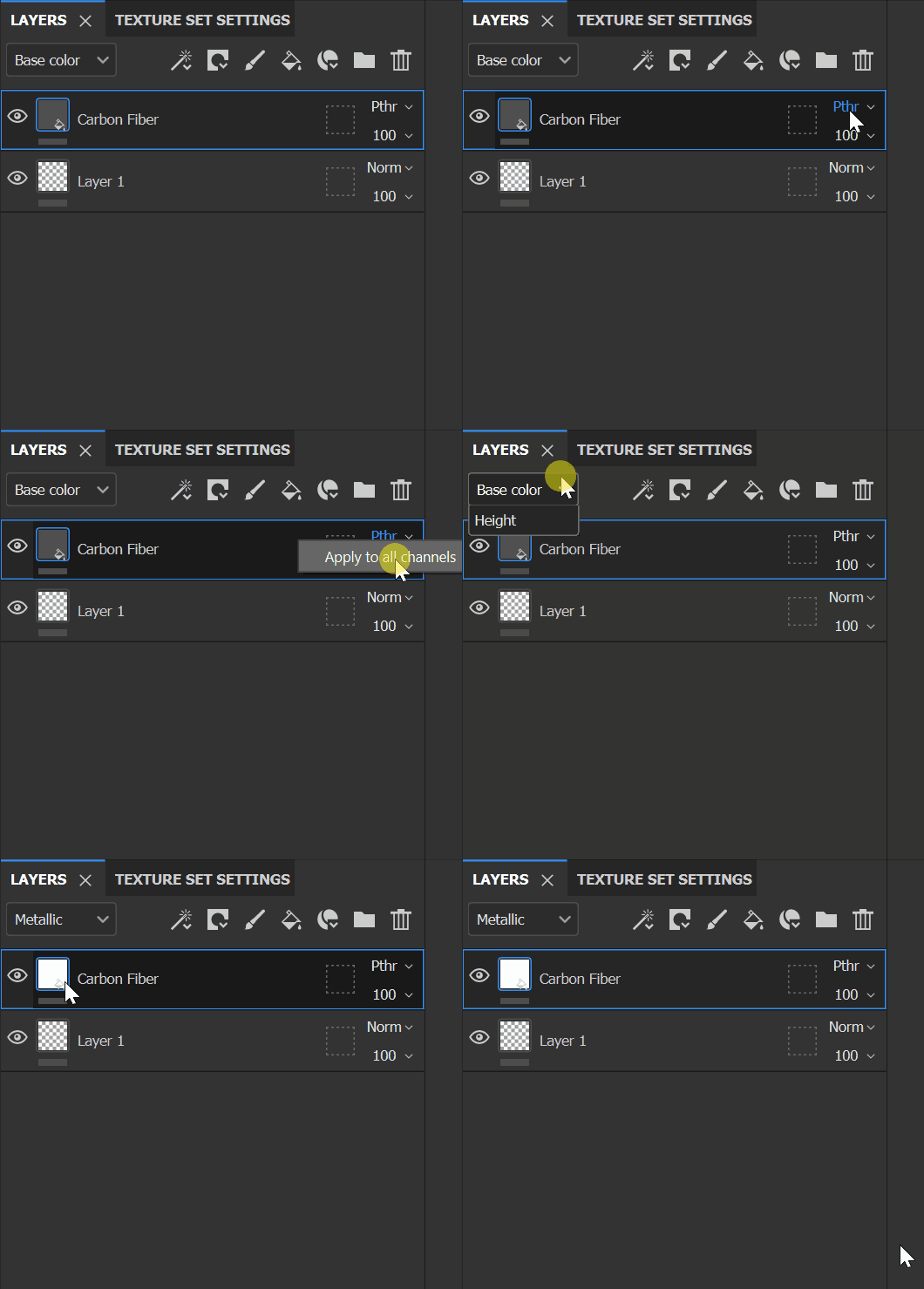
Unfortunately, it's currently impossible trough our API, but a nice little option not everybody knows about: you can apply the current blending mode to all channels.

Right click on your blendig mode>apply to all channels 


Obviously, this is not the same as the API, but this could avoid you to switch between all the channels to set the blending mode.


Have a nice day!


1 reply

Cyril Dellenbach
Community Manager
Cyril DellenbachCommunity ManagerCorrect answer
Community Manager
March 29, 2023

Hello David,


I hope you're doing well.


Unfortunately, it's currently impossible trough our API, but a nice little option not everybody knows about: you can apply the current blending mode to all channels.

Right click on your blendig mode>apply to all channels 


Obviously, this is not the same as the API, but this could avoid you to switch between all the channels to set the blending mode.


Have a nice day!


Cyril Dellenbach (Micro) | QA Support Artist | Adobe
Inspiring
March 29, 2023

Thanks, Cyril. That will definitely save some mouse clicks and I wasn't aware of the option to apply current blending mode to all channels.  I suppose another work around would be to create a smart material with a paint layer with channels all set to Passthrough. 


In the bigger picture, it would be great to enable some type of macro/script creation ability for all of the actions in Substance painter. In Max and Photoshop there is the ability to record actions and further tweak them to automate repetitive tasks.  Is there anything similar planned for Substance Painter?  Thanks again for your prompt and helpful response.