Participant
October 6, 2022
Answered

SP Blur filter UV islands on mask

  • October 6, 2022
  • 7 replies
  • 8295 views

came across this issue with substance painter when trying to apply a blur filter.
Substance is blurring it per UV, what results in a very ugly result and basically makes the blur filter worthless.

is there any workaround that?

It looks that someone way back asked about it, in the time when it was not owned by Adobe, but the post has disappeared

Thanks for the help

Correct answer Cyril Dellenbach

Hi Patrick, Hello everyone,


Currently, the blur filter is simply the blur node from Substance 3D Designer. Therefore, this filter has effect on the 2D view (so only the UV islands), and this is what creates the seams. As an artist too, I know how bothering these blur seams can be.


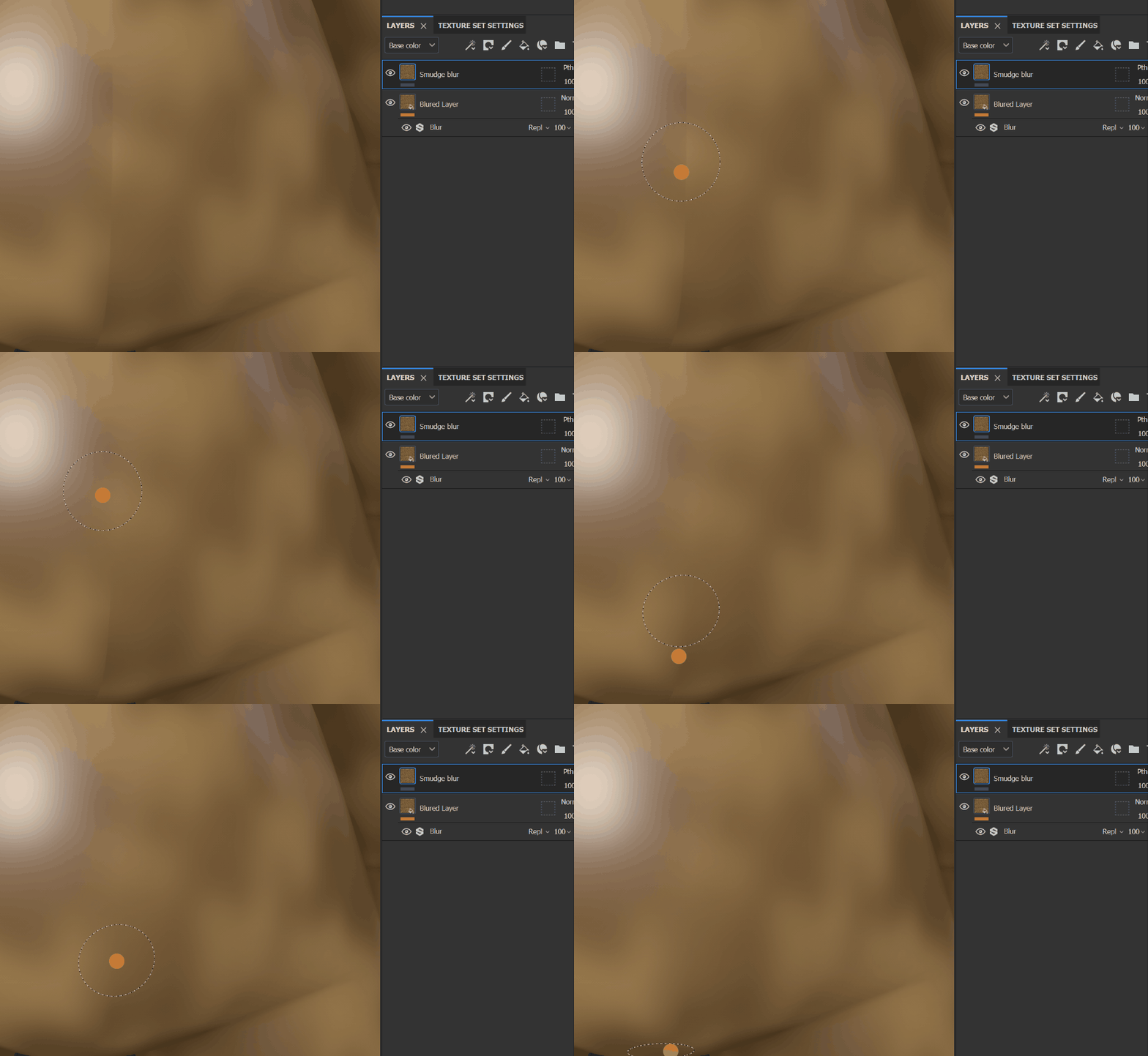
One workaround would be to blur your layer as usual, add on top of it a paint layer, set its blending mode to passthrough and paint with the Smudge blur the seams.


You could also try to make your own blur filter with Substance 3D Designer, or directly buy the 3D blur from the artist Victoria Holland. To be clear, this is a filter made by the community, I never tried it, and I don't know anything about its quality, but the comments seems good. My only advise if you do buy a custom filter: don't overuse it.


From experience, these filter are rarely optimized and can drop down your project performances.


Best regards,

 

7 replies

Cyril Dellenbach
Community Manager
Community Manager
August 25, 2025

As I can see there are still messages coming to this thread, I want to mention that a 3D blur filter should arrive in the software in a coming release. 

We're giving updates on the feature in this thread.


Cyril Dellenbach (Micro) | QA Support Artist | Adobe
Known Participant
August 3, 2023

Adobe, please respond. If there is no solution to using the blur filter across UV islands, let us know. Maybe there is a workaround.

Cyril Dellenbach
Community Manager
Cyril DellenbachCommunity ManagerCorrect answer
Community Manager
August 4, 2023

Hi Patrick, Hello everyone,


Currently, the blur filter is simply the blur node from Substance 3D Designer. Therefore, this filter has effect on the 2D view (so only the UV islands), and this is what creates the seams. As an artist too, I know how bothering these blur seams can be.


One workaround would be to blur your layer as usual, add on top of it a paint layer, set its blending mode to passthrough and paint with the Smudge blur the seams.


You could also try to make your own blur filter with Substance 3D Designer, or directly buy the 3D blur from the artist Victoria Holland. To be clear, this is a filter made by the community, I never tried it, and I don't know anything about its quality, but the comments seems good. My only advise if you do buy a custom filter: don't overuse it.


From experience, these filter are rarely optimized and can drop down your project performances.


Best regards,

 

Cyril Dellenbach (Micro) | QA Support Artist | Adobe
Known Participant
August 4, 2023
Thank you for the insight, Cyril.

Will give it a go the next chance I get!
LaurManAuthor
Participant
December 16, 2022

still nothing from Adobe 😞

Participant
November 5, 2022

Yeah I got the same issue. Adobe should address this issue asap as it practically makes blur useless.


Participant
October 12, 2022

I have the same problem and also friends of mine.

Participant
October 12, 2022

I have the same problem and woud appreciate if anyone has a workaround.

LaurManAuthor
Participant
October 11, 2022

Anyone from Adobe can help?


EriCAVAnti
Participant
June 25, 2024

Adobe support is the worst

Cyril Dellenbach
Community Manager
Community Manager
June 25, 2024

😢


Cyril Dellenbach (Micro) | QA Support Artist | Adobe