
Substance 3D Mesh Map Baking - Antialiasing per map
Hi all,
I wonder, if it could be a useful feature to be able to set Antialiasing in Mesh Map Baking separately for each map. I ran into that well known issue with white fringes at boundaries between metallic/dielectric materials in the metallic-PBR workflow (as described in the PBR Guide Part 2 ).
Due to the nature of the problem, I found, that the antialiasing setting can make the problem worse, like here in a quick example:
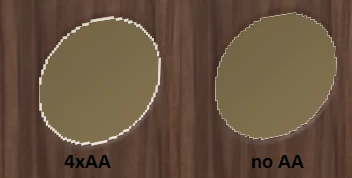
So the question is: if I use AA, wouldnt it be good to be able to switch off AA selectively, so that the metallic map does not get AA. I believe, this would reduce the problem while keeping AA for the other maps. Not sure, but I also believe, that the ID map also should not get AA applied, which it currently does.
Just some thoughts about possible improvements, looking forward for some discussion.
Best wishes for a Happy New Year,
Herbert


 AdChoices