


Conna3005
Known Participant
March 28, 2023
Answered

Substance Painter 2022 Autosave Crash

  • March 28, 2023
  • 1 reply
  • 991 views

I bought the 2022 Version of Sub painter and have a little Problem.

Every few Minutes Painter saves automaticely the Project. From Time to Time i have a crash. I have not found the option to deactivate Austosave. Where is it ?


Will there be a additional Perpetual for a Higher Painter Version as well, or do i have to activate a Subscription ?

This topic has been closed for replies.
Correct answer Cyril Dellenbach

Hi @Conna3005,


Thanks for the question.


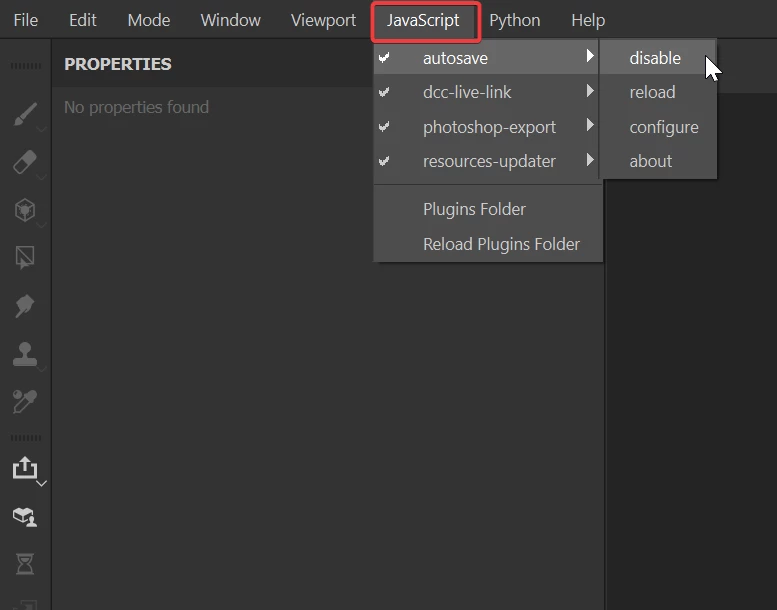
To disable the auto-saving, go under JavaScript>autosave>disable


With that being said, this issue should obviously not happen, so I'd advise to reload the autosave plug-in.


For your Substance 3D Painter Steam edition, we usually have one edition per year, but I am not an expert with all the details about our licenses, so feel free to ask on the Account, Payment & Plan community if you have any more questions about our licenses.


Have a nice day!


1 reply

Cyril Dellenbach
Community Manager
Cyril DellenbachCommunity ManagerCorrect answer
Community Manager
March 29, 2023

Hi @Conna3005,


Thanks for the question.


To disable the auto-saving, go under JavaScript>autosave>disable


With that being said, this issue should obviously not happen, so I'd advise to reload the autosave plug-in.


For your Substance 3D Painter Steam edition, we usually have one edition per year, but I am not an expert with all the details about our licenses, so feel free to ask on the Account, Payment & Plan community if you have any more questions about our licenses.


Have a nice day!


Cyril Dellenbach (Micro) | QA Support Artist | Adobe