


Participating Frequently
Sep 29, 2021 8:58 PM UTC
Question

Substance Painter Doesn’t Save Fill Layer Correctly; Also sometimes the layer is unresponsive

In this example I created a simple box.


1. Add a fill layer

2. Add black mask

3. Add paint under the mask

4. Use Arrow Bent for the Alpha and the Greyscale

5. Paint it. It appears on the box.

6. Save it as a Dummy.spp.

7. Load a different project.

8. Close out the project.

9. Load the Dummy.spp.

10. Both the alpha and the greyscale no longer have anything in them (see below).


This is repeatable and is very frustrating.
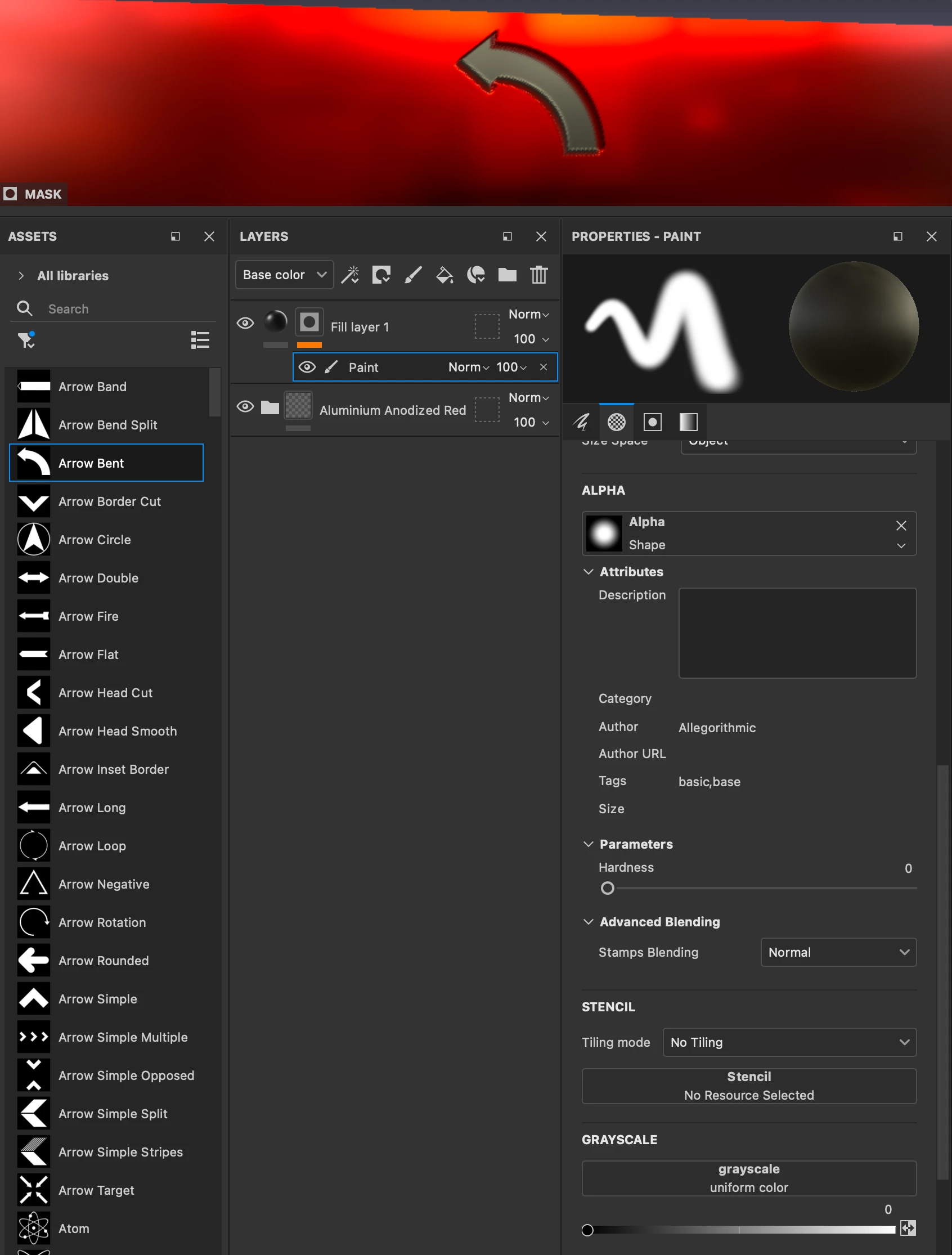
 

Second issue is random. I don't know if it requires a complex model or not, but sometimes I am unable to put ANYTHING in either the Greyscale or Alpha (or Alpha will take an image but the greyscale will not).

These two issues are very frustrating.

This topic is closed to new replies. Start a new post to keep the conversation going.

4 replies

Jeremie Noguer
Community Manager
Community Manager
Sep 29, 2021 11:15 PM UTC

Would you be able to share the .spp file? 
Wondering if this could be an issue with the AMD GPU on the iMac.

Translate
Lloyd5D2EAuthor
Participating Frequently
Sep 30, 2021 1:58 AM UTC

Well, I would except it doesn't appear to allow me to share the file... I'll change the suffix from .SPP to .SSA and let us see if we can fool the uploader (sigh) -- obviously you'll have to change it back to .spp.

I guess another thing would be to allow .spp to be uploaded 😅

Translate
Lloyd5D2EAuthor
Participating Frequently
Oct 6, 2021 7:24 PM UTC

Not to be a pain, but did you ever find the issue?


I've still not been able to figure out a workaround for the loss in the project.


I HAVE determined that if the project doesn't allow you to put anything in the greyscale or alpha, then shutting down Substance Painter then restarting it DOES allow you to put things in there. A real pain.


Thank you for any help you can provide.

Translate
Lloyd5D2EAuthor
Participating Frequently
Sep 29, 2021 9:00 PM UTC

FYI, running on MacOS with Big Sur 11.6 on iMac Pro (2017)

Translate