
Participant
January 14, 2022
Answered

Substance painter layer opacity

  • January 14, 2022
  • 1 reply
  • 11807 views

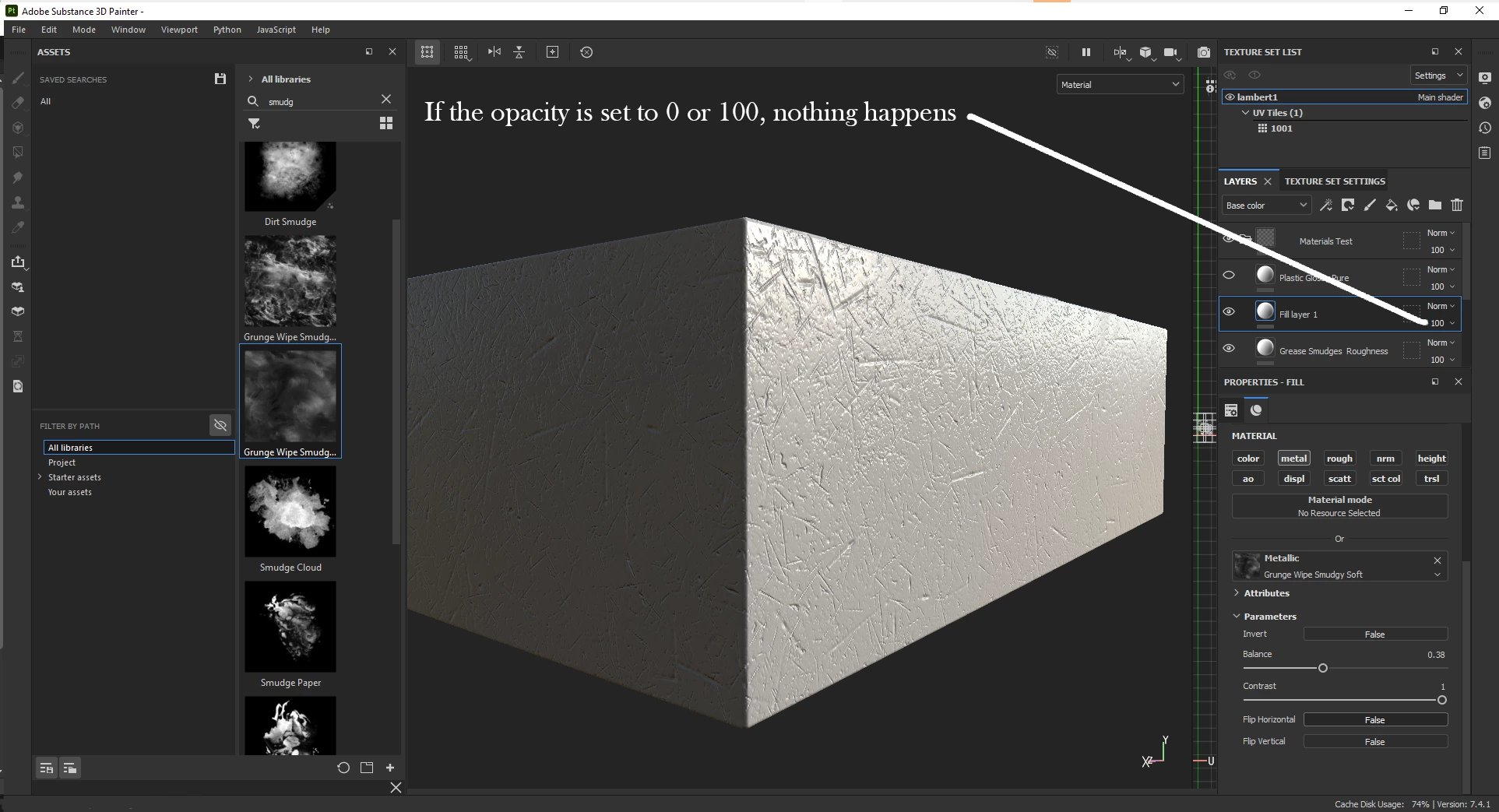
How do I get the layer opacity to work if there is a texxture plugged into the Roughness or Metal channel?

1. I created a fill layer.

2. Plugged a texture intoo the Metal channel: turned off all the other channels.

3. In the Fill layer Opacity control, tried to adjust the Opacity, but nothing happens.
     

This topic has been closed for replies.
Correct answer davescm

You are adjusting the opacity for the base color channel which is turned off. At the top of the layers panel select the Metal channel.

Dave


[I've moved your post from the Substance Designer forum to the Substance Painter forum]

1 reply

davescm
Community Expert
davescmCommunity ExpertCorrect answer
Community Expert
January 15, 2022

You are adjusting the opacity for the base color channel which is turned off. At the top of the layers panel select the Metal channel.

Dave


[I've moved your post from the Substance Designer forum to the Substance Painter forum]

Participant
January 15, 2022

Thank you so much, Dave.  This is the answer I was looking for.  


Have a great day, 

Sean

davescm
Community Expert
Community Expert
January 15, 2022

You're welcome 🙂

Dave