
Kantankerousaurus
Participant
January 30, 2022
Answered

Susbtance Painter unable to import Stylized_Flag_Fabricb.sbsar from Adobe Asset store

  • January 30, 2022
  • 1 reply
  • 1002 views

Hi,


The Subject title says it all really. I downloaded the Stylized Flag Fabric sbsar for use on a specific project this week, and sadly the current verion of Painter is refusing to import it to my shelf (see attached screengrab of the log). I've tried importing it as a 'Base Material', and have tried all of the other options, but none works in the most recent verion of Painter .


Interestingly, it does import into my legacy Perpetual version of Painter (2020.2.2), so I'm guessing the material needs an update.  


Thanks.
This topic has been closed for replies.
Correct answer davescm

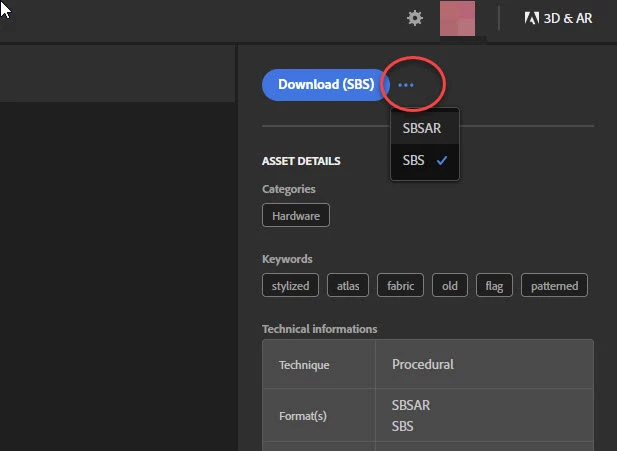
You can download that material as both sbsar and sbs

The sbs should open in Designer

Dave

1 reply

GeoffroySC
Community Manager
Community Manager
January 31, 2022

Hi,

This is due to the resources being flagged as an atlas. Atlases aren't yet supported in Painter. For now you could download the resource and import it in substance designer, change it's behavior to be useable as a basematerial. 

Kind Regards,

Geoffroy SC


Kantankerousaurus
Participant
January 31, 2022

Hi,


The file is a .sbsar file though, not a .sbs, so Designer doesn't allow me to do anything with it. Although I can see the 'Type: Atlas material' in Attributes, its greyed-out. I'm at a loss as to what to do with this asset.. 


Incidentally, my old perpetual version of Painter is crashing while the shelf loads, so perhaps this is related to adding some of these more recent assets. 


davescm
Community Expert
davescmCommunity ExpertCorrect answer
Community Expert
January 31, 2022

You can download that material as both sbsar and sbs

The sbs should open in Designer

Dave