


Participant
April 13, 2023
Answered

Texture Issues with all projects
  • April 13, 2023
  • 2 replies
  • 433 views

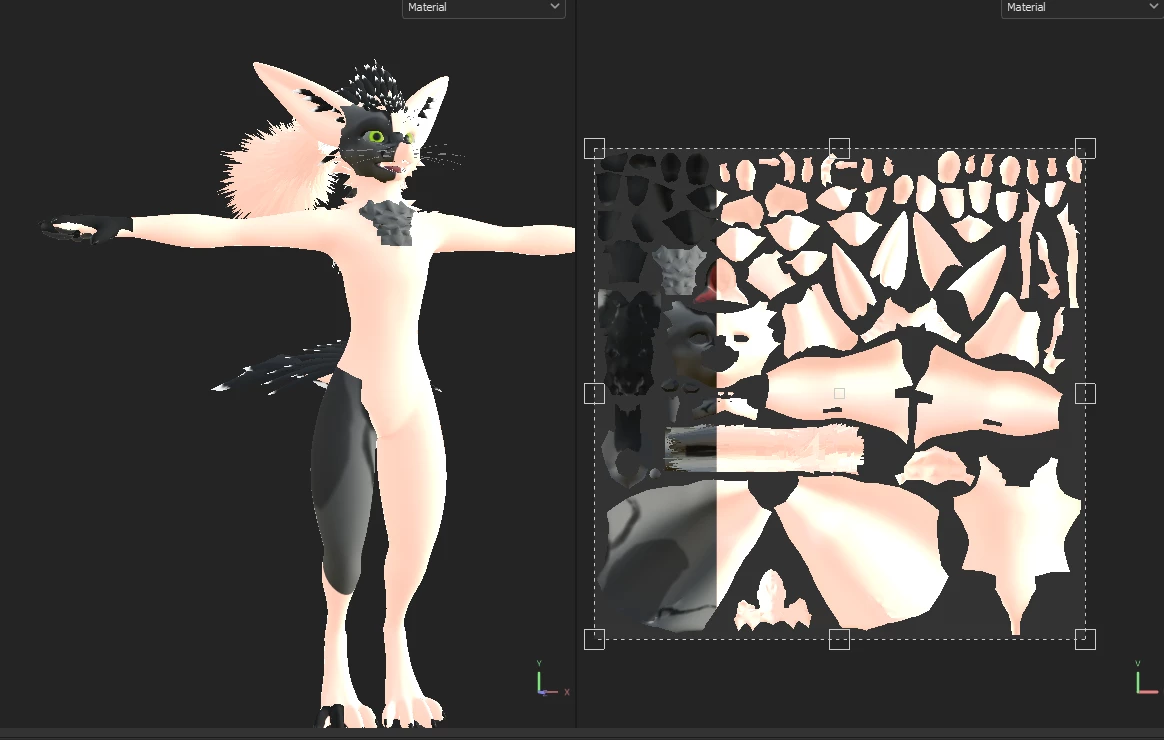
I just downloaded a fur texture brush for this avatar, but now each time I open any project, the right 3/4 of the texture turn this pink color while the rest of the model is the proper color. I also tried using a default substance painter model, and most of the model turned pink. The texture breaks as soon as I make any change to the model such as painting it or deleting a layer. I've tried re-installing substance painter and the model, and deleted the texture file I downloaded but the issue still persists. Any ideas how to fix this?

This topic has been closed for replies.
Correct answer WaffleFriii

I eventually fixed the issue, by downloading a previous version of substance painter, deleting that, and redownloading the current version. I still have no clue what caused this issue, whether the issue was the brush texture or something else, but it isn't a problem anymore.

2 replies

WaffleFriiiAuthorCorrect answer
Participant
April 13, 2023

I eventually fixed the issue, by downloading a previous version of substance painter, deleting that, and redownloading the current version. I still have no clue what caused this issue, whether the issue was the brush texture or something else, but it isn't a problem anymore.

Cyril Dellenbach
Community Manager
Community Manager
April 13, 2023

Hello @WaffleFriii,


I'll need a bit more info to give you a proper help. Could you send me your log (help > export log…), so I can take a deeper look at your project and could you also share a screenshot of your layer stack?


Keep me posted,


Cyril Dellenbach (Micro) | QA Support Artist | Adobe