

TexturingXYZ 32 BIT PROJECTING TO REPLACE MARI
Hello guys! How are you doing?
Quick intro:
I'm trying to take out MARI from my workflow and replace it with 3D PAINTER (much more intuitive, modern, and with a more friendly workflow. Also cheaper for me cause it's included on my adobe package) but I'm having a hard time with projection tool.
Here are some of my problems/points and questions.
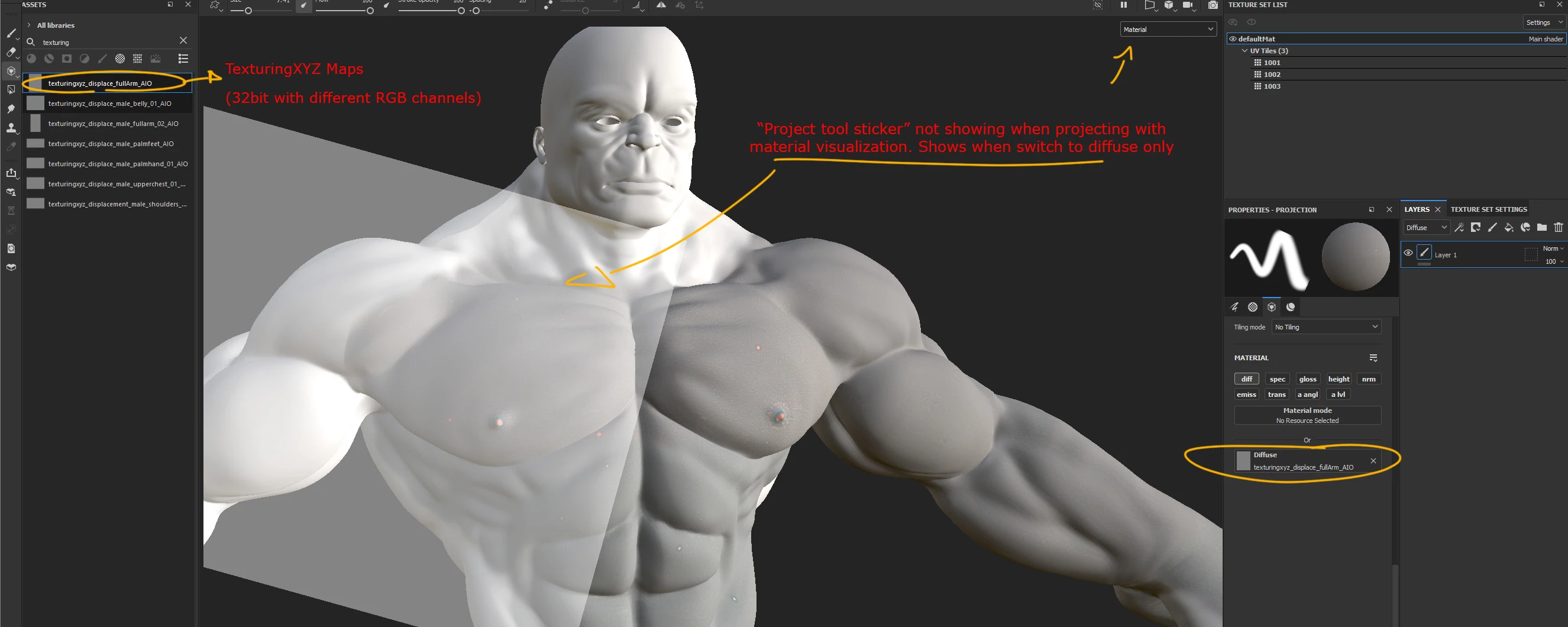
- I need the projected maps to be exported 32 bit with the RGB maps separately (R= larger displacement, G= small displacement, B= micro displacement). I achieved that by projecting the maps in the DIFFUSE slot instead HEIGHT (height will export grayscale only, correct?) That's not a problem on my workflow, I'm only projecting these maps to be exported and applied back in Zbrush.
-Projection tool stencil most of the time just won't show up in my viewport when MATERIAL is being displayed. It shows properly when I change to diffuse but this way I can't see properly the mesh details to project into. There's a way to fix it? I've seen some old topics telling to update GPU drivers, etc. It's all updated.
- There is a way to change the projection tool opacity display? As the maps use 50% gray is kinda hard to visualize them before projecting, due to the lowered opacity projection tool uses.
I'm really trying to replace Mari projection tools for Painter but some simple things are just making my workflow way too slow
If somebody can help me, would be awesome. Thank you very much!


 AdChoices