Known Participant
October 1, 2025
Answered

The GPU is not used when baking

  • October 1, 2025
  • 1 reply
  • 211 views

When I bake, only the CPU percentage increases, and it seems like the GPU isn't starting up. How do I change the settings in Windows or the app?

In the NVIDIA Control Panel, I've added the Substance Painter app, and in the Substance Painter settings, I have both CPU and GPU checked for IRAY HARDWARE.

Thank you in advance.

Correct answer Cyril Dellenbach

Hello @sha19899999,


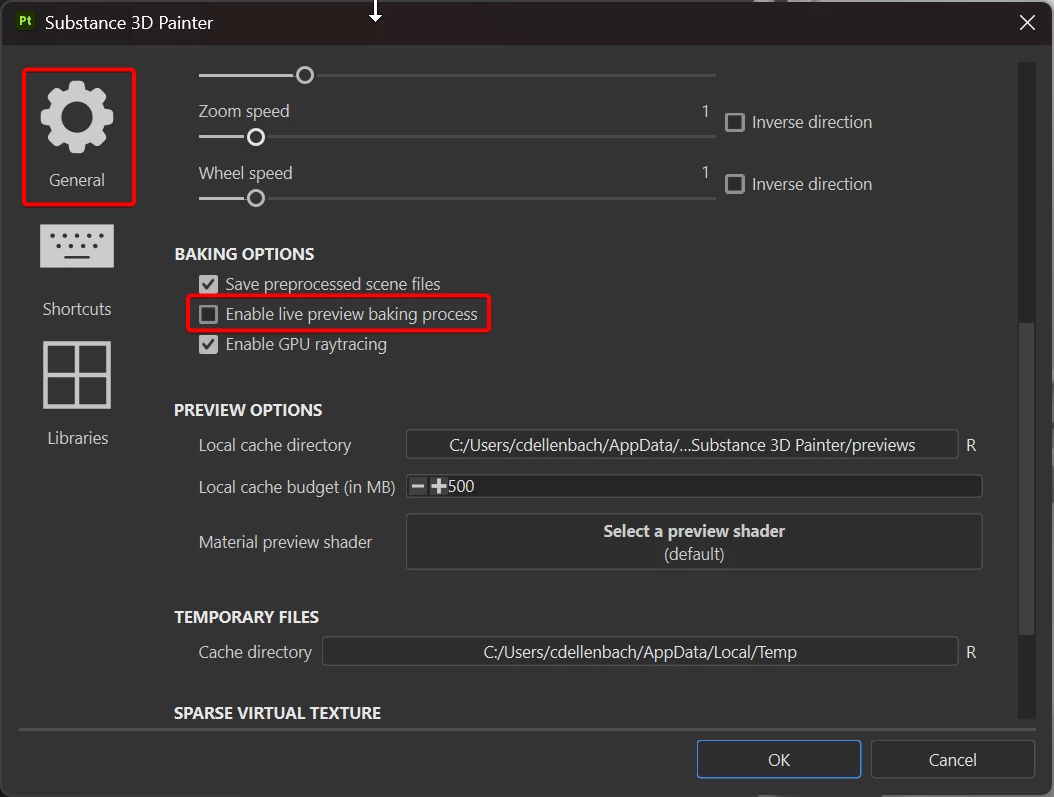
It's not that surprising, most of the channels are in fact using the CPU. I wouldn't worry too much about it, but if you're facing slow performances, I advise you to disable the baking live preview.

Edit > Settings > General > Baking options > Enable live preview


Best regards,


1 reply

Cyril Dellenbach
Community Manager
Cyril DellenbachCommunity ManagerCorrect answer
Community Manager
October 1, 2025

Hello @sha19899999,


It's not that surprising, most of the channels are in fact using the CPU. I wouldn't worry too much about it, but if you're facing slow performances, I advise you to disable the baking live preview.

Edit > Settings > General > Baking options > Enable live preview


Best regards,


Cyril Dellenbach (Micro) | QA Support Artist | Adobe
Known Participant
October 1, 2025

Thank you so much!