



Morteza Nazari
Inspiring
February 23, 2022
Answered

Triplaner pixlate

  • February 23, 2022
  • 2 replies
  • 3245 views

Hi, I put a triplanar in my generator to project the output of the work as a triplaner .. but the output of the work is in pixels.
I searched the internet and saw some people saying that the position map should be 16-bit. So where do I change the bake settings in the substance painter software so that the output of this process is a 16-bit map?
Correct answer Léna Piquet Froyok

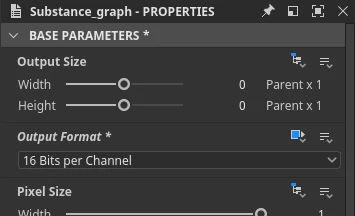
Set the graph bit-depth to absolute then choose the precision you want, which should be 16bit minimum:

2 replies

Léna Piquet Froyok
Adobe Employee
Adobe Employee
February 25, 2022

Pixelated results with generators/filters is related to a loss of precision/bit-depth at some point, it can be either:

  • the Substance graph isn't 16bit (or more, mask sure to force the bit dpeth before cooking the graph)
  • the input bitmap (bakes) are not 16bit

You mention that you baked in 32bit, but not which file format you used to store the result. If I recall well, Marmoset Toolbag doesn't support 16bit pngs and TGA is 8bit only as well. So make sure you use an appropriate file format.

Morteza Nazari
Inspiring
February 25, 2022

I saved the file as a PSD in Marmoust software, so it has the ability to save a 32-bit file. How do I convert a graph to 16 bits?

Léna Piquet Froyok
Adobe Employee
Léna Piquet FroyokCorrect answer
Adobe Employee
February 25, 2022

Set the graph bit-depth to absolute then choose the precision you want, which should be 16bit minimum:

Morteza Nazari
Inspiring
February 24, 2022

Actually, I took it in Marmoust software and baked 32 bits there! But it is still pixelated.


Morteza Nazari
Inspiring
February 24, 2022

My graph in Substance Designer is as follows:


And the triplaner settings are as follows: