


Participant
January 11, 2023
Question

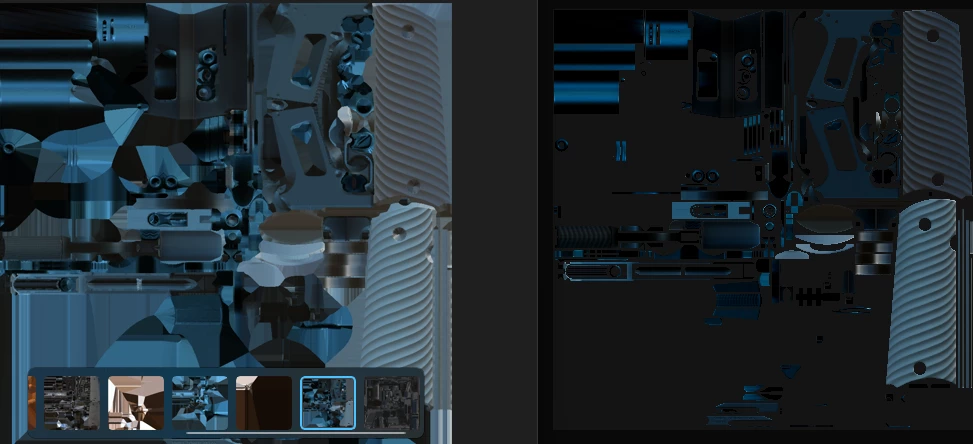
Why in the substance painter exported texture as a 2D view not look the same as in the viewport?
  • January 11, 2023
  • 4 replies
  • 3738 views

Look The Question is not about how many details on texture!!! It's about color!
In the right view, it's Substance 3d painter, and the left is exported as 2D view. But the right texture looks brighter with saturated beautiful light. It looks like in 3D view but the exported texture is not!
Have I use the screenshot instead of the built-in exporter?

This topic has been closed for replies.

4 replies

Participant
May 31, 2024

I'm with the same problem, I dont know what to do.. thats the 2D view textures exported

Participating Frequently
January 31, 2023

The one on the right from substance painter has the Image Based Light (IBL) cast on it from Substance Painters viewport, the one on the left is raw output from your layer stack without any lighting included. To demonstrate this, go into painter and use shift + right mouse button to move the environment lighting around. If you're in split view, you'll notice that the 2D image is changing as well.


To get the same effect in your target rendering platform, you'll have to create an HDRI environment that matches the one from painter (you can find the background images by right clicking on them and saying show in browser).


If you want a better idea of how your model looks without extra lighting and reflections (more like *but not exactly* how the processed output image will be) you can switch the background to one of the studio environments. They still include light, but have no color influencing your reflections.

Participant
April 26, 2024

Thank you for this insight. What you said makes sense and helps me understand the discrepancy that's been plaguing me. However, I'm left frustrated because there's no solution to the problem. What we need is a simply a screenshot of the 2D view as it appears in the viewport, generated at whatever resolution the user requries. It boggles my mind that SP would export a supposed "2D view" that doesn't have the viewport renderer's image-based lighting baked in.

davescm
Community Expert
Community Expert
January 14, 2023

Hi

Are you comparing 2D view Base Color to Exported Basecolor (which should match) or the lit Material view with the exported Basecolor map (which should not match) ? You screenshot is unclear on that.


Dave

Participating Frequently
January 12, 2023

What version of Adobe Substance 3D Painter are you using?

What are your project's settings for Color Management?

Near the bottom in Project Configuration:

If you have OCIO color management enabled - what are your 2D view settings top right of the viewport?


And last but not least - what output filetype are you exporting? And at what bit depth?

For a more precise answer it would even be perfect if you could share the exported image here as well.