Lucia.
Known Participant
March 4, 2024
Question

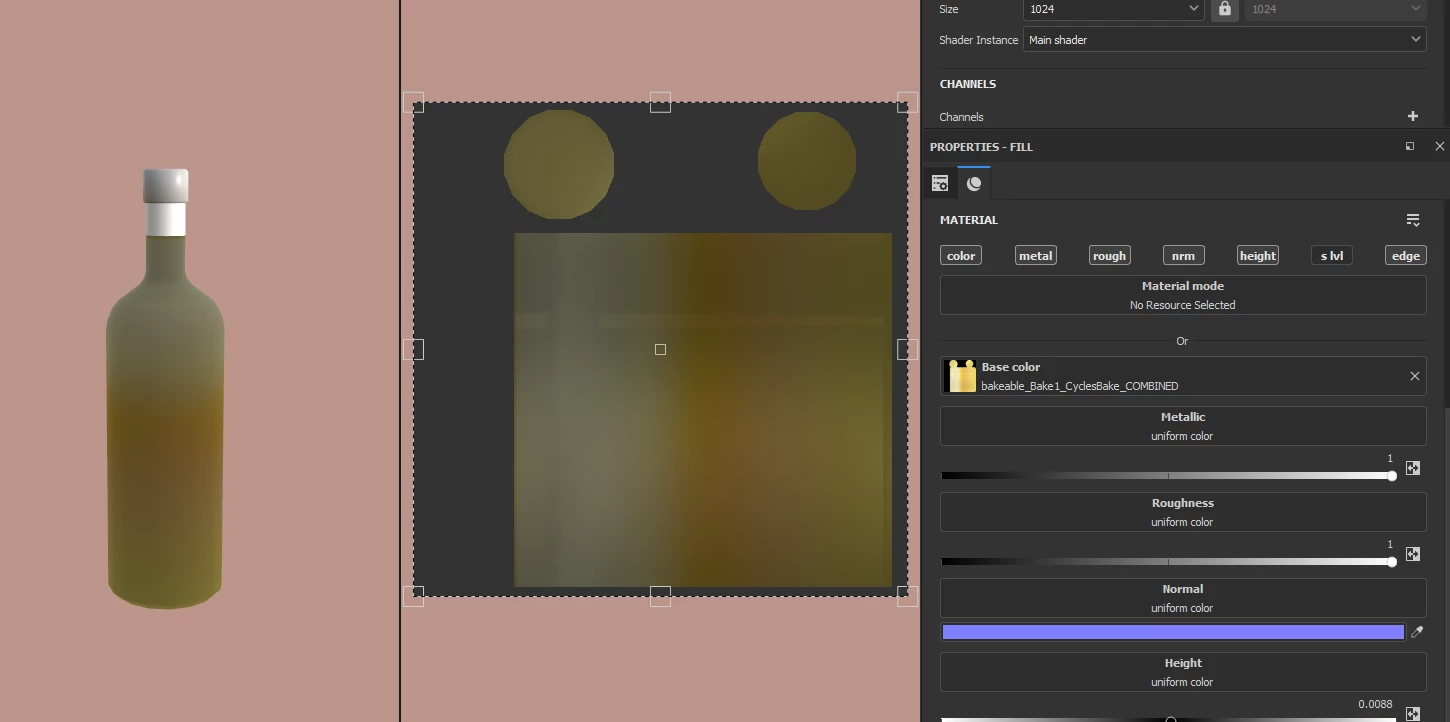
Why is my texture always dark when set to 0 metallic?

  • March 4, 2024
  • 1 reply
  • 376 views

Idk why it's so dark


This topic has been closed for replies.

1 reply

Cyril Dellenbach
Community Manager
Community Manager
March 4, 2024

Hello @Lucia.,


What are you referring to when mentioning a dark texture?

To be clear, the 3D and 2D view are currently displaying the material (in your screenshot). This means that the lighting, the roughness, the metalness, etc. will have an impact on how your object looks. If you simply want to have a clear view on the color of the material, you can switch the display mode to Base Color.


It's also worth mentioning that the metallic will natively "darken" the material looks, but this is the expected behavior.




Regards,

Cyril Dellenbach (Micro) | QA Support Artist | Adobe
Lucia.
Lucia.Author
Known Participant
March 4, 2024

I see. I suppose it's a matter of lighting, then. Is there a way to brighten the scene without changing the HDRIs? 

Cyril Dellenbach
Community Manager
Community Manager
March 5, 2024

You can rotate the HDRI with Shift + RMB + Move mouse, or you can increase the Environment Exposure under the Display settings.


Regards,

Cyril Dellenbach (Micro) | QA Support Artist | Adobe