



Question
Adobe Dimension Won't export Object with Materials and Image GLB
Hi guys, I hope everyone is doing well. I am having a problem with Adobe Dimension. I am using a custom Gaming Laptop running Win 11 Pro, with tons of SSD space, NVIDIA RTX 4070 Graphic Card (12GB), and I am using the latest version of Adobe Dimension (4.0.4) .
The issue is as follow:
- I am using a simple 3D model of a human silhouette, which I turned into 3D in Illustrator and imported into Dimension.
- I added a the "Polished Metal", gold material.
- I then added a simple label (PNG image) to the Model
- I tried to export to a .GLB format so I can use it in PowerPoint for a presentation I was working on.
- The export failed, and I got the following Message:
"Something went wrong while exporting your scene."
The funny thing is that if I one export the model without the image it will export just fine. If I then export the model with the image only, without adding any material it will also work fine. IT'S THE COMBINATION OF THE TWO, MATERIAL+IMAGE that creates the problem. And to top all of that, the issue lies with some of the materials, not all. See image attach to give you an idea of what I am saying here.
I also tried with a simple cube and the problem remains. So, the issues has nothing to do with my model.
I contacted Adobe and twice we lost connection after some trouble shooting. We uninstalled and reinstalled Dimension, reinstalled NVIDIA GeForce Experience drivers, and nothing worked.
Upon checking other materials, I noticed that mostly are the metal materials, but not all of them, that often created this issue. Has anybody experienced the same issue? Any help will be greatly appreciated.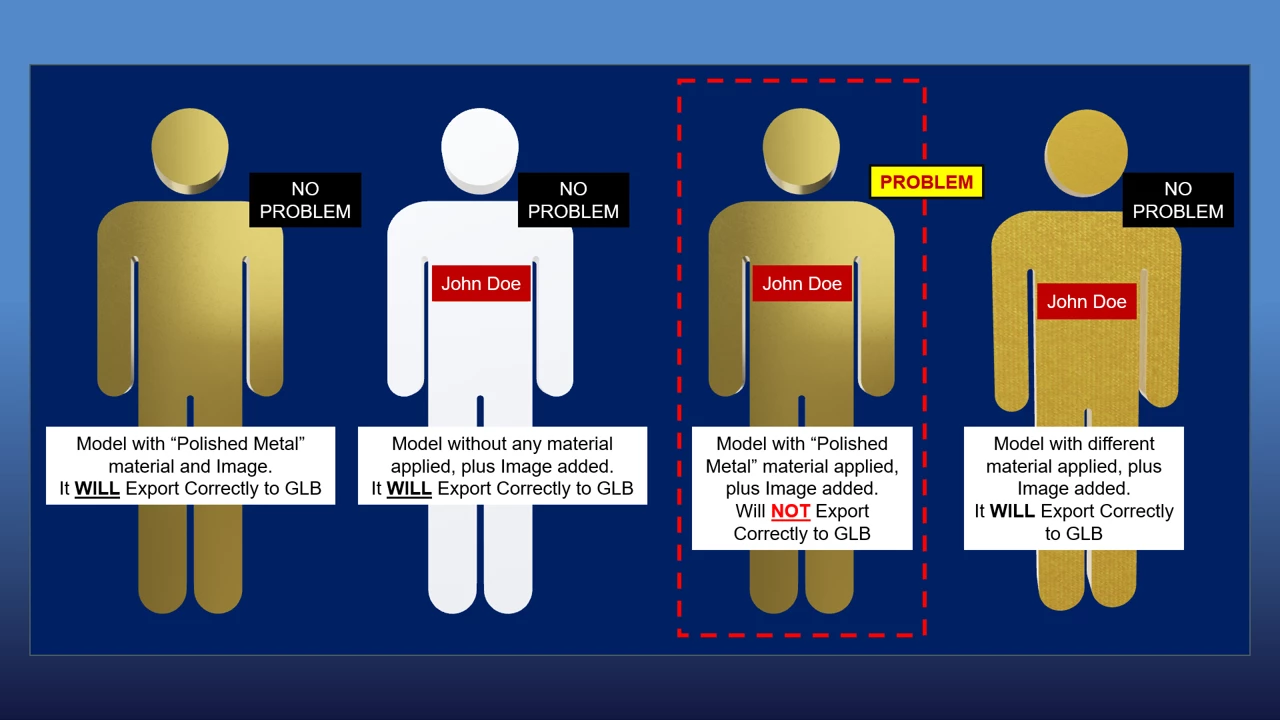
 AdChoices