Can't edit decal/graphic when press edit.
Usually when I pressed edit, photoshop opened and I could edit my graphic/decal in there. Few days later I tried to do the same thing, but photoshop would not open. Please help 🙂

On Friday, I contacted Adobe support about this issue. It seems they have not heard of this bug, nor do they have a solution for using Photoshop 2022 in the Dimension workflow. We tried many things, but ultimately the only solution that worked was uninstalling Photoshop 2022 (version 23.0.0). I was hoping that this would not be the case as I like to move forward.
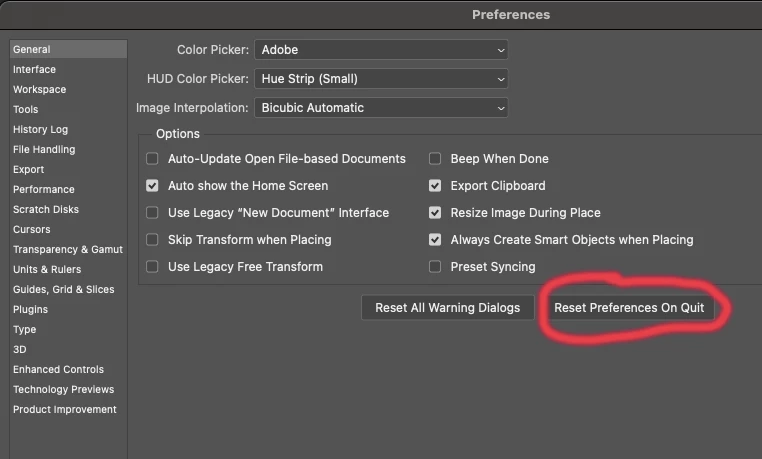
I also had Photoshop 2021 (version 22) on my computer, and Dimension still did not open it until I opened PS (version 22) preferences and chose "Reset Preferences on Quit" and restarted Photoshop.

At Adobe's request, I then re-installed Photoshop 2022 (without deleting PS 2021) and immediately disabled the workflow between Dimension and either version of Photoshop. They said that this seems to be a Mac-only issue.
Already have an account? Login
Enter your E-mail address. We'll send you an e-mail with instructions to reset your password.