


Participant
March 22, 2018
Answered

Can't find any model of a disk that works with decals

  • March 22, 2018
  • 2 replies
  • 428 views

Hi folks,

Has anyone at all been able to render a decal on a disk correctly? I've tested all the models on Adobe Stock with disks and none of them work with decals.

I either get an error message that the model dose't work with decals, or this attached warped thing. In the picture there's a cylinder with the default decal, and a disk with the default decal, but warping.
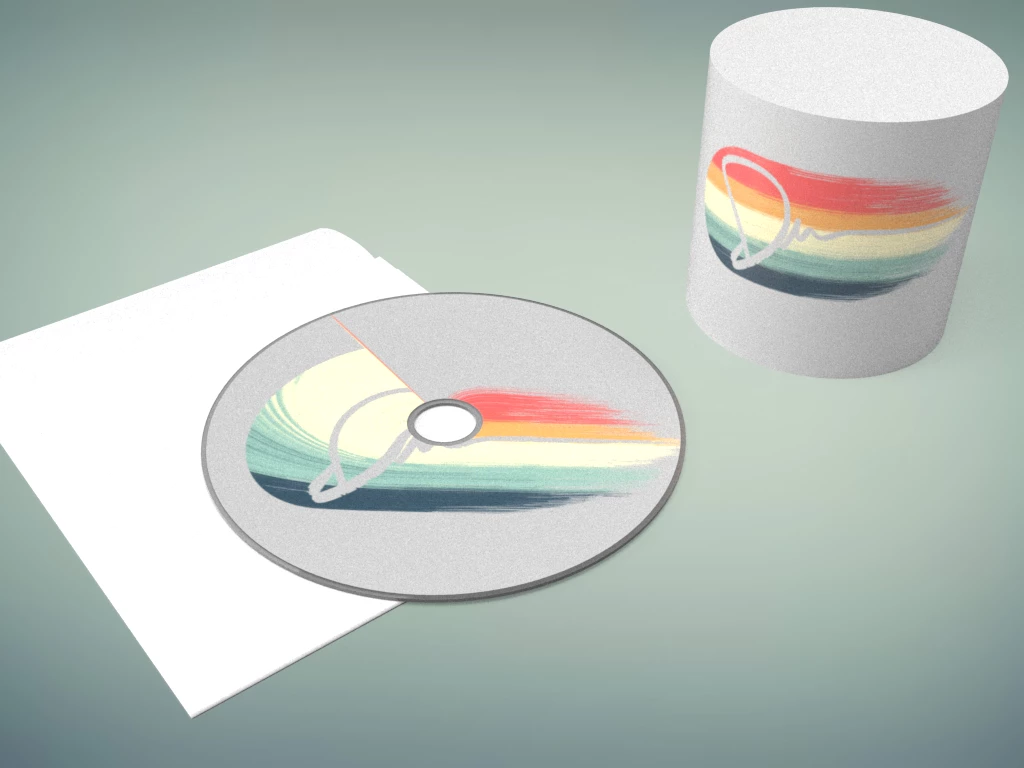
I would live to use this application for doing quick product renders, but there just doesn't seem to be the infrastructure behind it.

I don't suppose i'm doing something wrong, or there's a way around this?

This topic has been closed for replies.
Correct answer JeanetteMathews

The decal feature doesn't currently work well on any objects with holes in the graphic placement area.  I've marked this situation for our engineers as we're working on decal improvements for a release later this year.

2 replies

Ussnorway7605025
Legend
March 22, 2018

duncanm90697064  wrote

there's a way around this?

I would make another rendor of a flat plane with the decal and fix it in Photoshop i.e, mask it onto the disc

Participant
March 26, 2018

That's a good idea.

I tried it out and realised that the Dimension export includes some masking info to make this easier. So it's pretty simple to mask it onto the rendered CD object. Though it needs a bit of fiddling to match the lighting.

Bad example:

JeanetteMathews
Adobe Employee
JeanetteMathewsCorrect answer
Adobe Employee
March 22, 2018

The decal feature doesn't currently work well on any objects with holes in the graphic placement area.  I've marked this situation for our engineers as we're working on decal improvements for a release later this year.

Participant
March 26, 2018

Thanks for the reply. That's great that it's a logged bug. Looking forward to the next update.