


Participant
December 10, 2022
Answered

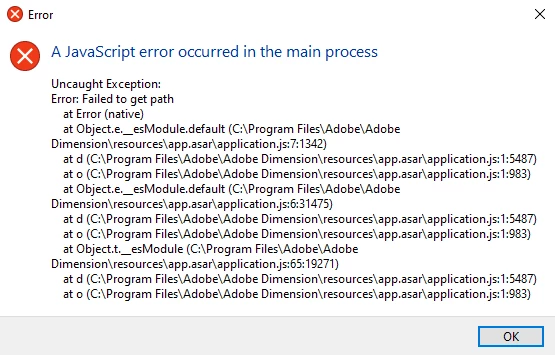
Can't run Dimension, "app.asar" error

  • December 10, 2022
  • 4 replies
  • 715 views

When trying to open dimension (version 3.0 and up) I get this error no matter what. Tried to install and run different versions but the problem still persists. Versions before 3.0 and up run as they should.

Does anyone know the solution?
This topic has been closed for replies.
Correct answer Ussnorway7605025

the software doesn't have permission to goto that folder


why could be a few things but thats what the message is telling us... did you upgrade Windows, change your antivirus or swap out a hard drive perhaps?

4 replies

Ussnorway7605025
Legend
December 11, 2022

your cc library stores files differently so if you have a lot of stuff in there it can block Dimension opening and again any sync folder like onenote will also not like you unplugging drives but you must have something Dimension stored on it somewhere


how to fix = replace the hdd... there is clone software around to copy the data but as i already said a fresh install is the best option

glad you got it working

Ussnorway7605025
Legend
December 11, 2022

ok and this old hardrive you pulled the plug on was part of the C drive, have Adobe software installed on it or a sync drive like onedrive, skydrive etc?


changing your antivirus software could also have caused it [my money is on the drive] but you can easy test that by uninstalling the antivirrus software [not just disable it] and see if Adobe Dimension starts working correct


if your file systems are totally messed up then of course a fresh install of Windows with Adobe [+ whatever else] is the best option... id assume you used some kind of clone software that prob messed it up but i'd also consider grabbing a new laptop to do this one as that way you kep your current system in tact while setting things up + Adobe Dimension will only want to be installed on a max of two systems per normal user account and to be honest is more trouble than its worth for software thats finished now

1f411fg4Author
Participant
December 11, 2022

Ok, that somehow was the problem. Just plugged the Hard drive back in and Dimension opened. 


It's quite unusual as all of my adobe stuff is installed on my C drive and other adobe programs open and work just fine. Would still like to fix this issue, as the HDD not really in an usuable condition.


Ussnorway7605025
Ussnorway7605025Correct answer
Legend
December 11, 2022

the software doesn't have permission to goto that folder


why could be a few things but thats what the message is telling us... did you upgrade Windows, change your antivirus or swap out a hard drive perhaps?

1f411fg4Author
Participant
December 11, 2022

Recently changed my antivirus and had some problems with my HDD so had to disconnect it temporarily. But this is all stored on my SSD. Any tips on what steps to take? Perhaps disabling the antivirus

Ares Hovhannesyan
Community Expert
Community Expert
December 10, 2022

Did you try to use the Creative Cloud Cleaner Tool to solve installation issues
https://helpx.adobe.com/creative-cloud/kb/cc-cleaner-tool-installation-problems.html.


1f411fg4Author
Participant
December 10, 2022

Yes, unfortunately no result