


Participant
January 13, 2022
Question

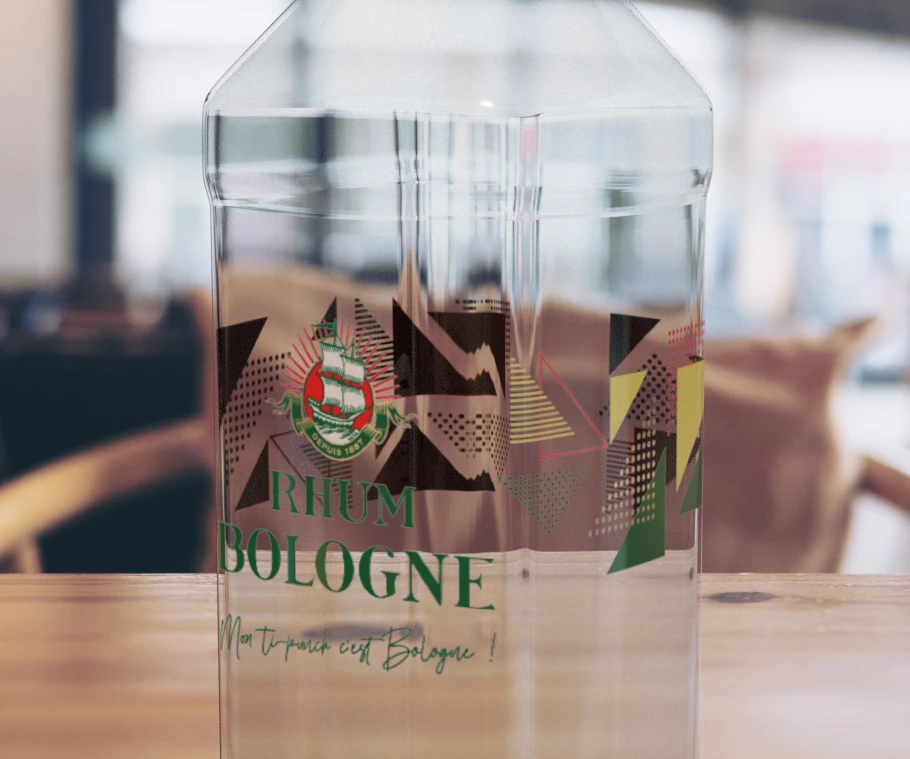
Decal appears black at the back of glass object

  • January 13, 2022
  • 1 reply
  • 271 views

Hello,

I have an issue when I use a decal on a glass object, like a bottle.

The decal at the back of the bottle, that we see through the glass, appears totaly black. Only in render mode.

I see no option to adjust that in Dimension. I may think it's because there's no light setup inside the bottle.

Thank you for your tips on that.
 

This topic has been closed for replies.

1 reply

Ussnorway7605025
Legend
January 13, 2022

is the decal a jpeg... in which case the backside of it is black


when you say rendor mode, you have not actually rendored the image yet?

Participant
January 14, 2022

The decal has to be PNG or PSD to keep transparency areas (and not a plain white background). In this case, it's PSD, but I've tried PNG with the same result.

The black spots appear only in render mode, not in edit mode where it keeps its true colors.

Ex :


Ares Hovhannesyan
Community Expert
Community Expert
January 14, 2022

Can you share decal image for testing? Thanks