


Participant
January 2, 2018
Answered

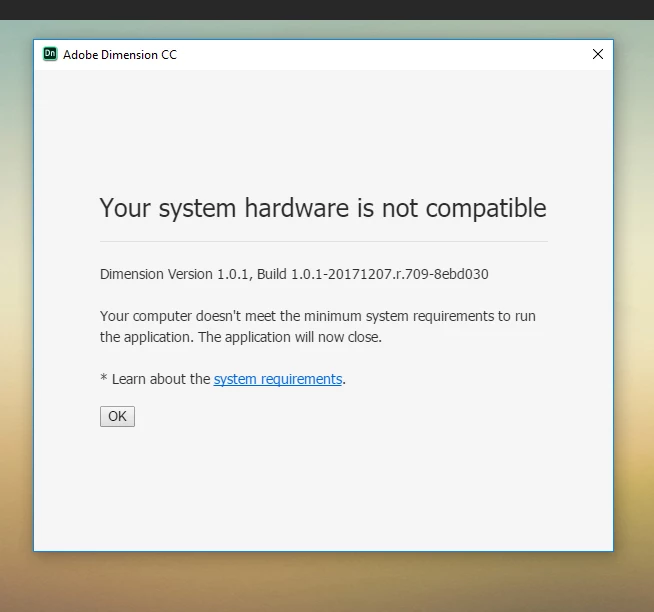
Dimension System hardware is not compatible

  • January 2, 2018
  • 3 replies
  • 1531 views

Adobe Dimension is saying this(see attached) but my computer has the spec to support it.  I have tried uninstalling and reinstalled.  Also, have updated all window apps
- Intel Core i7 - 7660U CPU @ 2.50GHz

- RAM 16

- Windows 10 x64

    This topic has been closed for replies.
    Correct answer JeanetteMathews

    In our next planned update we are removing system requirements as a blocking factor.  We are testing that version now and you're welcome to join the Dimension CC Prerelease to get early access to that build and try it out.

    3 replies

    JeanetteMathews
    Adobe Employee
    JeanetteMathewsCorrect answer
    Adobe Employee
    March 24, 2018

    In our next planned update we are removing system requirements as a blocking factor.  We are testing that version now and you're welcome to join the Dimension CC Prerelease to get early access to that build and try it out.

    JeanetteMathews
    Adobe Employee
    Adobe Employee
    January 31, 2018

    As a note on this topic for anyone else viewing this.  We're aware that this system requirements dialog is not particularly helpful in telling you what is going on.  We're working on improving the dialog to tell you exactly what doesn't meet requirements (could be a Windows version, RAM, etc.).

    Dimension currently checks:

    OS Version

    Open GL Version (can update video card drivers to see if this is the issue)

    RAM (we require 7GB of available RAM so if you are running other programs check your RAM usage and shut down other RAM intensive programs.  This is a common issue for machines with 8GB of RAM.

    VRAM (we require 512 MB of VRAM.  For users with integrated graphics cards VRAM is actually taken out of RAM which can affect your RAM numbers as well.  This number is determined by the OS and can be edited in the registry but this is not something Adobe officially recommends.)

    Ussnorway7605025
    Legend
    January 3, 2018

    willing to bet its the G-card (or the actual driver) that is the cause... run a dxdiag test and look for errors in Display or Rendor tabs

    (Americans spell it render)