

bratdogg
Participant
June 1, 2021
Answered

Experiencing strange screen behaviour with mouse hover

  • June 1, 2021
  • 4 replies
  • 1112 views

Does anybody have a clue why this would be happening?
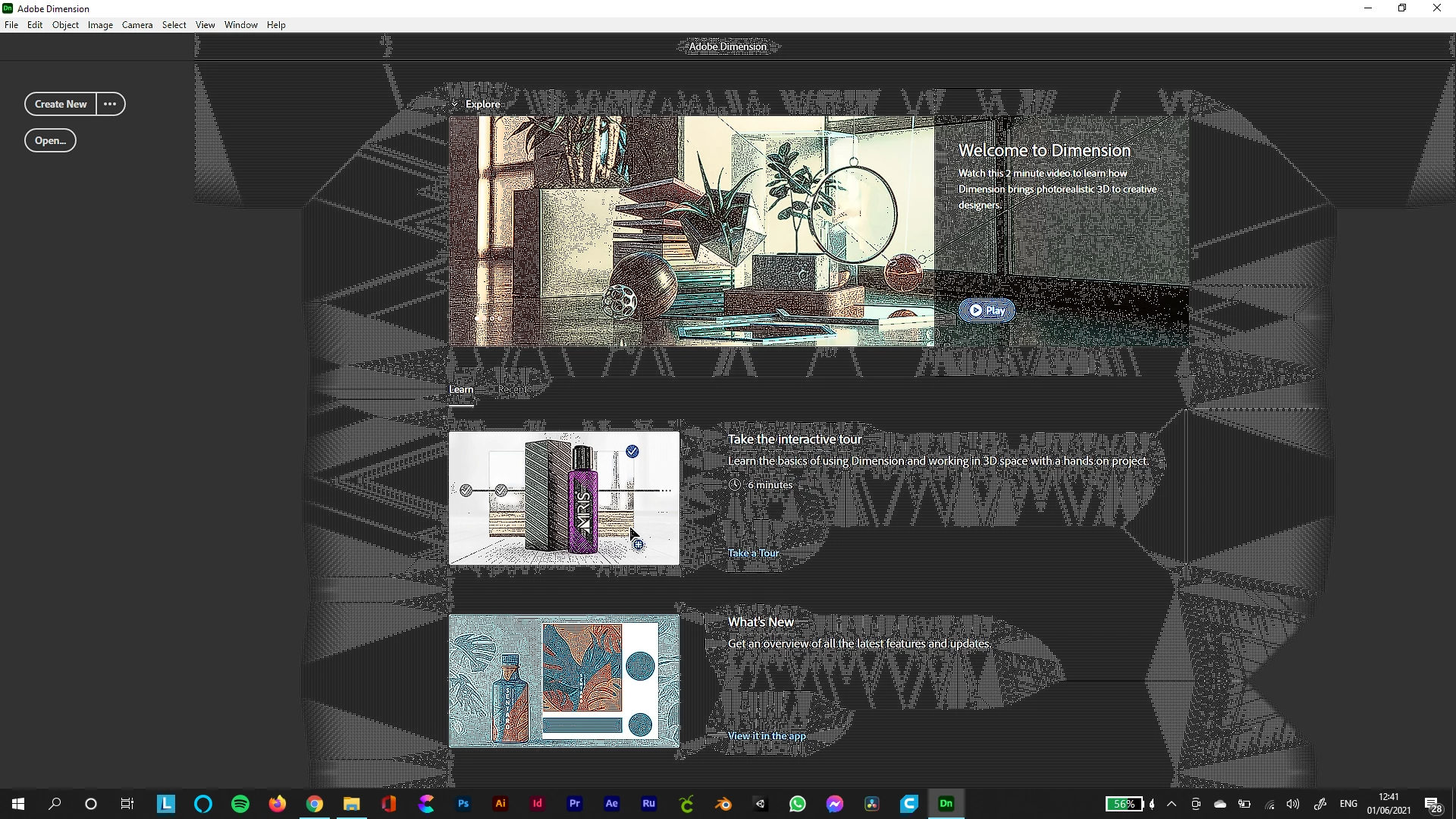
So I noticed with a different app (can't remember which now pro AI or AE), a similar thing was happening but there was an available update, which I got and and all was good.

I don't usually use Dimension but knew it would come in handy for a recent project, but this weird corruption occurs, it happens when I hover over a menu item or button and just keeps getting larger the more I move the mouse.


  • The software is up to date and I tried uninstalling and reinstalling.
  • My system is a year old: windows i7 6 core, 16gb ram, nvideo Geforce rtx 2060 6gb.
  • This happened when I had no other apps open, not even a browser.
  • I also was able to use after effects, photoshop and illustrator today at the same time without any issues.

Moved from Using the Community (which is about the forums) to the correct forum... Mod
To ask in the forum for your program please start at https://community.adobe.com/


This topic has been closed for replies.
Correct answer Ussnorway7605025

yes its a well known issue

try opening the nvidia panel and turn off sharpening globally then save and restart the system for testing

4 replies

Participant
August 5, 2021

I am experiencing this strange glitch with my work station that is really driving me nuts. Basically after the PC has been running for a while (anywhere from 1 hour - 5 hours after boot), my mouse will start to glitch during hover events. This happens most commonly while using Photoshop, Android Studio, and Firefox, but will happen during other program use as well.

Ussnorway7605025
Legend
August 6, 2021

the image you posted in your other thread is a Gpu glitlz and the fix is to open your Gpu settings panel to disable global sharpening


the mouse problem could be the same issue because hover normally opens a task bar which would need your Gpu to rendor but then again maybe your idea of a "glitch" looks different and I'd need to see a screengrab of it to be sure... at the very least I know its a system level problem because it happens in other software

Participant
December 5, 2021

That doesn't work unfortunately. All sharpening setting have been disabled via NVIDIA control panel and the issue persists

Participant
August 5, 2021

Sorry i don't have any clue for this problem.


Ussnorway7605025
Legend
June 2, 2021

The conflict is caused by Adobe software that is not detecting your Gpu correct and that is because they are still mostly Mac fans who don't understand Windows or the idea that software changes

The key points in your case is the screenshot you show the issue with and the fact you told us your Gpu ... Well done for including them 😉

Ussnorway7605025
Ussnorway7605025Correct answer
Legend
June 1, 2021

yes its a well known issue

try opening the nvidia panel and turn off sharpening globally then save and restart the system for testing

bratdogg
bratdoggAuthor
Participant
June 1, 2021

Thank you so much, that worked perfect.

I searched for an answer but to be honest I couldn't get the terminology right to describe what the issue was. 

I've never had this issue before and used adobe products for over 20 years.

Just out of curiosity do you know what the issue is referred to as, or what the conflict is?