rons75178507
Participating Frequently
January 13, 2020
Answered

GPU rendering

  • January 13, 2020
  • 4 replies
  • 25872 views

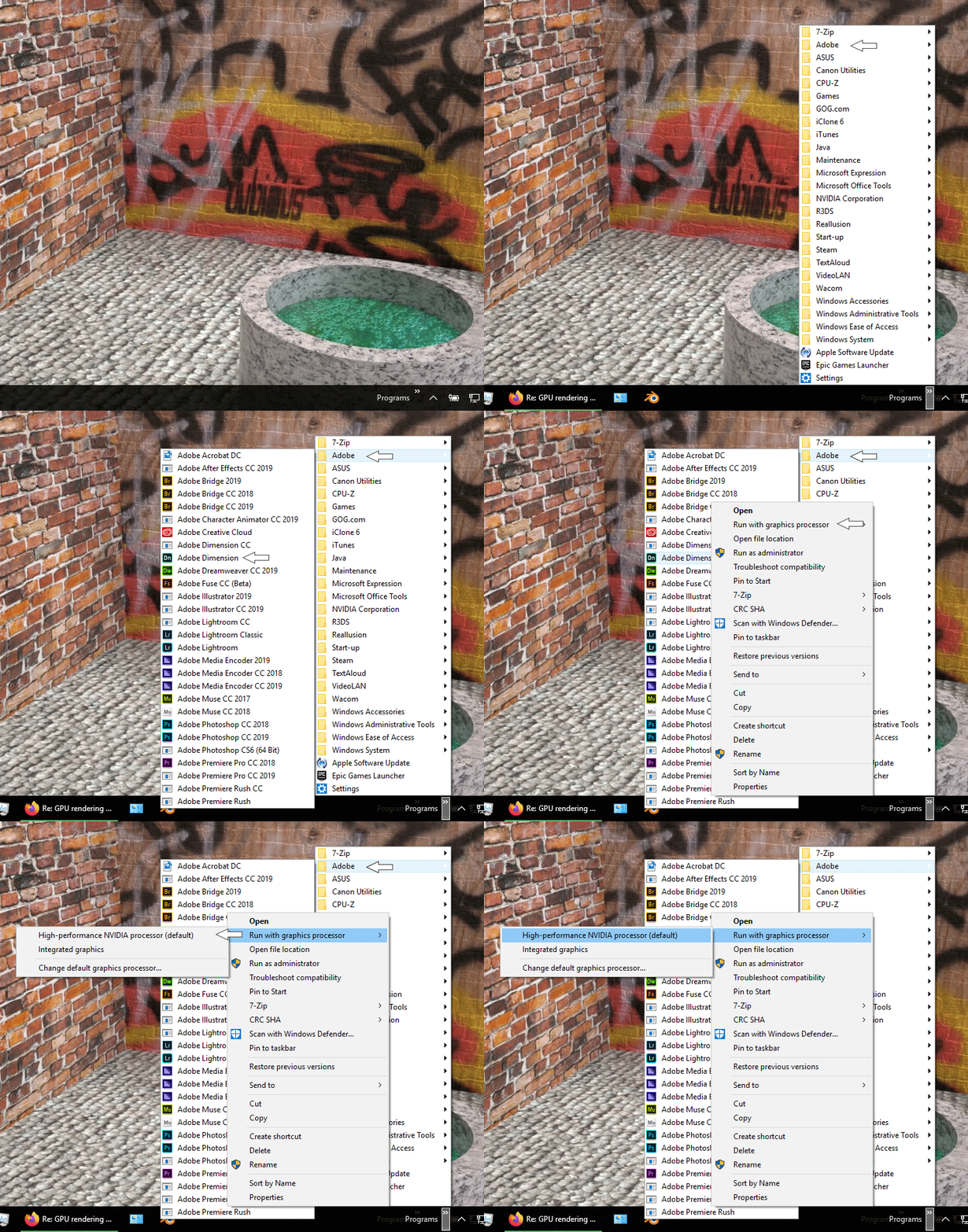
I´m using a nVIDIA GTX 1070 (441.87). How can i switch to GPU rendering?

This topic has been closed for replies.
Correct answer Ussnorway7605025

it doesn't set Gpu rendor but just which system Gpu to start with... by default Dimension is made to run on Mac and so only uses the system Cpu

4 replies

Participating Frequently
July 30, 2020

I have spent numerous hours speaking to Adobe tech support and still have no answer, I recently used Adobe Dimension and it gave me the option to use my graphics card (GPU) to render, it worked fine for a couple of renders then the option completely disappeared from the EDIT > PREFERENCES menu. The guys at Adobe were no help whatsoever, they thought it should be there, after they remotely looked at my menu and saw it was not there, they hung up and did not solve my issue. This is by far the one downfall of Dimension, rendering software which is using the processor is just not useable at all, rendering times are way too long. When will this be solved?

Ussnorway7605025
Legend
July 30, 2020

I would assume you updated your Gpu drivers at some point which is going to be why Dimension Gpu-rendor stopped working i.e, Adobe only allowed for that single driver... if this is your error then rolling back to the old Gpu drivers will get it working again


p.s, yes it was reported many times but Adobe is a big place and Dimension is only a small team

Participating Frequently
July 31, 2020
Thanks, Adobe thought it was my old drivers as it didn't work with those,
so Adobe technician remotely controlled my pc and updated the drivers, the
GPU rendering option is still not there, I believe I must have been using
Adobe Dimension Beta which seems to have that option but I cannot find
anywhere to download it. Why would the option automatically delete from the
menu? I have seen videos on YouTube of people switching the option on but I
do not have that option. Adobe have not helped and I have not got any
answers.
Ussnorway7605025
Ussnorway7605025Correct answer
Legend
January 15, 2020

it doesn't set Gpu rendor but just which system Gpu to start with... by default Dimension is made to run on Mac and so only uses the system Cpu

rons75178507
Participating Frequently
June 9, 2020

I actually work with AD version 3.2.1 and tested the render settings. I´ve updated my GTX1070 with the latest drivers... In my test it takes 1 minute to render a image with the onboard GPU. After the change to the GTX it takes the same time. And I can not see high performance on the GTX1070 while rendering...  

Ussnorway7605025
Legend
June 10, 2020

with out knowing the file there is no value to your test but I would not expect there to be a difference between Gpu time on a file that only takes 1 min to rendor

Ussnorway7605025
Legend
January 14, 2020

imo he is asking about setting the Gpu rendor ... there may or may not be a post about it in the prerelease forums, I don't spend any time in there now days


there is zero help documents about v3.1 so there is no point to reading them

Ares Hovhannesyan
Community Expert
Community Expert
January 14, 2020
rons75178507
Participating Frequently
January 15, 2020

I can not find any possibility to define the video card setting in the context menu of the program icon...I´m using W10...