Participant
August 27, 2024
Answered

Grundeinstellung von Arbeitsfläche nicht möglich

  • August 27, 2024
  • 2 replies
  • 940 views

Hallo in die Runde,

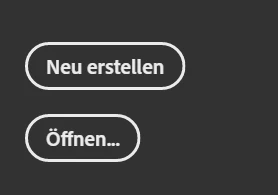
ich versuche in der neuesten Version von Dimension die Größe und Auflösung vom Dokumenten einzustellen. Normalerweise ist neben "Neu erstellen" noch ein Button mit drei Punkten drauf, worüber diese Eintsellungen gemacht werden. Der fehlt jetzt komplett - Was kann ich tun? Ich habe es schon deinstalliert und neu installiert.

Bei der ältern Version ist es vorhanden aber da sind ja leider noch nicht so viele tolle Texturen etc., also ist es keine Option wieder darauf zurück wechseln.


Ich habe mal zwei Screenshots angefügt.

Das weiße ist wie es sein sollte, das schwarze, wie es bei mir ist.
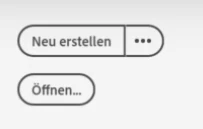
Was kann ich tun? Gibt es noch einen anderen Weg?

Ich bedanke mich jetzt schon mal für die Hilfe. 🙂

This topic has been closed for replies.
Correct answer Ares Hovhannesyan

Dn and camera change only size unfortunetly, but resolutin stay 72ppi. No way for Dn.

2 replies

Klаus
Inspiring
August 27, 2024

Settings for size/resolution are to be specified in connection with a camera now. Create a (new) camera and put in the values for size/resolution that you need.

Tito98A5Author
Participant
August 28, 2024

Thank you very much for your reply.


The tip with the camera is very helpful and solves the size setting.

But unfortunately not the resolution problem.

There must be a way to adjust the resolution. Do you have any other idea?

Ares Hovhannesyan
Community Expert
Ares HovhannesyanCommunity ExpertCorrect answer
Community Expert
August 28, 2024

Dn and camera change only size unfortunetly, but resolutin stay 72ppi. No way for Dn.

Ares Hovhannesyan
Community Expert
Community Expert
August 27, 2024

Yes , the resolution settings are changed and now they look like as for Adobe Substance 3D Stager. You can try to export PSD file and change resolution in PS. You will get several layers in PSD file. Before changing image size or resolution you can flatten or merge layers in Photoshop.

Tito98A5Author
Participant
August 28, 2024

First of all, thank you very much for your answer.

Since I am not using the SG, only the beta version MD, I have no idea where I would find it.


Changing the resolution in Photoshop afterwards is not the solution either, as I also want to use it for smaller clips. Also, I think there is always some loss of quality when upscaling images.


Do you have any other ideas on how I can increase the resolution from 72 dpi to 300 dpi, for example? 🙂