

Participant
October 25, 2019
Question

HELP

  • October 25, 2019
  • 6 replies
  • 466 views

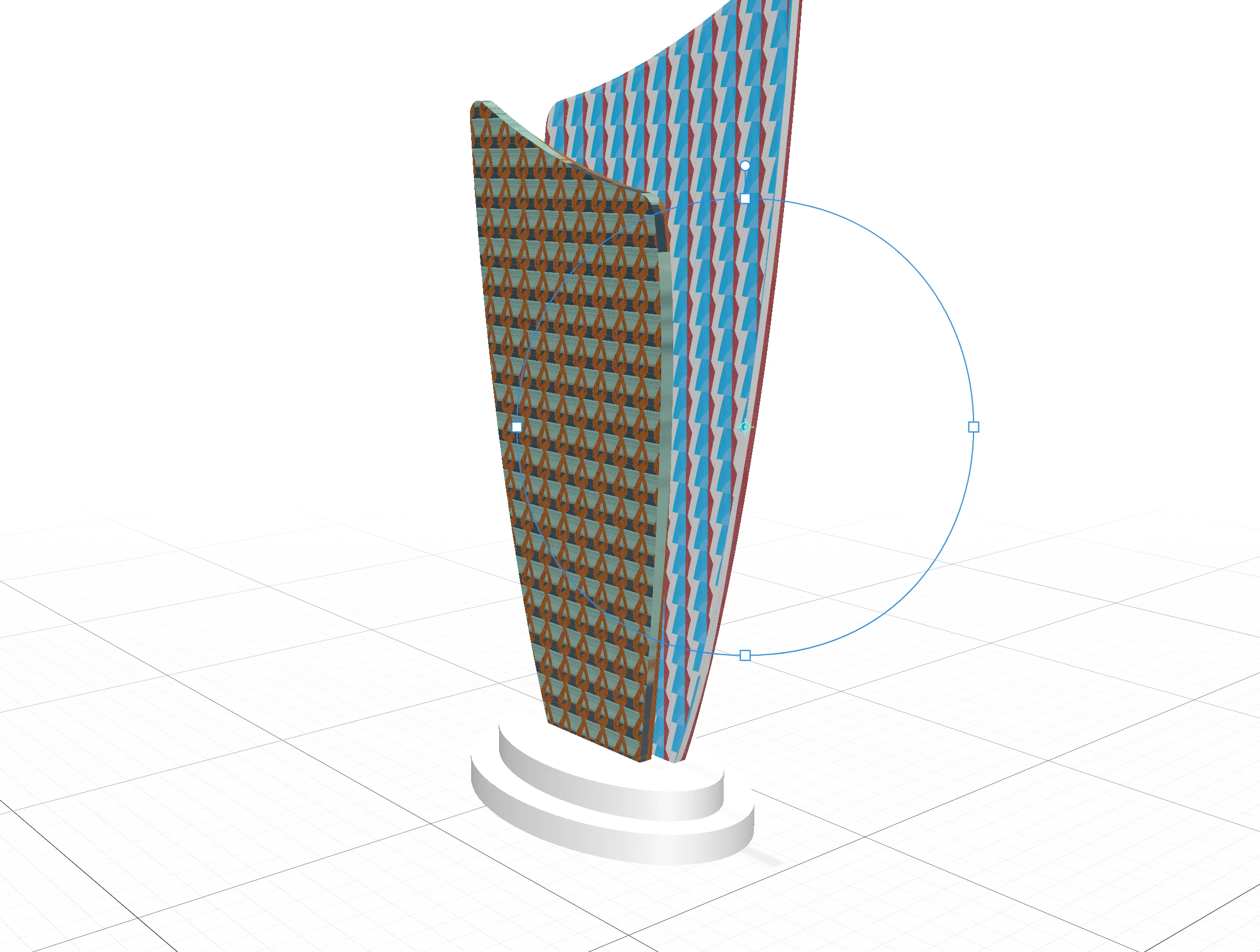
Help ... obj file created by fusion 360, I can't insert logo. see example

    This topic has been closed for replies.

    6 replies

    Ussnorway7605025
    Legend
    November 10, 2019

    if its a Dn file you can zip it and share from your creative cloud, Obj files don't need to be zipped unless you want to include the mtl which isn't really needed for testing

    in theory you should be able to upload Dn files to this forum (but it doesn't work for me here in Australia) and I'm yet to see anyone else get it working... most people use Dropbox as they test their systems to work

    https://community.adobe.com/t5/Dimension/A-new-Dimension-forum-Check-it-out/td-p/10602264

    Ussnorway7605025
    Legend
    November 8, 2019

    yes always... your best chance to get help with models is to share the file


    if we can test it then your odds of getting a fix | work around go up dramatically guys

    Participant
    November 8, 2019

    Hi Ussnorway, I'm new to the community. How/where do I share files, is there an email i should send it to?

    Ussnorway7605025
    Legend
    November 6, 2019

    p.s, a work around = place the Obj in Dimension, use the wand to select only that front face then give it a new material... it doesn't matter what as long as it is different to the other materials


    now you can add a decal to [only] that new face i.e, in effect makes a new temp UV map that just includes the area you selected with the wand

    Participant
    November 8, 2019

    Hi,

    I am experiencing the same problem.

    I export from fusion to an OBJ. When I try to map a JPEG or PNG image onto the object, I'm seeing that it's splitting the surface into 8x8 cubes and tiling the decal into each individual square. When you reduce the size of the decal, it reveals that the decal is scaling inside the split surfaces (not 100% sure is a surface issue).

    I've tried all the ways to map image with same result. I've tried adding this same image to stock objects and it works fine. 

    Magic wand tool selects everything, re-scaled up or not, with the same result.

    Happy to email the obj file if you like. 


    for comparison - stock obj vs fusion obj 


    Ussnorway7605025
    Legend
    November 6, 2019

    quote> No repeated. STL file ok single logo. FILE OBJ not single but repeated logo <quote

    in that case your uv map must be wrong;

    on the stl copy does the logo show on the back face as well?


    on the Obj file, I would import it into Photoshop and regenerate a new UV map then export as wavefront Obj... that should fix it but again, happy to have a go if you share the file

    Ares Hovhannesyan
    Community Expert
    Community Expert
    October 26, 2019

    Can you describe your steps?. That will help us to understand problem. Thank you

    Ussnorway7605025
    Legend
    October 26, 2019

    your example shows that the decal is working

    if you want a different effect then please tell us want that would look like... as for the model it looks a little stretched but it could be just the angle


    p.s, happy to have a go if you want to share the model + decal

    Participant
    November 6, 2019

    Thanks friends: No. I would like the single logo. No repeated. STL file ok single logo. FILE OBJ not single but repeated logo