


awur6opsk881668203
Participant
July 29, 2020
Answered

How to unsubscribe from 'Adobe Dimension' mails

  • July 29, 2020
  • 3 replies
  • 711 views

In my profile I unslected all e-mail notifications.

Still, I get mails:


For example:

From: noreply@adobe.com 2020-07-29 04:12 (CEST)

'Adobe Dimension | Upcoming Live Meeting'

Hi there! This is Kevy from the Dimension team!


Join us tomorrow for a demo session highlighting several exciting features that will be in the upcoming prerelease build. The session will be hosted by our Product Owner, Jeanette Mathews. 

Features:

...Redacted

  • Copy/Paste Directional Lights

When:  Wednesday, July 29th @ 9:00 - 10:00 am PST

Where:  Blue Jeans Events: CLICK THIS LINK TO REGISTER  If you have already registered and received a link for tomorrow, there is no need to do so again. 

Please Note: We are using a new webinar platform called Blue Jeans. We ask that you pre-register for the event by clicking the link above. 

This webinar is not public and meant for prerelease users only.

Looking forward to seeing you all soon!


Cheers,
Kevy Vona, Program Manager
This topic has been closed for replies.
Correct answer awur6opsk881668203

I think I found it:


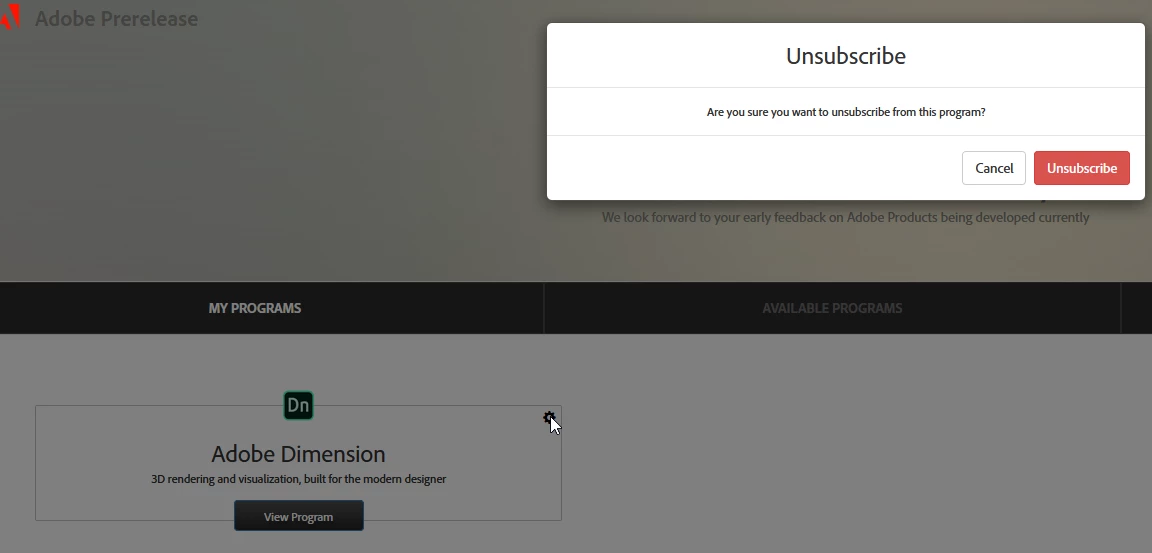
1) Goto https://www.adobeprerelease.com/

2) My Programs -> Adobe Dimensions -> Click on Gear -> Unsubscribe:


I hope it works...

Many thanks for your help getting me to the correct site....


3 replies

Ussnorway7605025
Legend
July 31, 2020


 Is there another adobe site for prereleases?


yes and no;

  • yes prerelease uses a different (uservoice) system because that small team can track feature requests back to day 1 i.e, dec 2016 and this forum is just a joke when it comes to sorting stuff
  • no its not a different team and you can get there by the link on this forum page


It is against the Prerelease licensing terms of use to:
- Share content made from a prerelease build in public.
- Discuss features or content from the prerelease site in public.


correct but its only against the terms for YOU to do that... Adobe staff can do whatever they like and once one of the Dimension team makes a [public] post about this or that prerelease feature then its fare game


  • as I said, what box you tick or don't tick is irrelevant because Adobe ignores it and the team that sent you that email is a different small bubble that doesn't talk to other Adobe bubbles... thats just the way the company is run mate
awur6opsk881668203
awur6opsk881668203AuthorCorrect answer
Participant
July 31, 2020

I think I found it:


1) Goto https://www.adobeprerelease.com/

2) My Programs -> Adobe Dimensions -> Click on Gear -> Unsubscribe:


I hope it works...

Many thanks for your help getting me to the correct site....


Ussnorway7605025
Legend
August 1, 2020

the email you posted came from marketing mate so leaving the prerelease program is great but will not stop the emails... anyway good luck to you 😉

Ares Hovhannesyan
Community Expert
Community Expert
July 30, 2020

Did you receive it onyour adobe id?. Open your account and try to find notification in settings. 

awur6opsk881668203
Participant
July 31, 2020

Yes,

1) Adobe ID: I logged in at https://account.adobe.com/?lang=en

It is the same email.


2) Then Common tasks -> Manage notifications:

all notifications are unselected. Is there another adobe site for prereleases?


Btw: Got again an Adobe Spam mail at 31.07.2020, 05:27 (CEST)


-----

Hello!
It's Kevy from the Dimension team.
 
Hope you are doing well and staying safe! 
 

A new build is available on prerelease for you to check out. This build has several new features that were covered in the most

We recommend being careful using these builds for testing as they are under development and may have issues that affect projects.


...Redacted


Ussnorway7605025
Legend
July 30, 2020

the bottom line is Adobe doesn't give two figs what box you ticked but you can block the address [and report them] through your isp if that makes you fell better