


Participant
September 26, 2019
Answered

import material from adobe stock and then use it

  • September 26, 2019
  • 3 replies
  • 3254 views

I am using Adobe Dimension CC - I imported a new material from Adobe Stock (I licensed it and saved it to my downloads folder) Now I would like to use this new material, but I don't know how to import it into my project

    This topic has been closed for replies.
    Correct answer Ussnorway7605025

    3 replies

    Ussnorway7605025
    Ussnorway7605025Correct answer
    Legend
    September 26, 2019

    Alexandre Becquet
    Community Expert
    Community Expert
    September 26, 2019

    Hi, if you return to Adobe Stock page, find your material and click on the heart to add it to your Library and after just drap and drop from the library.


    Let me know if it's help you

    Participant
    April 28, 2021

    Thanks!!! 

    Ares Hovhannesyan
    Community Expert
    Community Expert
    September 26, 2019

    Adding a File > Import Materials option will allow for downloaded materials or materials created in other apps to be imported. You can now import materials that you've downloaded from Adobe Stock via the File > Import Material menu option.


    Select object and Import it from Import Material into object

    Participant
    September 26, 2019
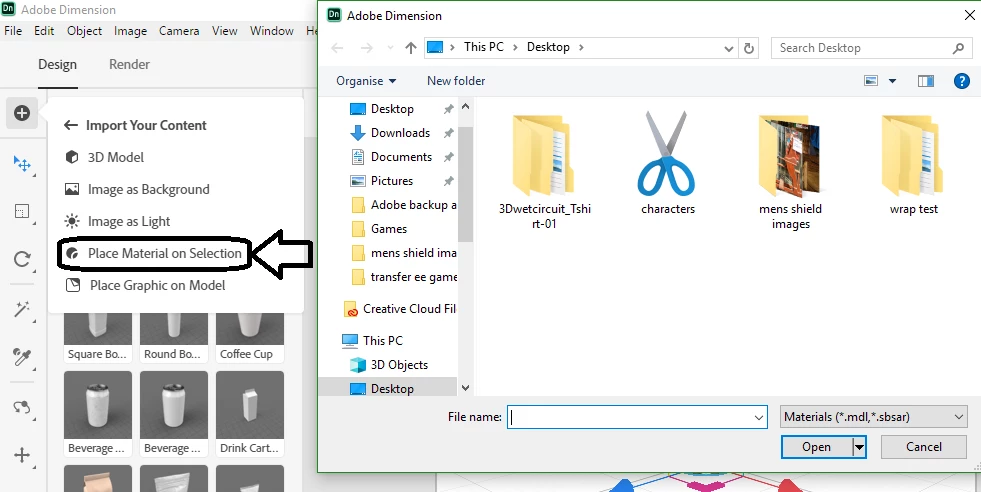
    Thanks Ares, but the only import options I have are 3D Model, Image as Background, Image as Light, Place Material on Selection, and Place Graphic on Model