


Participating Frequently
December 15, 2023
Question

Keeping a pattern going in the same direction

  • December 15, 2023
  • 1 reply
  • 290 views

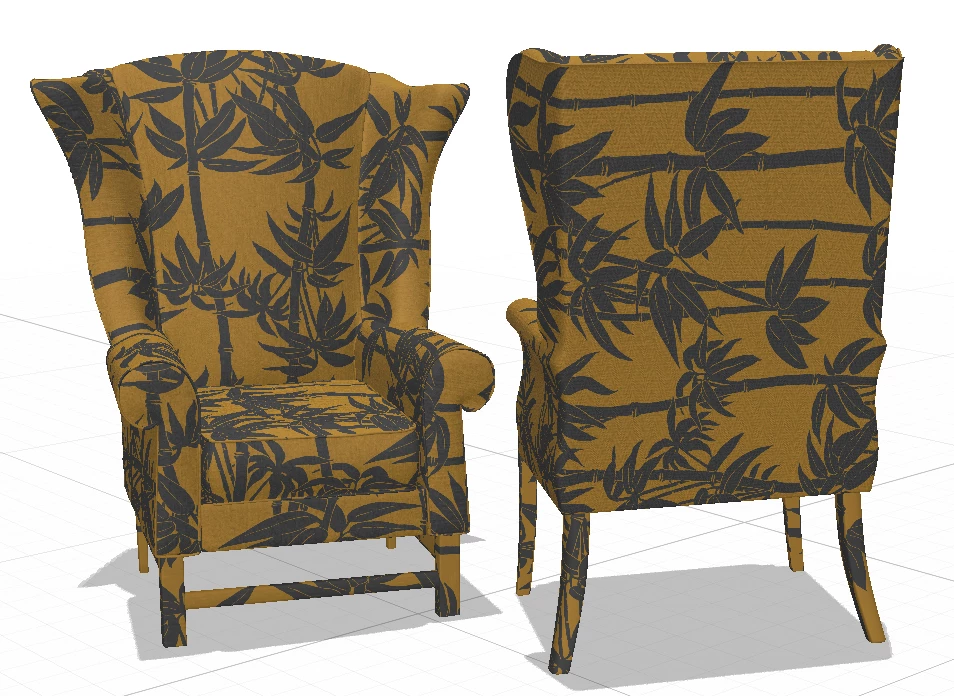
I am trying to place a pattern that runs vertically on a chair, using the fill, and it gets placed beautifully at the front, but on the sides and back, the pattern is placed horizontally!

Is there a way I can keep the pattern to be placed in the same direction (vertically!) all around the chair? 

(Also,  on this specific object, the pattern ends up on the legs too)
This topic has been closed for replies.

1 reply

Ares Hovhannesyan
Community Expert
Community Expert
December 17, 2023

It can be done if each texture will be placed on separate selection and modified. The reason is UV mapping and depend how is object created.

Participating Frequently
December 18, 2023

Thanks. So it has to do with the object.

I got it from Adobe Stock as I don't create objects myself. The original pattern on the object was a stripe that was placed correctly.

I would go get another object but there aren't that many, so the choice is pretty poor.


Ares Hovhannesyan
Community Expert
Community Expert
December 18, 2023

You can use Magic Wand Tool for selecting separate parts of your object and place separate textures that will allow to modify them separately (if your object have separate layers).