elvirh93437285
Participant
February 22, 2020
Answered

Logo is tilling

  • February 22, 2020
  • 2 replies
  • 600 views

Hi All


just tryed to use Dimension for the first time...playing around with it to se how it works

I came accross a problem. I made a 3d model of a giftbox saved as OBJ and imported to dimension

In dimension everything works fine untill I apply a logo to the box...it gets tiled...like 100 logos in line in sted of just one image...what do I do wrong?

If I thake a model that is stock in Dimension the logo is applyed just fine

This topic has been closed for replies.
Correct answer Ussnorway7605025

in best order;

  1. what you do is build the Obj correct
  2. or use a stock model
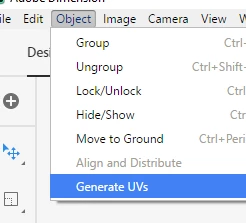
  3. or press the "generate uv" ... note this will not fix the sceams but just cleans up the faces and may give you enough to get the image you are after

+ tile image = fill not decal

2 replies

Ares Hovhannesyan
Community Expert
Community Expert
February 23, 2020

How you apply image.to object? Can you describe your steps?/ Thank you

Ussnorway7605025
Ussnorway7605025Correct answer
Legend
February 23, 2020

in best order;

  1. what you do is build the Obj correct
  2. or use a stock model
  3. or press the "generate uv" ... note this will not fix the sceams but just cleans up the faces and may give you enough to get the image you are after

+ tile image = fill not decal

elvirh93437285
Participant
February 23, 2020

Thanks 🙂

That seemd to do the trick