


Answered
Manner to set newly re-sized object's Scale as "1" for XYZ?
Hello!
I received an .obj file from a co-worker of an object, but its native dimensions were too small. So, in Dimension I changed their Size XYZ to the dimensions that I needed and it looks good. However, the Scale is now not "1" for XYZ of the object, it is now Scale of "102.8" for XYZ (because I had to make it that much bigger!).
The problem is that when I place a decal on to the new bigger object... the decal is incredibly large, since the object's Scale is now "102.8" for XYZ because I had to make it bigger. I would like to change the current size that I edited... to be Scale of "1".
- Is there a way to re-size an object in Dimension... and then set that new size as the Scale of "1" for XYZ?
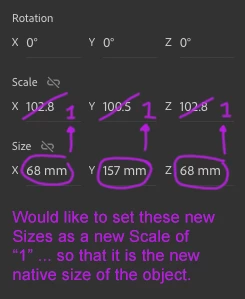
Thank you if you can help with with this, as I do not know how to edit the .obj file that I am importing.

 AdChoices