



michellexyz
Participating Frequently
October 20, 2019
Question

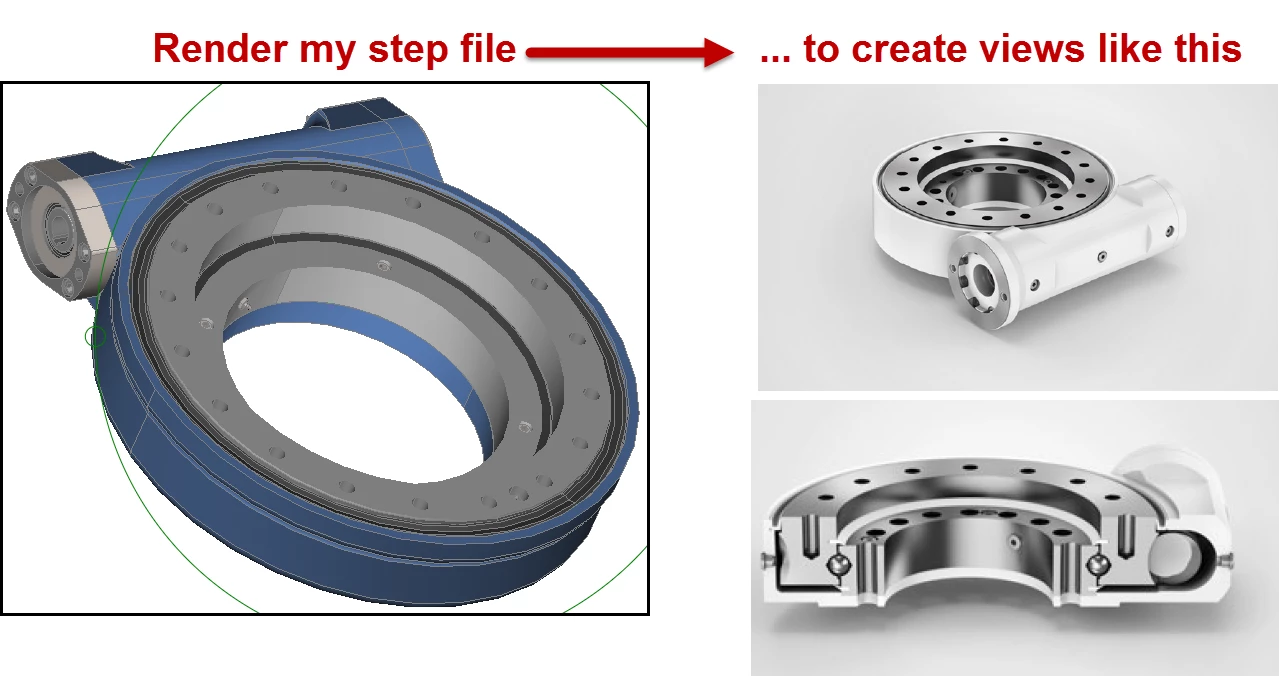
Newbie - Can Dimension render my .step model like this?

  • October 20, 2019
  • 2 replies
  • 501 views

Hi there, 

I need to create a 3D render as shown in the attached screenshot. My model is from a CADCAM system, and in .step format.

Questions

1. Is Adobe Dimension the "best" Adobe program to create a render in?

2. In order to achieve the renderings shown, is there a steep learning curve? Or will it be quite easy? (I am not a graphic designer)

3. Could anyone point me in the direction to some documentation where rending is explained in Dimension? Goodness.. I'm really hoping this is going to be easy.


Many thanks
Michelle
 

This topic has been closed for replies.

2 replies

Ussnorway7605025
Legend
October 22, 2019

on a Windows machine I'd start with Dimension


you will need to have the model as a base Stl (Obj or Fbx) to load it

then you need a well lighted display image... the default blank page is a good start


Ussnorway7605025
Legend
October 21, 2019
  1.  Photoshop does a better rendor when you need anything with custom lights but most people find Dimension simple to use
  2. If the model is made from different parts then it is very simple... Cutting up a single model to show the cut out as different parts will take a bit longer
  3. No this forum is busted and we can't show you the tutorials but they are online and also in the software
  4. Windows or Mac?


[ussnorway https://helpx.adobe.com/dimension/tutorials.html ]

michellexyz
Participating Frequently
October 21, 2019

Hi Ussnorway,

Thank you for your reply. I'm using Windows. To cut the model - thats fine and easy to do - I can just do that in my CADCAM system. It's only the rendering I need. Which tool do you recommend I use, Photoshop?