


Inspiring
January 19, 2026
Question

Overwriting files + broken render preview

  • January 19, 2026
  • 1 reply
  • 38 views

Within the last week, the pop-up warning for potentially overwriting files with the same name has disappeared. I keep overwriting files by mistake. Is there a new setting I need to toggle? I didn't see anything obvious. Please help!


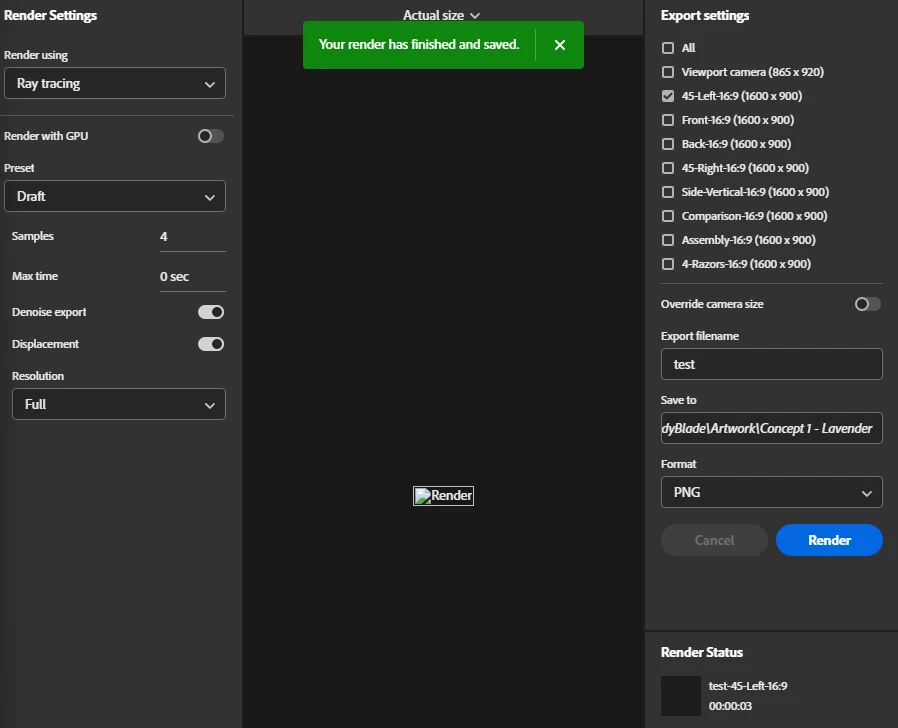
Not sure if it is related, but my render preview is also broken. This is less crucial, but still bothersome. It will show the rendering in real time, but then show this broken PNG image upon completion.
LaurieS_0-1768854598806.png

I am on the latest Dimension (18.1.1).

1 reply

Ares Hovhannesyan
Community Expert
Community Expert
January 21, 2026

Can\t reproduce your bug.  From your screenshot I noted that you rendering without GPU. Can you try with GPU render. Also roll  to previous version and try with previous version. 

Laurie SAuthor
Inspiring
January 21, 2026

GPU render didn't fix the issue. I haven't tried reverting to an earlier update, however I opened a file from over a year ago, and it's worked fine.


Then I created a brand new file, and imported my working file from yesterday as a 3D object, but had the same issues again.


I just created a new file with a completely new object, and it's working. I'm absolutely stumped. Maybe there is an object in my working file that is causing this.

LaurieS_0-1769018759875.png

Ares Hovhannesyan
Community Expert
Community Expert
January 22, 2026

Dn render engine has been updated last year. That can be a reason that file can't be opened.