



thompsonryan
Inspiring
August 6, 2019
Answered

Prevent decal from duplicating?

  • August 6, 2019
  • 3 replies
  • 868 views

I built a simple box OBJ in photoshop. Just a simple extrusion. I'd like to place images on each side of the box. I'm ok with placing these by separately by hand since they will be the correct ratio.

Right now importing a demo decal to test the model and it's showing up across all sides in a strange way.

Any tips to prevent this from happening would be helpful. I have a feeling it maybe something in Photoshop before exporting to an OBJ.

Thanks!!

Check out what I'm seein
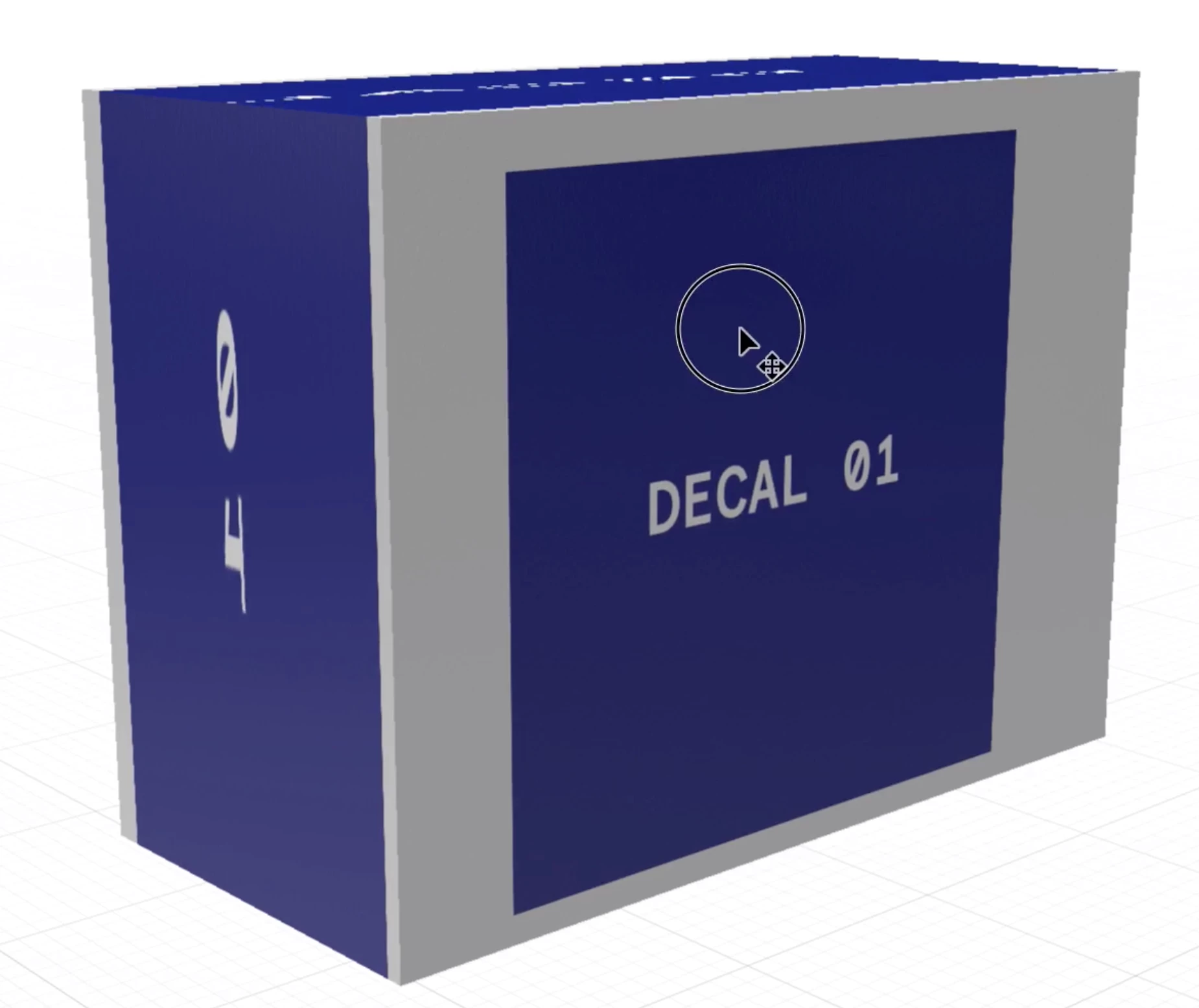
Screen Recording Here

This topic has been closed for replies.
Correct answer Ussnorway7605025

the underlinning issue is the way you built your box in Photoshop so you now have two options;

  1. try and fix your box using the wand like Ares Hovhannesyan shows which is correct or
  2. build your box a different way to make the faces different to each other

Ares Hovhannesyan shows the first option so I'll show you the other ok

when you build your box in Photoshop use the shape tool for the faces and then just extrude the layer... I coloured my extrusions green to make them stand out for you but that isn't needed

p.s, understand that Dimension will only give good results on the faces... the sides of your box are extrusions so they have small area and you should build your box out of all shapes if you want to put images on the sides as well as the faces

pps, we can see the issue clear because you added a vid, so well done!

good luck with it mate

3 replies

Ussnorway7605025
Ussnorway7605025Correct answer
Legend
August 8, 2019

the underlinning issue is the way you built your box in Photoshop so you now have two options;

  1. try and fix your box using the wand like Ares Hovhannesyan shows which is correct or
  2. build your box a different way to make the faces different to each other

Ares Hovhannesyan shows the first option so I'll show you the other ok

when you build your box in Photoshop use the shape tool for the faces and then just extrude the layer... I coloured my extrusions green to make them stand out for you but that isn't needed

p.s, understand that Dimension will only give good results on the faces... the sides of your box are extrusions so they have small area and you should build your box out of all shapes if you want to put images on the sides as well as the faces

pps, we can see the issue clear because you added a vid, so well done!

good luck with it mate

Ares Hovhannesyan
Community Expert
Community Expert
August 7, 2019

Ares Hovhannesyan
Community Expert
Community Expert
August 7, 2019

There is possibility in Dn to use Magic Wand selection tool and select each surface separately. That will allow to place graphic separately into each surface.