Participant
Jan 10, 2023 2:01 PM UTC
Answered

Problème modèle Adobe Dimension

Bonjour, 

Je suis actuellement en train de réaliser un modèle de voiture sur Adobe Dimension. Nous avons récupéré le modèle 3D sur Hum3D et lors de l'insertion des éléments sur le véhicule ces derniers sont mit en symétrie. Par exemple, lors de l'insertion d'un élément sur la porte avant droite, ce dernier se dupplique sur la porte avant gauche. Sur le capot, l'élément est en symétrie aussi. Pourquoi ai je cette symétrie sur mon modèle ? 

This topic is closed to new replies. Start a new post to keep the conversation going.
Ares Hovhannesyan
Ares HovhannesyanCorrect answer
Community Expert
Jan 11, 2023 3:17 PM UTC


Select 

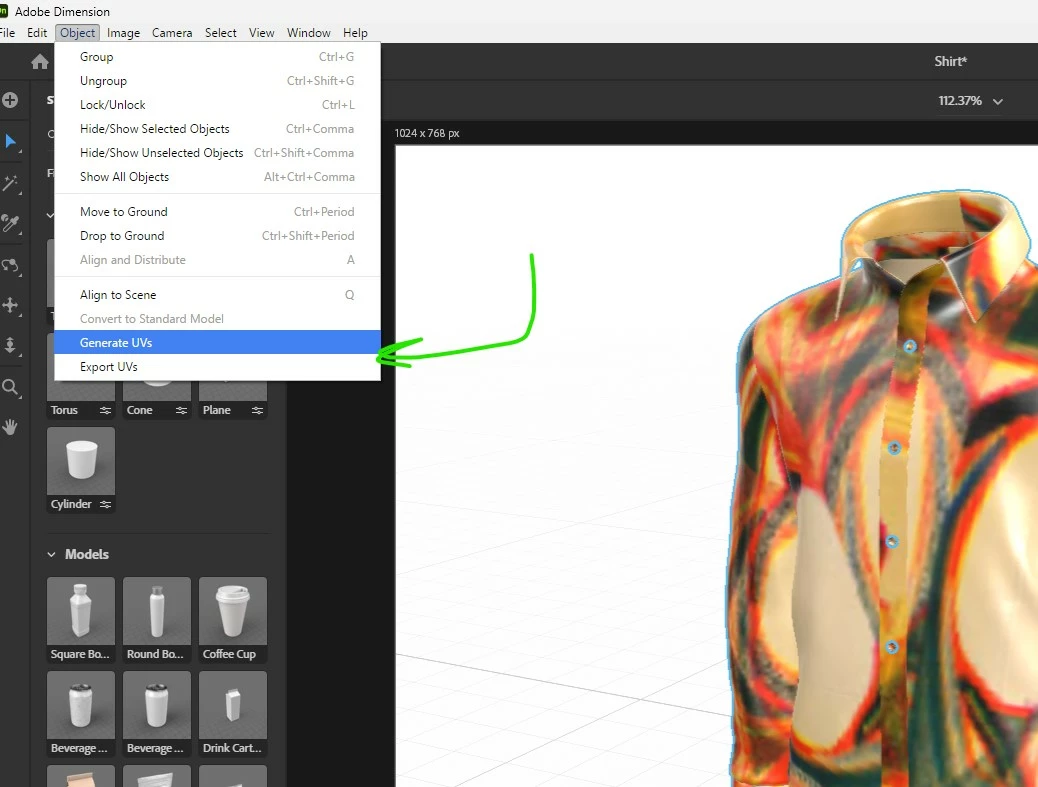
Select Object and use Generate UV from Object Menu


5 replies

Ussnorway7605025
Legend
Jan 10, 2023 9:43 PM UTC

why = because it saves time

how to fix = use the magic wand on the car bonnet to give it a new material thats different [you can adjust to look the same later] then place your decal

this why only the car bonnet changes it Uv instead of remaking the entire car

Translate
Ares Hovhannesyan
Community Expert
Community Expert
Jan 10, 2023 7:37 PM UTC

The reason can be UV Maps or meshes structure. Did you try to Generate UV from your model in Dn before applying?

Translate
Participant
Jan 11, 2023 10:51 AM UTC
 
How to do ? 
Translate
Ares Hovhannesyan
Community Expert
Ares HovhannesyanCommunity ExpertCorrect answer
Community Expert
Jan 11, 2023 3:17 PM UTC


Select 

Select Object and use Generate UV from Object Menu


Translate