



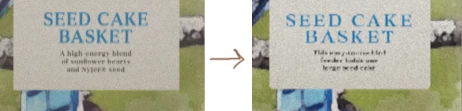
Renders are significantly more pixelated in 2.0
Hi team,
I downloaded 2.0 yesterday and I'm LOVING so much of the update, especially the ability to put multiple decals! Thanks for all the hard work you do.
Unfortunately, I'm running into an issue where my decals are now even more dramatically pixelated than they were previously. Before, I could get around this more or less by rendering at double the size I needed, doing a bit of smoothing in Photoshop, and then shrinking it to half size. Now the jaggies are so bad that even once smoothed out by shrinking, text is still totally unreadable.
I've read through the previous threads on the subject and I've tried everything I could find, such as making my decals square etc. Is there any workaround for this in the new version? Or is the only option manually layering the original art over the render in Photoshop with a smart object?

 AdChoices