


Participant
November 17, 2017
Answered

Sketchup Obj export to Import Dimensions

  • November 17, 2017
  • 3 replies
  • 4476 views

Hi, I'm trying to open an obj file from Sketchup pro but when I import it to Dimension, it just shows the loading screen and never opens the actual obj file. I eventually have to force quit the program because it locks on that loading screen. I also have no idea how to look at a crash report or error log so if anyone would like to see that, I again, have no idea how to find that.

This topic has been closed for replies.
Correct answer JeanetteMathews

Thanks, Michael.

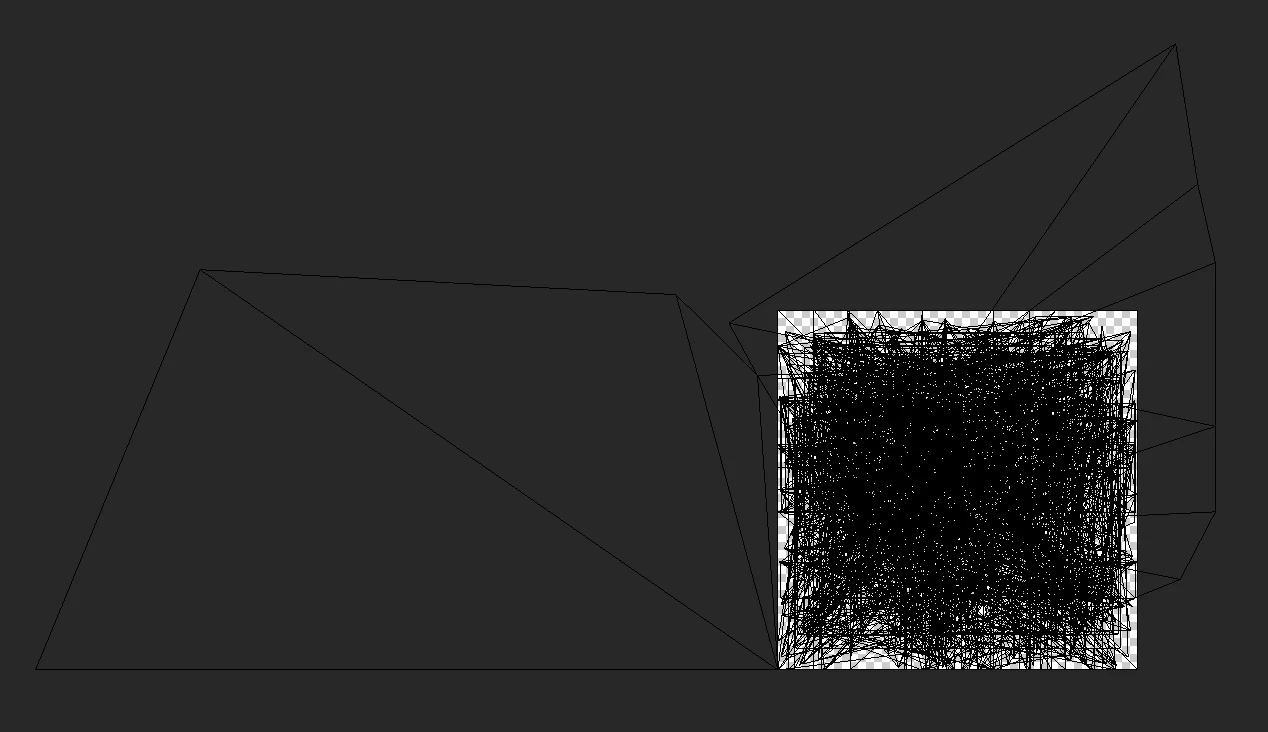
Looks like the model has UVs that are very far out of bounds.  This is a known issue with our importer and we are working on fixing it for a future release.  You can see here that the UVs are mostly in the 0-1 space (the white square area) while a few areas are far outside.  You'll need to edit the UVs to make them fit within the 0-1 space to get it to import at the moment.

3 replies

Participant
November 20, 2017

Awesome, thank you for the clarification

JeanetteMathews
Adobe Employee
Adobe Employee
November 18, 2017

Please send a support request at the Adobe Dimension CC Feedback Portal with the file attached for .obj evaluation.  Or if you prefer to stay here, a link to Dropbox, Google Drive, etc.

Participant
November 20, 2017

This is the file Dropbox - BOS.obj

JeanetteMathews
Adobe Employee
JeanetteMathewsCorrect answer
Adobe Employee
November 20, 2017

Thanks, Michael.

Looks like the model has UVs that are very far out of bounds.  This is a known issue with our importer and we are working on fixing it for a future release.  You can see here that the UVs are mostly in the 0-1 space (the white square area) while a few areas are far outside.  You'll need to edit the UVs to make them fit within the 0-1 space to get it to import at the moment.

Ussnorway7605025
Legend
November 18, 2017

Dimension can not open an obj file

you need to import obj files into your project