sarahe12753528
Participant
May 22, 2019
Answered

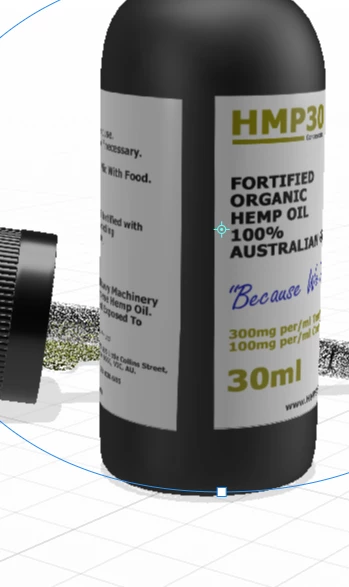
The label is crooked on my model
  • May 22, 2019
  • 1 reply
  • 370 views

I don't understand why the label I've applied on my model keeps turning out crooked and with a large gap.

    This topic has been closed for replies.
    Correct answer Ussnorway7605025

    sarahe12753528  wrote

    I don't understand why the label I've applied on my model keeps turning out crooked and with a large gap.

    its crooked because the model is crooked... you can adjust your angle with the top rotate tool but the gap is normal and just the way decal works

    for no gap you should change to a fill type instead

    note if the model doesn't have a true all round label you can use the pipe or half pipe default models that come with Dimension... there was some talk of adding better options for cutting up or custom making models but I am not in pre-release so not sure if the team ever got around to adding them in

    1 reply

    Ussnorway7605025
    Ussnorway7605025Correct answer
    Legend
    May 24, 2019

    sarahe12753528  wrote

    I don't understand why the label I've applied on my model keeps turning out crooked and with a large gap.

    its crooked because the model is crooked... you can adjust your angle with the top rotate tool but the gap is normal and just the way decal works

    for no gap you should change to a fill type instead

    note if the model doesn't have a true all round label you can use the pipe or half pipe default models that come with Dimension... there was some talk of adding better options for cutting up or custom making models but I am not in pre-release so not sure if the team ever got around to adding them in