


Trasform tool not working with a mouse (bug?!)
Hello, since version 4..., the transform tool has not been working correctly with a mouse, only from the panel. I have tried everything, including deleting the cache, restarting, reinstalling, updating everything (Win, drivers, Adobe...), and cleaning the registries, but it seems like a bug. This problem did not exist for me before version 4. When I hover the mouse over the arrows or squares, the color (active button) does not change. Oddly, when I start a new file, it sometimes works but only for a limited time and with some basic shapes.
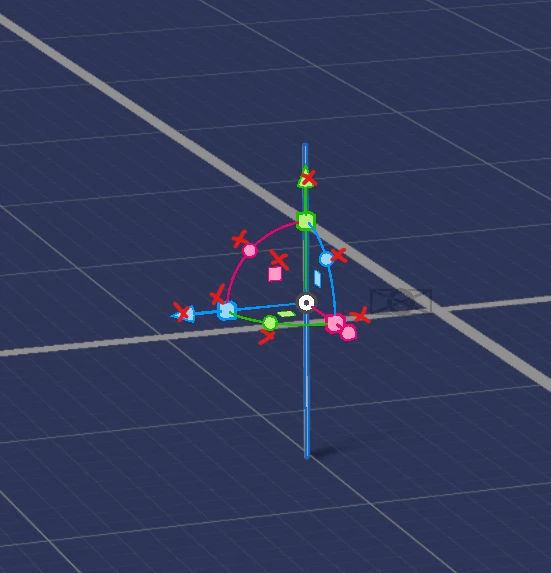
The active button color doesn't change when hovering the mouse over the arrows or squares. Oddly, it sometimes functions upon starting a new file, but only temporarily and with basic shapes. The red "x" indicates non-functionality, and it's not responsive to the mouse. After verification (with any other mouse), the mouse and drivers are not the issue. My system specifications include Windows 10 Pro, an i7 5820K CPU with 6 cores and 12 logical processors, 64 GB RAM, an Nvidia GTX 1070 with studio drivers, SSD, M2 ...
I would appreciate any help here. Thanks to all in advance!
 AdChoices