
Inspiring
December 19, 2018
Question

ALT+click in live view does not show css properties in php files.

  • December 19, 2018
  • 15 replies
  • 2538 views

Is there a way to use 'ALT+click" to show css properties in php files?

When I ALT+left click an element, on a php file with include(...) I only see:
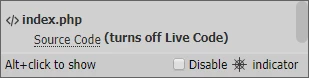
Is this one of the limitations of working with php files?

This topic has been closed for replies.

15 replies

karpiyonAuthor
Inspiring
December 23, 2018

I understand Birnou  very well, this has been too long for me as well.

I have found a solution as stated before - not a clean one but it is wokring.

i'll try the "Site Root" and let you know.

Thank you all !!!

karpiyonAuthor
Inspiring
December 22, 2018

Which I think is the root cause of this issues - it should be C:/xampp/htdocs/DnD_B4/css/main.css

BenPleysier
Community Expert
Community Expert
December 23, 2018

karpiyon  wrote

Which I think is the root cause of this issues - it should be C:/xampp/htdocs/DnD_B4/css/main.css

Something just struck me that may solve the problem. Try links relative to site root.

I tried this using another program with positive results. No fiddling around with PHP code.

As side note: Birnou has indicated that he is sick of the criticism from one poster in particular. He will not be coming back. A PM to get him back here will not go astray. Hopefully others will follow suit..

Wappler is the DMXzone-made Dreamweaver replacement and includes the best of their powerful extensions, as well as much more!
karpiyonAuthor
Inspiring
December 23, 2018

Thank you again for all the effort spent on this thread.

...its not working...

I'll stick with my unclean solution for now.

karpiyonAuthor
Inspiring
December 22, 2018

it gives:

C:/xampp/htdocs/css/main.css

karpiyonAuthor
Inspiring
December 21, 2018

it gives this:

/localhost/DnD_B4//css/main.css

Which is what i would want it to be but if i use this:

but this:

<link href="/css/main.css"..

is translated by the browser to /localhost/css/main.css

even though I set teh alias

Ant yet a gain, these 2 are syntax identical:

<link href="http://localhost/DnD_B4/css/main.css" rel="stylesheet" type="text/css">

<link href="<?php echo siteRoot()?>/css/main.css" rel="stylesheet" type="text/css">

yes, only this one:

<link href="http://localhost/DnD_B4/css/main.css" rel="stylesheet" type="text/css">

allows me to view the css properties which i accepted as DW limitation you mentioned at the beginning.

B i r n o u
Legend
December 22, 2018

and now what gives

<?php

    echo '/'.trim( $_SERVER['DOCUMENT_ROOT'], '/' ).'/css/main.css';

?>

Legend
December 21, 2018

Try putting base href in the head of your pages:

<base href="http://localhost/DnD_B4/">

If you want to save the effort of of updating between testing server and live platforms do something like this with PHP:

<?php

$dev = array('localhost', '127.0.0.1');

//Check If testing server before outoutting stuff

if(in_array($_SERVER['HTTP_HOST'], $dev))  {

        echo '<base href="http://' . $_SERVER['HTTP_HOST'] . '/DnD_B4/">';

}else {

        echo '<base href="https://' . $_SERVER['HTTP_HOST'] . '">';

    }

?>

Paul-M - Community Expert
karpiyonAuthor
Inspiring
December 21, 2018

Should the above be used with the alias (DnD_B4) ?

karpiyonAuthor
Inspiring
December 21, 2018

well, I tried both and it still the same.

If i just use "/" as the site root and not a relative path or my siteRoot() function, the styles are not applied.

karpiyonAuthor
Inspiring
December 21, 2018

If I only use this i cannot see any properties when i use ALT+click

If i don't use it i have no styles

karpiyonAuthor
Inspiring
December 21, 2018

Thank a lot.

Should I change anything here once i create the alias?

B i r n o u
Legend
December 21, 2018

it's depend,

now, your server folder is the one created on your hard drive and that contains the web site (where the alias point at)

and the url is your localost followed by the alias name.

karpiyonAuthor
Inspiring
December 21, 2018

Thank you for your time & effort !

I followed your instruction and yes, now http://localhost/DnD_B4 takes mo to my website.

However, it does not solve the 404 issues when i use a link relative to root, e.g.

<link href="/css/main.css" rel="stylesheet" type="text/css">

I still have to use this unclean method if i want the styles to be applied and DW to show me the element properties:

<link href="<?php echo siteRoot()?>/css/main.css" rel="stylesheet" type="text/css">

<?php if(isLocalSite()):?>

<link href="/css/main.css" rel="stylesheet" type="text/css">

<?php endif?>

I guess i'll have to stick with this

karpiyonAuthor
Inspiring
December 20, 2018

As what I've came up with so far, and yes it does not look clean is this:

I load the php head:

require_once(phpRoot()."/_scripts/pageMake/heads.php");

in the head i cal the same file twice:

<link href="<?php echo siteRoot()?>/css/main.css" rel="stylesheet" type="text/css">

<?php if(isLocalSite()):?>

<link href="/css/main.css" rel="stylesheet" type="text/css">

<?php endif?>

I do this for each style sheet i want to appear when ALT+click as well as for the media queries.

If i neglect the /css/main.css in this case ithe properties are not show when I ALT+click.

If I on;y use /css/main.css i have no styles at all.

Why is this working?

Dan

karpiyonAuthor
Inspiring
December 20, 2018

Could you send a link which explains how to use alias xampp server please?

B i r n o u
Legend
December 21, 2018

karpiyon  a écrit

Could you send a link which explains how to use alias xampp server please?

here is a way to handle it, in the more evolutive and object way

  • quit and close all xampp services that are running
  • open the xampp folder and create at this root an empty folder, name this folder as you like (i.e alias)
  • open the xampp/apache/conf folder, you will find a file called httpd.conf open it
  • at the very end of this file add the following line
    include "c:/xampp/alias/*"
    (think to replace the word alias by the name that you choose for your folder created previously)

now when you want to create an alias

  • open a code text editor (a real one.. not at all notepad)
  • choose a name for your website root... (i.e mywebsite)
  • create a file named by the name of your alias and using a .conf extension
    in our example case, mywebsite.conf
  • save this file in the alias folder created previously
  • open the file and add the following content (minimum)
    Just after the Alias instruction, start by the name of the alias surrounded by two slashes, the indicate in between quotes the location of your local web site
    then open a DIRECTORY tag and enter the only one needed instruction to give you access to it

Alias /mywebsite/ "D:/mywebsitelocation/"

<Directory "D:/mywebsitelocation/">

    Require all granted

</Directory>

  • that's it...

use the alias

added comment...

you can use and point to a Synology NAS as aliases, so in the CONF file enter the following (minimum)

Alias /mywebsite/ "//yourNASserver/mywebsitelocation/"

<Directory "//yourNASserver/mywebsitelocation/">

    Require all granted

</Directory>

and you can add any additional instructions that you will need for this specific web site in the CONF file

karpiyonAuthor
Inspiring
December 20, 2018

Thanks!

This talks about using a variable or any part of code to deduct the root folder.

I've done this and my site is working fine, both locally on on remote.

However, using any kind of code to deduct root folder and than use this when i call a .css file disable the property inspector.

This is what i try to refrain from doing - no code for site root.

BenPleysier
Community Expert
Community Expert
December 20, 2018

The only other way is to change the XAMPP root directory, but this would apply to all of your sites. Have a look at this answer php - how to configuring a xampp web server for different root directory - Stack Overflow

Wappler is the DMXzone-made Dreamweaver replacement and includes the best of their powerful extensions, as well as much more!
B i r n o u
Legend
December 20, 2018

BenPleysier  a écrit

The only other way is to change the XAMPP root directory, but this would apply to all of your sites. Have a look at this answer php - how to configuring a xampp web server for different root directory - Stack Overflow

using aliases resolve it too... (well I didn't read the article and perhaps that is what they explain to do...

anyway using aliases dosen't apply to all web site but it is a case by case...