
Stephen Hallett
Participating Frequently
February 16, 2022
Answered

Code Syntax colour not working

  • February 16, 2022
  • 5 replies
  • 942 views

My HTML code is not being syntax coloured - all code is just black text. How do I get code syntax colouring to work?


In menu 'View' -> 'Code View options', 'Syntax Coloring' is enabled

Dropdown box at bottom left of code window is 'HTML'

I created 'File' -> 'New' -> 'HTML' (no framework) to get simple clean html file
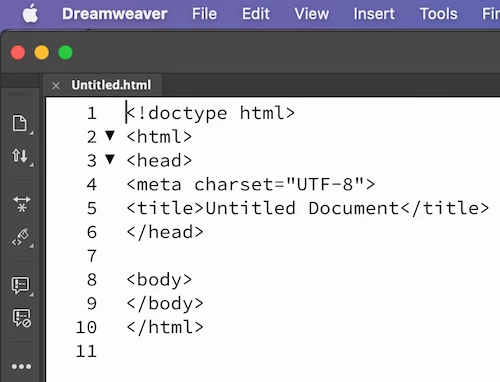
Using Dreamweaver 21.2   15523 build; on macOS Monteray 12;.2.1

Thanks

This topic has been closed for replies.
Correct answer Jon Fritz

It might be a font issue. Looks like others with the same basic problem have been able to fix it by switching the font used in code view to something else.

See if this post helps at all...

https://community.adobe.com/t5/dreamweaver-discussions/my-default-code-theme-color-is-very-weird-can-anyone-tell-me-how-to-fix-it/td-p/12742135


5 replies

Nayan_Kankariya
Community Manager
Community Manager
February 16, 2022

Hi Stephen,


Thanks for writing to us. We see the below work-around resolves the coloring in code view, can you please confirm if the same works on your machine.


1. Is this behavior observed after updating macOS version on your machine. If yes, please let us know from which macOS version did you update your machine to macOS Montery 12.2.1.

2. Is this behavior observed from updating Dw to 21.2. If yes, please provide the base Dw version from which you have updated Dw to 21.2.


We are unable to recreate the behavior internally and hence the above info will help us in further investigating the issue at our end.


Workaround:

1. Launch Dw and Invoke Preferences dialog under Dreamweaver menu
2. Switch to Fonts section
3. Change the code view font to something else (Times New Roman etc)
4. Click on Apply button and close Preferences dialog


Please refer to the below screenshot for locating Code view font under Fonts section in Preferences dialog.


Have a pleasant day!


Regards,

Nayan

Dreamweaver Team

Stephen Hallett
Participating Frequently
February 16, 2022

Nayan - many thanks, yes that has fixed it. Changing the font to other than Source Code Pro fixes this problem and code is coloured by syntax. Thanks!

Jon Fritz
Community Expert
Jon FritzCommunity ExpertCorrect answer
Community Expert
February 16, 2022

It might be a font issue. Looks like others with the same basic problem have been able to fix it by switching the font used in code view to something else.

See if this post helps at all...

https://community.adobe.com/t5/dreamweaver-discussions/my-default-code-theme-color-is-very-weird-can-anyone-tell-me-how-to-fix-it/td-p/12742135


Stephen Hallett
Participating Frequently
February 16, 2022

Oh wow - yes that fixed it! Crazy. Its been driving me up the wall. I changed the font to Times New Roman and has sprung into colour. I changed to other fonts (eg Arial, Courier New) and code is all in colour. I then tested by switching back to font 'Source Code Pro' and it goes back to black text. So it's the font!!! Thanks for your advice!


Community Expert
February 16, 2022

Youps, sorry I just realised that you was on MacOs, so keys are Cmd + Opt + Shift

Stephen Hallett
Participating Frequently
February 16, 2022

Many thanks for your response Lena. I have tried a few things and gathered response to Nancy's post here

Community Expert
February 16, 2022

Have you try reseting preferences ? https://helpx.adobe.com/dreamweaver/kb/restore-preferences-dreamweaver.html

In short, launch Dreamweaver by clicking on its icon while maintaining Win + Ctrl + Shift keys down.

Nancy OShea
Community Expert
Community Expert
February 16, 2022

Syntax highlighting is controled by your Code Theme.

Which Code Theme are you using?  See screenshot. 


Nancy O'Shea— Product User & Community Expert
Stephen Hallett
Participating Frequently
February 16, 2022

Nancy, and Lena, many thanks for your responses, I have tried a few things on the Mac version of DW:

1. Reset preferences: Holding down Cmd + Opt + Shift and starting DW bought up the reset dialogue. I reset OK, the next choice was to upload or download saved preferences from cloud. I selected 'upload' to avoid existing issues. Unfortunately the problem persisted

2. Tried a seperate DW installation on Windows, colour coding all works fine. So on Mac completely uninstalled and then reinstalled DW. Told it again to 'upload' not 'Download' preferences to cloud. Unfortunately problem persists.

I am just using the default 'Classic' code theme. I have 'Syntax Coloring' turned on, and file is recognised as an HTML file.

Not sure what next step is...