martinv44029552
Inspiring
March 7, 2017
Answered

Considering purchasing Adobe Dreamweaver.

  • March 7, 2017
  • 4 replies
  • 4733 views

I have been considering purchasing/downloading the latest version of Dreamweaver, as I wish to build, design and manage my own website.

But as a complete novice, I'm wondering whether it may be too technical and complicated for my poor little brain and whether I might benefit from a simpler programme?

I realise a lot depends on what I require but my current website martinvallis.com not designed by me, is all that I require. Nothing fancy.

Any thoughts or suggestions appreciated.

Thanks

    This topic has been closed for replies.
    Correct answer Nancy OShea

    Hello Melissa

    That sounds very useful and my likely first port of call.

    I'm just fiddling with my free download before it runs out and i purchase the real deal and get down to work, with the courses and tutorials etc.

    But, hopefully the last question and then you can all get back to whatever you're doing, without the annoyance of the newbie<(:-)>

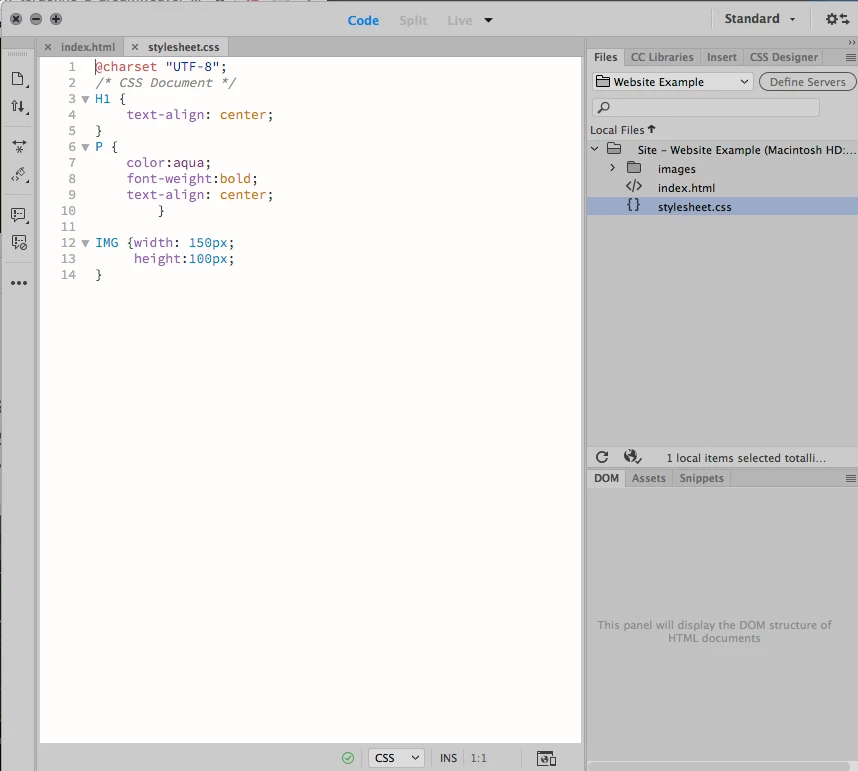
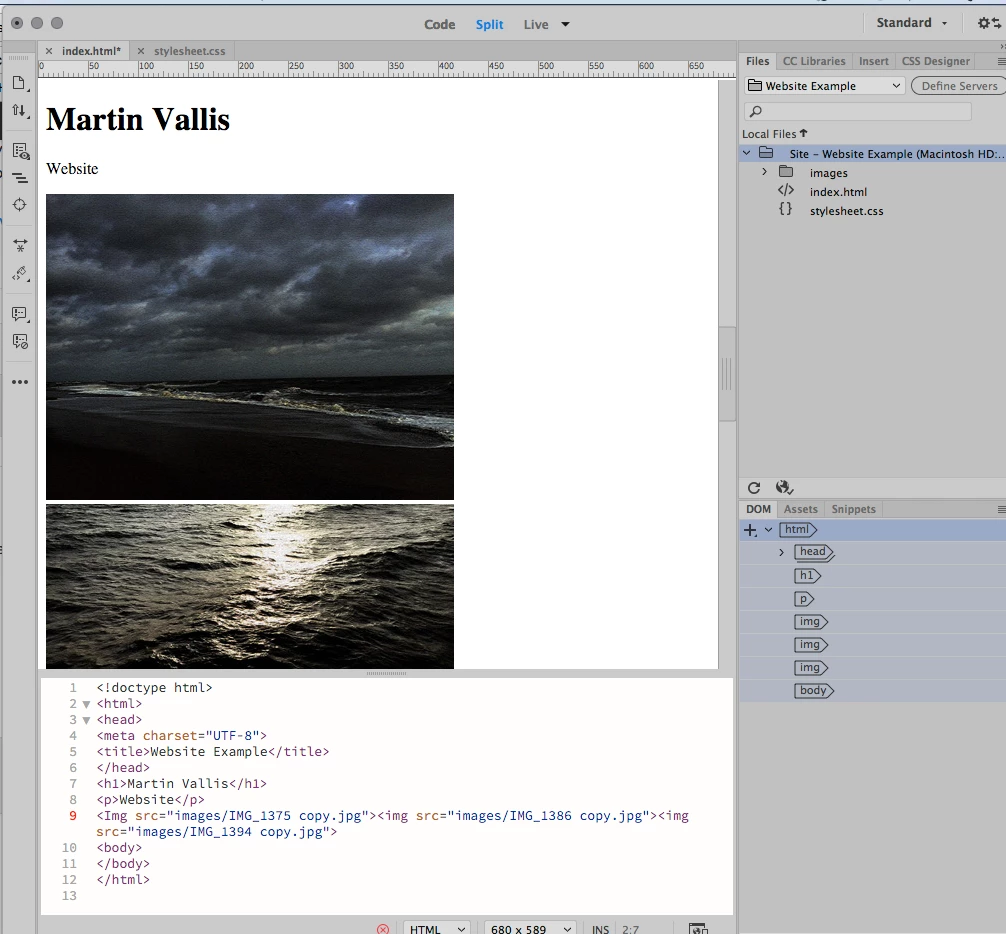
    As you can see from the images attached, I believe I've set up my components correctly?

    How do I apply my css stylesheet so that the information within, reflects in actuality, i.e. so that the text align, colors etc., appear?

    What important ingredient have I left out<(:-(>

    Many Thanks in advance


    Inside the <head> tag of your HTML document, add this line of code.

    <link rel="stylesheet" type="text/css" href="stylsheet.css">

    Where stylesheet.css is in your root folder the same level as index.html.

    Now, if your CSS file is saved inside a sub-folder, you must prepend the path with your folder name.

    <link rel="stylesheet" type="text/css" href="foldername/stylsheet.css">

    Save and view in Live View.

    Nancy

    4 replies

    rayek.elfin
    Legend
    March 14, 2017

    I'm just playing the devil's advocate here, but...

    Since you are teaching yourself html and css / basic web page management, I'd say you'd be just as well off by downloading and installing the free Brackets instead of opting for an expensive long-term Dreamweaver sub. Brackets' core is actually built into Dreamweaver nowadays, and, as many here will probably tell you, most experienced DW users avoid the visual tools anyway, and prefer the coding view (for many reasons - too many to get into now).

    With Brackets and a browser you have more than enough to create your webpages. Well, you'd need a FTP app or use Brackets' FTP extension to connect to your webspace and manage files online.

    And all completely free. I'd say: save your money. One more potential issue is that with a subscription you lose access to DW when you stop paying or can no longer afford the Adobe rent. That is not the case with Brackets. And the coding environment is of the same high-level quality - more perhaps, because Brackets supports all community-made extensions, while DW does not.

    Just saying.

    Nancy OShea
    Community Expert
    Community Expert
    March 14, 2017

    I used Brackets alongside Dreamweaver for a few years prior to CC 2017.  I liked it's code engine a lot.   But DW's excellent file management features kept me coming back to DW. And as you say, Brackets has no Design/Live View editing.  It's mainly for coders who like looking at code. 

    Nancy

    Nancy O'Shea— Product User & Community Expert
    rayek.elfin
    Legend
    March 14, 2017

    Well, file management can be improved with extensions:

    - documents toolbar

    - Brackets Icons

    - Brackets Todo

    - sFTPUpload

    For coding:

    - Beautify

    - autoprefixer (saves a lot of effort, time, and energy)

    - minimap

    - code folding

    And many more: TOP-100 extensions - Brackets Extensions

    Another option is Pinegrow with Atom: live editable preview while you code and vice versa.

    Anyway, just providing options - the OP mentioned he prefers to purchase a one-time license instead of a sub.

    melissapiccone
    Community Expert
    Community Expert
    March 7, 2017

    Take a class! I teach DW to complete beginners. We start with HTML and CSS. It's not DW that is complicated, it's CSS. And, osgood, DW is mobile friendly, creating a custom page from scratch or using a bootstrap teplate.

    Dreamweaver is not an app you just start using - unless you are comfortable with HTML & CSS.

    Melissa Piccone | Adobe Trainer | Online Courses Author | Fine Artist
    melissapiccone
    Community Expert
    Community Expert
    March 7, 2017

    osgood - I'm sure I'm the first person in history to misunderstand a comment, but thanks for letting me know my time isn't valuable because I post stupid answers - I'm happy that you understand everything ever written in the forums.

    Melissa Piccone | Adobe Trainer | Online Courses Author | Fine Artist
    Legend
    March 7, 2017

    melissapiccone  wrote

    osgood - I'm sure I'm the first person in history to misunderstand a comment, but thanks for letting me know my time isn't valuable because I post stupid answers - I'm happy that you understand everything ever written in the forums.

    At least I take time to know whos who in the forum and what their experience is. Telling me DW is mobile friendly...........bad mistake.

    Jon Fritz
    Community Expert
    Community Expert
    March 7, 2017

    If you've got some time to work through a few tutorials on html and css and then DW, you could probably modify that site with DW pretty easily.

    Without understanding html and css though, it would be rough. Luckily they're very simple concepts to get the basics under your belt.

    http://www.w3schools.com/html
    http://www.w3schools.com/css

    Define a site in DW  (absolute must to understand)

    Adobe Dreamweaver Learn & Support

    Muse is easier for the non-coding designer, but the code it generates is much more difficult to modify later. Once your site is in Muse, it should probably never leave.

    Legend
    March 7, 2017

    https://forums.adobe.com/people/Jon+Fritz+II  wrote

    If you've got some time to work through a few tutorials on html and css and then DW, you could probably modify that site with DW pretty easily.

    It's not hugely mobile friendly. OP says they wish to build, design and manage their own site so I assume they are thinking of a complete upgrade, with minimalist styling in mind.

    Legend
    March 7, 2017

    martinv44029552  wrote

    I have been considering purchasing/downloading the latest version of Dreamweaver, as I wish to build, design and manage my own website.

    But as a complete novice, I'm wondering whether it may be too technical and complicated for my poor little brain and whether I might benefit from a simpler programme?

    I realise a lot depends on what I require but my current website martinvallis.com not designed by me, is all that I require. Nothing fancy.

    Any thoughts or suggestions appreciated.

    Thanks
    If you don't know html and css its probably going to be hard going to work with the program.

    Small world, I was at Medway College of Design from 1975 - 1979.

    It might be worth investgation Adobe Muse if you want to start a fresh, that's more of a point, drag and click approach.

    martinv44029552
    Inspiring
    March 7, 2017

    Hello osgood (not peter,by any chance?)

    Thanks for your response.

    It truly is a small world, were you studying photography or something else, would we have run across each other?

    I've actually got the time to learn HTML and CSS, providing, as I've said, it's not too technical?

    I'm not that computer literate or geeky  , er... no disrespect to those that are, i take my hat off to you.

    I'll check out Adobe Muse.

    Legend
    March 7, 2017

    martinv44029552  wrote

    Hello osgood (not peter,by any chance?)

    Thanks for your response.

    It truly is a small world, were you studying photography or something else, would we have run across each other?

    I was in graphic design, the floor below photography. If I remember rightly photography was on the top floor, only went up there on a few occasions to borrow a camera. Oh my I went back a few years ago, the inside of the building is unrecognisable. I believe Dave Watson was principle at the time.

    I used to play a lot of table tennis in the common room, and was pretty good at the bar football, that's mostly where you would be able to find me, or playing football on Jacksons field.

    'Peter' was my hero at the time, I'm a Chelsea supporter hence the forum name....... osgood.