


Participant
November 5, 2016
解決済み

Dreamweaver 2017 - what happened to Find & Replace window?

  • November 5, 2016
  • 返信数 29.
  • 37255 ビュー

Hello,

First, I apologize if I I've overlooked something, however I can't get the new Find & Replace window working as in DW 2015.

This is the new Find and Replace window:
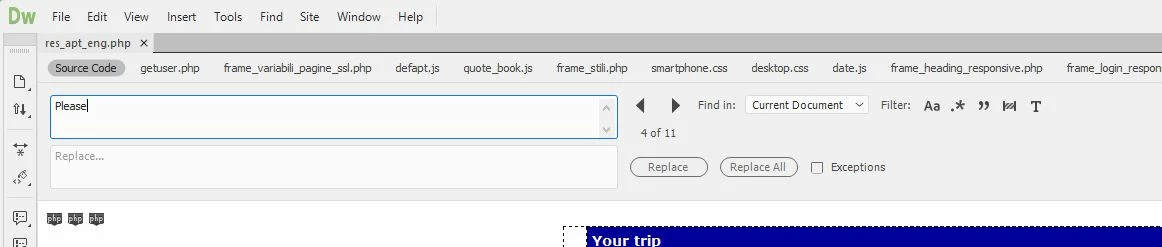
FIRST QUESTION:

Where is the "Find All" button? There are many circumstances for which I really need to get a list of the occurrences found, even when searching within the current document only (for proper work-flow, it's not enough to just browse back and forth using the two arrows). As displayed below, the search result window remains totally empty, even if there are 11 occurrences found:

SECOND QUESTION:

I haven't found any way to undock the Find & Replace window, but it can be displayed only on top of the current document, taking lot of space. I really need to undock the Find and Replace window, and to drag it on a secondary monitor, to maximize editing space. This was perfectly possible in DW 2015, as displayed below:
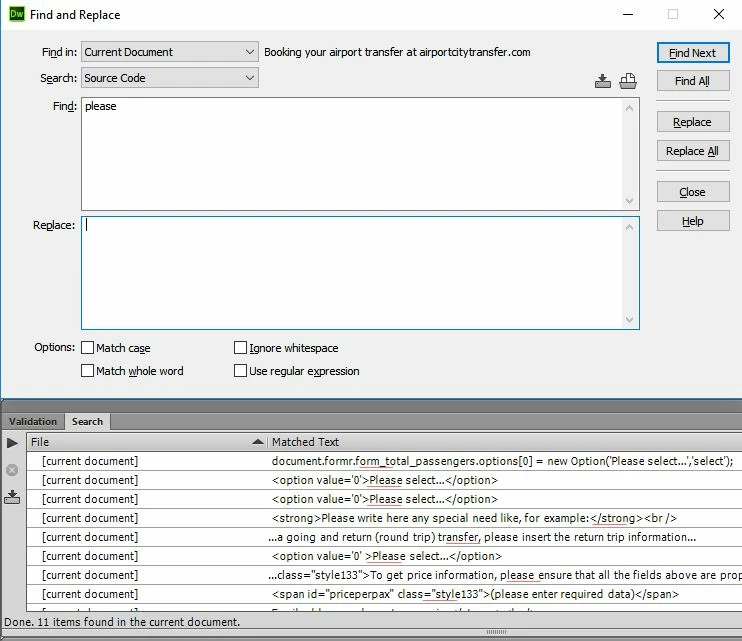
Please help!

このトピックへの返信は締め切られました。
解決に役立った回答 Preran

Actually I installed KomodoEdit because I had some urgent work I needed to do and I'd already lost 40 minutes on this Today I have a bit more time on my hands and so I'm going to look into it in more detail. I will probably start there, thanks for the link.


Hi everyone,

UPDATE: Feature changes to Find and replace will be available later in 2017. The latest version has some critical bug fixes.

See Dreamweaver 2017.0.1 is now live  for more info.

Thanks,

Preran

返信数 29

Known Participant
November 1, 2017

It is 10-31-2017.  I just reverted from 2018 to 2015.  The same problems are in 2018 as mentioned above.

Jon Fritz
Community Expert
Community Expert
November 1, 2017

https://forums.adobe.com/people/Joe+Bigler  wrote

It is 10-31-2017.  I just reverted from 2018 to 2015.  The same problems are in 2018 as mentioned above.

They aren't "problems" anymore, now they're "features".

This is just the way it works now: Two separate find & replace tools. All of the options except for saving or loading queries are available, in different locations, with some being closed, collapsed, or out of view by default.

Known Participant
November 1, 2017

You are correct.  In fact, you can still save and load queries.  If you click on the circled ? button in the lower left corner, it will take you to

Find and replace text, tags, and attributes

On the right side are links such as

It looks like some of the features are hidden by default, but you can make them active by making changes to the registry or preferences on a MAC.

Participant
August 17, 2017

I have a question. Why, in the name of all that is good and just, did you change it in the first place?! The find/replace feature was perfect in CS6. Now it's this fragmented thing that doesn't let you search in selected text, can't use regular expressions, can't dock, and so on.

This just blows my mind. Why take something that was great and make it unusable?

Jon Fritz
Community Expert
Community Expert
August 17, 2017

I fully agree, it is fragmented and because of that, harder to use. In my opinion there was no reason to change a very familiar tool in the first place. Then to change it "back" to what's there now was silly, however, as far as I have seen, it's all there...

Find in Selected Text: Hit Ctrl + F then the odd "martini glass with check" icon to make sure "Find in Selected Text" is checked


Regular Expressions: Same as above (in either Ctrl + Shift + F or Ctrl + F) and check the box for Use Regular Expression

arielcar
Participant
July 26, 2017

Select Find > Find and Replace in Files or press Ctrl + Shift + F (on Windows), or Cmd + Shift + F (on Mac) to open the Find and Replace dialog box.

Participant
June 2, 2017

OK, so when is the find/replace panel going to be fixed?

I need the sitewide search to do my job!!

WTH!!

Nancy OShea
Community Expert
Community Expert
June 2, 2017

What do you mean ?

I'm can search my local site folder, no problem.

Do you have all the latest updates?

Nancy O'Shea— Product User & Community Expert
Participant
June 2, 2017

I do have the latest updates.

It looks like it is hidden under ctrl+shift+f.

=( Soooo annoying!

Thanks!

onuru44673800
Participant
April 25, 2017

I find "Find All" button. But I could not find the others

Jon Fritz
Community Expert
Community Expert
April 25, 2017

When you hit Ctrl + Shift + F the small arrows, just to the left of the Replace button, are used to find the next or previous matches.

Participating Frequently
April 25, 2017

Well, the news is that with Dreamweaver 2017.1, the Find and Replace window has resurrected, but is moved to Ctrl+Shift+F.

Jon Fritz
Community Expert
Community Expert
April 25, 2017

It's also worth mentioning the Find in Tag is also back. it's in the same Ctrl + Shift +F (or under Find > Find & Replace in Files option) under the Advanced tab.

Jon Fritz
Community Expert
Community Expert
April 4, 2017

Not sure what you mean by destroying Copy/Paste, it has always worked fine for me under W7 and W10.

The bold and italic buttons are in the Properties Inspector (at the bottom of the window, if you place it there). Make sure you have the HTML button on the left selected, just under the Properties window's tab. Since they add the html <strong> and <em> tags they aren't available if you have the CSS button selected...

I do agree, the F&R tool was damaged in major ways in CC2017. I still use CC 2015 for that. If you're a paid subscriber, all Cloud versions can be installed on the same machines at the same time under a single subscription, they just won't run at the same time. To get CC2015 installed (until Adobe, hopefully, fixes the problem)...

http://blogs.adobe.com/adobecare/2015/06/16/how-to-find-and-install-previous-version-of-adobe-apps-in-cc-2015/

Participating Frequently
April 2, 2017

I tried DW 2017 .01 to check how the fixes advanced... but no, Find and Replace looks so horrible as before. Returning to 2015 version. It is incredible that since November they still didn't fix the Find and Replace feature by adding all the regex functions as in the previous 2015 version. And it is still fixed and I cannot move it! Anybody having the idea of reforming Find and Replace in this way in the 2017 version should be fired. Months of work spoiled! Thanks God we have the 2015 version!

Guru and Founder of Parabhairavayoga
Nancy OShea
Community Expert
Community Expert
April 2, 2017

The beauty of CC is you can have multiple versions on your system.  

I mainly work in 2017 unless I need 2015 to search for special tags.  For all other tasks, CC 2017 works fine for me.

Nancy

Nancy O'Shea— Product User & Community Expert
john stephanites
Known Participant
April 2, 2017

Hi Nancy do you use the live reload? How does that work for you? I have issues with it a lot. Is there a way to reset it

Inspiring
February 16, 2017

I just  switched over from CC 2015. Generally performance is better  -- CC 2015 constantly choked on my venerable laptop.

But the loss of the Find All function is just insane. How does that just disappear after being part of the software for 10 years? "Ooops. We forgot the seatbelts."

lynnebrunton
Participant
February 16, 2017

Yeah, I was using 2017 but I've gone back to 2015 because of many reasons:

  • You have to have a page open to use the Find function.
  • You can't move the Find window to float away from the app.
  • Only Find All works for me in the current page, and I can't find individual instances.

And a number of other things.

Participating Frequently
February 17, 2017

For those who keep trying to adapt to CC 2017 instead of reverting, I just thought I'd repeat that while the "Find All" button is indeed missing and missed when you set the search scope to Open Documents, you can get around it by changing the search scope. If you search with "Find All" in "Open Documents" it is usually fast enough and the search results are by default sorted by file. If that search result is too cluttered, you can instead use "Selected Text" as search scope. You'll have to click the page and press ctrl+A to select the entire file, and it demonstrates that the code coloring for selected text is inferior, but it works. That's my backup plan, I use "Open Documents" mostly now.

As for the non-floatable Find panel, since I floated the search result, I find that the panel input field isn't always clickable any more; and I have to press Ctrl+F to get the input field selected sometimes. But that maybe only after the program get partly swapped out to disk; 4GB doesn't appear to be enough any more, between Windows 10, Dreamweaver and my open browsers. 

I'm pretty sure we'll get the "Find All" button back in next year's skin, the automagic skiparound idea clearly didn't hold up to real world usage. Let's not forget that the 2017 version brought a major code editor swap, and the 2018 version will be the first mature version of the Brackets integration. I am more concerned that my site specific code complete doesn't work any more since that doesn't seem to be as common a problem.

Participating Frequently
February 9, 2017

Holy moly. We went to a CMS so I haven't been in DW recently. Until today. It feels disastrous. I would never, ever recommend it based on my experience today.

It's gotten to this: I pasted the HTML into MICROSOFT WORD, cleared all formatting and round tripped it back to DW to strip tags. I would never ever have thought that pasting from word would be my usable workaround for getting rid of styles! smh

Anyway this was my best-working solution. Maybe it'll help someone.