


Participant
November 5, 2016
Answered

Dreamweaver 2017 - what happened to Find & Replace window?

  • November 5, 2016
  • 29 replies
  • 37380 views

Hello,

First, I apologize if I I've overlooked something, however I can't get the new Find & Replace window working as in DW 2015.

This is the new Find and Replace window:
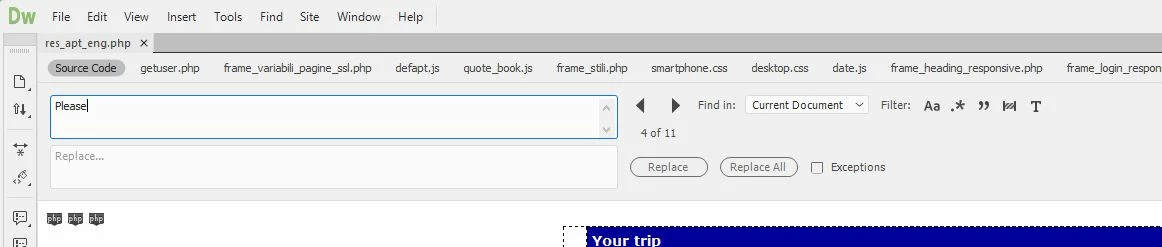
FIRST QUESTION:

Where is the "Find All" button? There are many circumstances for which I really need to get a list of the occurrences found, even when searching within the current document only (for proper work-flow, it's not enough to just browse back and forth using the two arrows). As displayed below, the search result window remains totally empty, even if there are 11 occurrences found:

SECOND QUESTION:

I haven't found any way to undock the Find & Replace window, but it can be displayed only on top of the current document, taking lot of space. I really need to undock the Find and Replace window, and to drag it on a secondary monitor, to maximize editing space. This was perfectly possible in DW 2015, as displayed below:
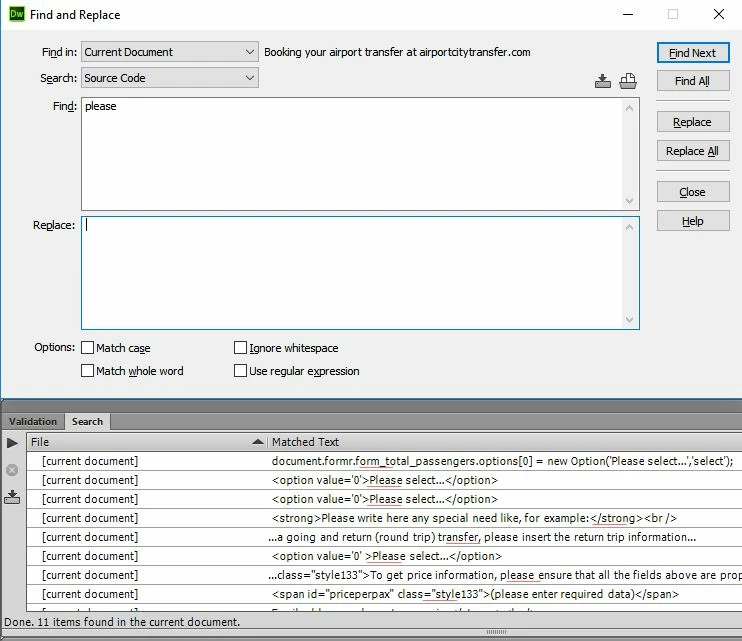
Please help!

This topic has been closed for replies.
Correct answer Preran

Actually I installed KomodoEdit because I had some urgent work I needed to do and I'd already lost 40 minutes on this Today I have a bit more time on my hands and so I'm going to look into it in more detail. I will probably start there, thanks for the link.


Hi everyone,

UPDATE: Feature changes to Find and replace will be available later in 2017. The latest version has some critical bug fixes.

See Dreamweaver 2017.0.1 is now live  for more info.

Thanks,

Preran

29 replies

snowblind
Participant
February 8, 2017

Now stuck with the latest version of dreamweaver (bosses orders) and the search is annoying.

We have found a work around for getting find all in current document though!

1. Copy your search text into the replace box

2. Click replace all

3. Dreamweaver will replace all your search terms with the same text, and display it in the bottom box. You can then sort and click the results in the bottom box much like a find all.

Stupid work around i know, but at least it kind of works.

Participating Frequently
February 8, 2017

That's a kinda destructive workaround. But you're in luck, cause I have an alternative way for you to achieve Find All in the current document. Less unexpected, destructive use, may not be faster, but is logical. Also, I expect your version jumps the document view to the last replaced location, where my suggestions let you stay where you were, which in my opinion is important.

1: Change search scope from "Current Document" to "Selected Text"

2: Copy your search text into the "Find..." box.

3: Click the current document and select the entire document with Ctrl+A.

4: Voila, the Find All button now searches your current documents entire text.

There's also a third workaround to gain the functionality, but it is only practical for small/orderly sites:

1: Change the search scope from "Current Document" to "Selected Files in Site"

2: Locate the current document in "Local Files", and select it.

3: Copy your search text into the "Find..." box.

4: Voila, the Find All button now searches your selected, current document.

I don't know who came up with this autojump idea, but it wasn't as clever as they'd think. We do not only search when we want to navigate, and we do not want to iterate all the search results, we want to go directly to the right one. I would much rather have line numbers in the search result. And while I am in wish mode, a preview popup when you point on a line in the search result. They made the UI faster for the wrong user cases, and clumbsy for developers.

john stephanites
Known Participant
February 2, 2017

I still don't use Dw. Love it or the direction and idea. The live reload is to wonky and I just can't get it working right or I should say consistently working. I use Cloud 9 and Visual Studio Code/Terminal mostly now. I check in on DW when updates hit and when they get it together I'll be back, maybe. I consider DW to be a freebie thrown in with Photoshop/Illustrator and Bridge and Animate CC. I couldn't see myself pay Adobe that much a month just for DW, way to many free options out there. Damn good editors and ftp clients the Github app or Source Tree and good to go for me. All free! Problem is web dev is going a different way these days and if they don't change and go back to 1985 like everyone wants then they will lose. DW as it stands now is still way behind and have a long way to go to be relevant again so if you don't like change hold on to your hat I think it's gonna get bumpy!

john stephanites
Known Participant
February 1, 2017

  I just gotta say as I read all the complaints about loss of time and money. I find it hard to believe that as a "Pro" you have only one option for editing. I mean I have three or four always and if one is updated and buggy I move over to my next favorite. If I get bored using one I might switch to a different one. My point is that I can't believe that DW is your only option and for the important things you are not using source control. Once shit happens you don't make a move and use something stable until the other is worked out is beyond me. I know there is that initial time wasted finding out things went bad but enough to shutter the doors I would hope not. If a major update comes out and you update without knowing or investigating if it will work for your business before you put it into production shame on you. Have a great day!

Participant
February 1, 2017

yeah you got me I am not closing doors yet, but sorry I pay for a program that cost my company a great deal every month I do not expect to have to change every time they make an update. And no I cannot be behind all my employees at all time I have a small company and have a lot of work myself. Furthermore changing editing program is fine but really tedious when you work on a common project with your colleagues.

Anyway I guess you are right I should not expect that one company can deliver the product they are selling that is the attitude of today's world, nobody is responsible and if you get ****** by somebody it is your own fault.

have a nice day too, thanks.

Nancy OShea
Community Expert
Community Expert
February 2, 2017

Do whatever you like and works best for your workflow.

Presently I have 2 versions of DW, PS and AI installed.  I also have Brackets code editor but I rarely use it since DW 2017 came out in November.  In fact, I'm using CC 2017.1 right now on a production site with no major problems.  Maybe because I am fully adjusted to how it works now.   It takes time and for some folks change is really hard.  So don't make major upgrades until you have some free time to devote to it.

Nancy

Nancy O'Shea— Product User & Community Expert
Participant
January 31, 2017

only a few bugs? really? this is a catastrophe, I have lost hours of production because of this big mess up. If I had the mean and the time I should sew Adobe for all what I can, but I am sure that in their closes they have a point that protect them for the case they deliver us C..P, and they really did.

I do not want to add to the endless list of your complaints guy, but I needed to have this out of my chest. Really I hope that the guys that did the program "update" (not sure we can call it that) will get fired after they clean up the mess they have done. I am sorry for them if they have families and responsibilities but I also have and because of them I loose money and clients and my employees may loose their jobs because of those imbeciles.

This is suppose to be a program for developers? really in what world. Please correct this big mess and if you cant then make an automatic "upgrade" to CC 2015 for those who wants to and yes this time upgrade is not a mistake I did write correctly.

Nancy OShea
Community Expert
Community Expert
January 31, 2017

<...make an automatic "upgrade" to CC 2015...>

You can get it yourself.  Log-in to your CC Desktop app.

Nancy O'Shea— Product User & Community Expert
Participant
February 1, 2017

what about the complaints of peoples that have more problems when using this method to go back to CC2015 ? do I need to use more time with that too?

Inspiring
December 19, 2016

I just updated. Unfortunately I don't see any difference to the find/replace feature

Preran
Legend
December 19, 2016

I will check with the team, but from what I understand, I think the bugs with Find and Replace have been taken care of in this release. Changes to features will probably happen later. Let me get back to you with more info after I have it.

Thanks,

Preran

Inspiring
December 19, 2016

Thanks Preran! I'm mostly hoping to be able to save queries and load them. It's possible some of the other bugs mentioned have been fixed.

Inspiring
December 6, 2016

I really wish I'd read this post before asking the IT guy at work to upgrade all my Adobe software. I use regular expressions that are saved a presets....now there is no longer an option to open those .dwr files. I don't even remember what those regex look like. Now I need to go into my HTML files and manually delete stuff line for line. Come on, this is Adobe not Microsoft. Don't replace invaluable features with a "sleek" new look.

Nancy OShea
Community Expert
Community Expert
December 6, 2016

I can see where not having a way to access your RegEx presets could be a deal breaker. 

Did you log this as a bug yet?  Help menu > Submit Bug/Feature Request.

In the meantime, you can revert back to 2015.  If your IT guy removed it when he installed the 2017 update, you can still get it from CC Desktop App under APPS > ALL APPS > PREVIOUS VERSIONS.

Nancy

Nancy O'Shea— Product User & Community Expert
Participant
November 30, 2016

This change to the find and replace interface is SO frustrating! Having to set up far-too-complicated searches and then review results in a different place makes me want to scream. Adobe, please restore the 2015 find and replace or at least make it optional in the next update.

Legend
November 30, 2016

They won't change it - we 're stuck with it just like the crappy LIve View ... We're sticking with DW CC 2015 for now but are going to review our workflow and what we can do to get away from Adobe. It was forced on us with the Macromedia takeover years ago unfortunately and hasn't been good news pretty much from day 1 when Adobe starting removing features and introducing new crappy ones.

Paul-M - Community Expert
Known Participant
November 30, 2016

I agree, now running 2015. When I have time I will find another editor and save myself a lot of money. All I want is a great text editor.

Participating Frequently
November 21, 2016

I'm not sure why others aren't getting a Search results panel. When I search current document only and do a find all or replace all, the Search panel opens and I see all matched lines. This happens whether I have one file open or several. That said, it is an annoyance that I can't do Ctrl-F directly from a folder in the Files panel and I will file that as a bug.

Webmaster San Francisco Municipal Transportation Agency (SFMTA)
john stephanites
Known Participant
November 16, 2016

I see all these posts on this thread of how bad DW is and I just don't see. I'm lucky I guess. It works just as good as any other comparable program. With a few minor tweaks it should be good which if I remember correctly the blog had said they were working on it. I think it's way better than it was but have yet to use the designer panel. My biggest issue was multiple cursors and better shortcuts along with live reload. They did that and I'm happy. I like the editing CSS without going to the file. What else is there? The search thing seems to be a big thing for people but been ok so far for me but I don't refactor a lot. One thing I thought weird was getting rid of the beta site. Good luck everyone.

Known Participant
November 16, 2016
I see all these posts on this thread of how bad DW is and I just don't see. I'm lucky I guess.

Good luck to you too... really!

CC 2017 - HTML entities in js files being converted when saved

Participant
November 16, 2016

Hi all,

I struggled for a while with the find and replace function. It didn't want to search in my source code. The solution of this particular problem doesn't seem that hard. Click on the 'T' in the right top of your find and replace box and it searches all your source code too. For me the description 'Search text only' wasn't that obvious to deselect. Source code is text only isn't it?

The black box around 'Aa' must not show around the 'T'.

My overall experience of this new version of DW is not that bad. Adding more color schemes to DW seems like a better solution then changing them totally, but that's a minor inconvenience.

Bye,

Steven

Korkola_Design
Participant
November 14, 2016

I'm a long-time DW user. I mainly use it as a code editor because I like the Site Management, Find/Replace and FTP features. Over the years, I've tried other code editors (i.e. Atom, Sublime, Coda), but I always came back to DW because I liked the way these features worked. I had high hopes for DW 2017 when I heard about new features like a modern design, shortcuts and auto-compiliing built in. Unfortunately, it looks like they've messed up some of the tried-and-true core features in the process.

Losing the Find All button was a huge mistake. Having to open a file to use Find / Replace is annoying. The Replace button doesn't replace-and-find-next like it used to. It jumps back to the first result after each replace which is infuriating. Also, why not build in the flexibility to undock the Find / Replace button if the user prefers?

Apparently, I'm not the only one with gripes about these changes. I really hope Adobe is listening to the DW user base or they risk losing it to the ever-improving alternatives available.

Looks like it's back to DW 2015 for the time being.

Known Participant
November 14, 2016

I posted a number of things last week. I got very frustrated so I just migrated back to an older version.

I have been monitoring comments and I agree, we should not shoot the people on here trying to help. If I did, my apologies.

That said, until it is better, I will use the old version. I use DW as an editor, not a WYSIWYG tool, live view or anything else.

1. Creative Cloud 'almost' forces me to upgrade and removes the older versions.

2. I want AT LEAST the same. If I need to set parameters to get the same, the parameters need to be there, with an FAQ.

Why not make the upgrades more 'optional'? This is not the first time that I have felt this way and when I get time I will use some of it to review other editors for functionality. Creative Cloud should help, not corral me into making bad decisions when I am busy.

Thanks

Nancy OShea
Community Expert
Community Expert
November 14, 2016
Why not make the upgrades more 'optional'?

They are 100% optional.  Nobody is forcing you to install updates/upgrades until you're ready for it.

  • read the release notes,
  • ensure you have nothing urgent on your plate,
  • carve out some spare time to explore the new UI.

If you can't afford a disruption in your workflow,  don't click the Update buttons.

Nancy O.

Nancy O'Shea— Product User & Community Expert