


Participant
November 5, 2016
Answered

Dreamweaver 2017 - what happened to Find & Replace window?

  • November 5, 2016
  • 29 replies
  • 37380 views

Hello,

First, I apologize if I I've overlooked something, however I can't get the new Find & Replace window working as in DW 2015.

This is the new Find and Replace window:
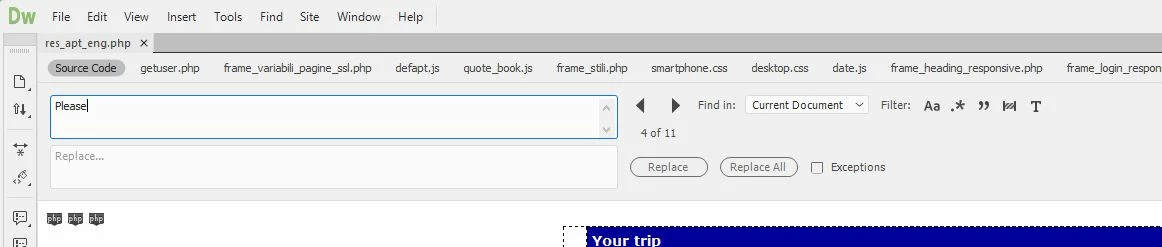
FIRST QUESTION:

Where is the "Find All" button? There are many circumstances for which I really need to get a list of the occurrences found, even when searching within the current document only (for proper work-flow, it's not enough to just browse back and forth using the two arrows). As displayed below, the search result window remains totally empty, even if there are 11 occurrences found:

SECOND QUESTION:

I haven't found any way to undock the Find & Replace window, but it can be displayed only on top of the current document, taking lot of space. I really need to undock the Find and Replace window, and to drag it on a secondary monitor, to maximize editing space. This was perfectly possible in DW 2015, as displayed below:
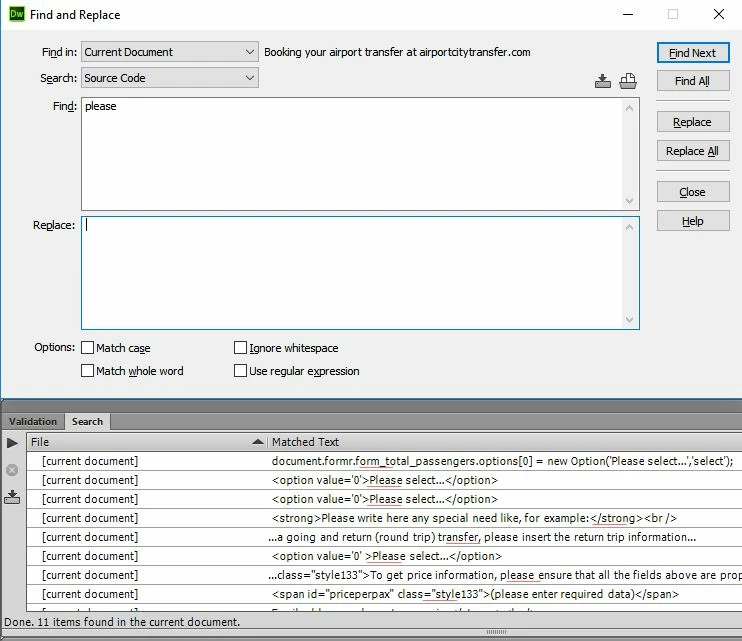
Please help!

This topic has been closed for replies.
Correct answer Preran

Actually I installed KomodoEdit because I had some urgent work I needed to do and I'd already lost 40 minutes on this Today I have a bit more time on my hands and so I'm going to look into it in more detail. I will probably start there, thanks for the link.


Hi everyone,

UPDATE: Feature changes to Find and replace will be available later in 2017. The latest version has some critical bug fixes.

See Dreamweaver 2017.0.1 is now live  for more info.

Thanks,

Preran

29 replies

Participant
November 14, 2016

Seems like I am not the only one who is very frustrated by this new search and replace disaster. Please fix this!

This example below is the exact way find and replace should be working and should never be changed, also it's possible to drag the window and find trough files without the need of a file to be open.. In the new version I need to have a file open to use the find and replace which is so frustrating.

john stephanites
Known Participant
November 13, 2016

to me DW is the best it's ever been. If you Don't think so use something else. It's not the best editor out there never has been but it comes with CC and integrates the best. There are updates to come and a beta that one can get involved with and push for there needs. As far as being more like Brackets I don't think that's a good idea. Brackets is brittle at best and doesn't work very well at all. Very similar to Atom. An editor I really wanted to love but it wouldn't allow it cuz it crashes so much. I love the new look and feel of DW but the  jumping thing from top to bottom it Still does. in the end that will make me stop using it again for Code Studio which I don't want to use but I have to because it works like they say it does and something DW should be more open to is extensions. Make it easy like Sublime VC Studio to write and install and people would. That would take some of the burden of and let you concentrate on bigger things. All on all I think it will be the shit. I have faith that they are close but I think they released it to early. There are companies out there selling extensions for a lot. Find out which ones they sell the most and put that functionality in. Problems solved.

Participating Frequently
November 13, 2016

Typical fanboy's praise leading no where except: If you don't think so,

use something else.

Why not better to say: If you don't think so, what do you need us to do to

improve your experience with our software. We are all ears!

That would be a better slogan.

On Mon, 14 Nov 2016 01:26:23 +0300, john stephanites

Guru and Founder of Parabhairavayoga
Nancy OShea
Community Expert
Community Expert
November 13, 2016
Why not better to say: If you don't think so, what do you need us to do to

improve your experience with our software. We are all ears!

That would be a better slogan.

But this is not the Adobe complaint desk.  This is a user-to-user forum. If you want to communicate with Adobe directly about CC 2017, use Help menu and Submit a Bug/Feature request.  They are listening.   In fact, I had a follow-up response from them today asking me to provide a screencast to help them see the problem I discovered.  Complaining to us is useless.  We're just product users like  you.

Nancy O'Shea— Product User & Community Expert
ConsoleGenRL
Known Participant
November 10, 2016

It's a pain I know but you CAN re-install DWCC 2015 and use that till they sort out this mess.

Alas unlike during the beta you cannot have DW CC 2015 and DW CC 2017 open concurrently.

Also the DW CC 2015 and DW CC 2017 desktop icons are identical unlike from the beta.

I pin them to my task bar in Windows 10 - DW CC 2015 on the left and DW CC 2017 on the right.

Still having "Toolbar" hiding menu bar issue (and it can't be dragged elsewhere either). Argh!

Taskbar:

BenPleysier
Community Expert
Community Expert
November 11, 2016

Try dragging from the very start of the bar, in the case below, by dragging the darker parts.

Wappler is the DMXzone-made Dreamweaver replacement and includes the best of their powerful extensions, as well as much more!
ConsoleGenRL
Known Participant
November 11, 2016

Bingo! You legend!

Persistance pays off!

ConsoleGenRL
Known Participant
November 10, 2016

I pleaded in the beta to make it more like DW CC 2015 but alas fell on deaf ears.

  1. you can't bring up the Find/Replace dialog unless  you have a document open. WTF?
  2. It is docked solid and can't be moved like it could in DW CC 2015 (even to another monitor if desired). WTF?
  3. CTRL+F to open the dialog. Loog for "Find All" just to the right of the first large text field.
Participating Frequently
November 10, 2016

Not sure who decided to mess up find/replace, I hope you fix it soon. I need to be able to replace the contents out of links. I have to hunt down every <a> tag now and highlight the contents. This was easy before. Don't fix things that don't need to be fixed please!

Participating Frequently
November 10, 2016

Completely agreed I cannot move to the latest version of DW because of

this missing tag find and replace feature.

Guru and Founder of Parabhairavayoga
mahakk20912952
Adobe Employee
Adobe Employee
November 8, 2016

Hi,

I hope below answers will be helpful:

Answer to 1st question: Where is the "Find All" button?

Find All button won't be present in when you have Find in selected as "Current document". Reason is DW automatically highlights all the matched occurrences with in current doc, so there is no point showing Find All button in case of Find in "Current Document". But you will see "Find All" button for rest of the options.

Same reason you are seeing search panel empty.

Answer to 2nd question:

I haven't found any way to undock the Find & Replace window, but it can be displayed only on top of the current document, taking lot of space.

In the new DW CC2017, Find and Replace is no longer a dialog but a panel,which is the reason you can't enjoy dialog flexibility.We will definitely take your point into consideration. Thanks for the feedback.

Participating Frequently
November 8, 2016

A panel... what a joke.

Guru and Founder of Parabhairavayoga
Known Participant
November 6, 2016

I found similar problems and then found this post.

Additionally, testing, "ignore white spaces" filter does not seem to work, it is easy to test..

Looks like 2017 only finds exact string matches even with the filter on.

Looking in the search results window, I see that each result includes multiple lines of text, making it very difficult to see which line has matched.

What is the bug reporting process?

Known Participant
November 6, 2016

Plus, in the default (black) theme, you cannot see which filters are on!

Participating Frequently
November 6, 2016

Yes, a disaster as you pointed out!

Guru and Founder of Parabhairavayoga
Nancy OShea
Community Expert
Community Expert
November 5, 2016

Yup.  It's messed up.  No more Specific Tag searches either.

Nancy O.

Nancy O'Shea— Product User & Community Expert
Participating Frequently
November 6, 2016

This is a serious problem for me who performs a lot of stripping out of code. It is a serious problem in my case. I won't use complicated regex formula every time I to find and replace tags, sorry.

If they removed this feature, I need to know how to return to the 2015 version. I will have to wait till they fix it or directly go on using the 2015 version forever. Stupid decision by the devs if they removed this very important feature.

Guru and Founder of Parabhairavayoga
john stephanites
Known Participant
November 6, 2016

There is a area in your Creative Cloud app on the desktop. I keep mine pinned in the menu bar on top (Mac). There is a drop down menu in the apps section which show previous versions that you have on your computer. If you do not have it set to automatically remove older versions they should be there.