
Participant
November 29, 2016
Answered

Dreamweaver CC 2017 process "node" high CPU usage

  • November 29, 2016
  • 28 replies
  • 45026 views

I have installed Dreamweaver CC 2017 on a Macbook Pro (i7, 16 GB RAM) and the process "node", which seems to be connected to Dreamwaver shows a 100 to 120% CPU usage all the time and my fan is running at high spped all the time. Has anyone a suggestion how this can be fixed? Thanks!
This topic has been closed for replies.
Correct answer mig15

Thanks Jon Fritz II that is an answer - though not ideal, it would solve the problem.

I think I have found an answer that works in the current version!

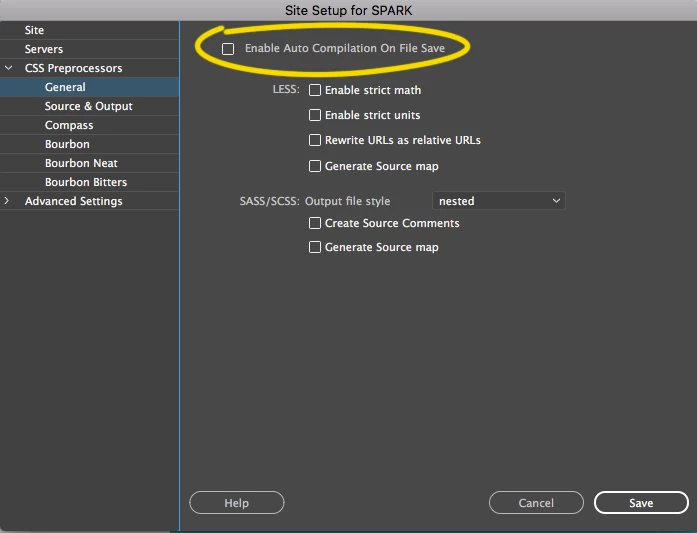
I switched off "Enable Auto Compilation On File Save" in the "CSS Preprocessors" section of the Site Management screen for the current site I'm working on - and it worked!!

When I switch it on, node goes to above 150% and when I switch it off the Dreamweaver node process(es) go to 0%.

I hope others have the same success.

28 replies

Participant
April 20, 2021

For Windows 7 users who can't update to the latest version (because it requires Windows 10), and who want to leave the option of auto-compile ENABLED.  Creatae a .bat file which runs:
tskill node
tskill ruby


Since this only seems to happen when I copy a large number of files into the project directory (after setting it up), Ruby/Node spawn 200+ tasks and that starts pushing the CPU to 100%, so the .bat file kills those processes and everything goes back to normal. Auto-compile still works on subsequent changes to SASS/SCSS files so this worked for me, although it's a pain to have to watch my CPU usage and kill those tasks when working on larger projects.

Legend
April 20, 2021

Are you using GIT?

Paul-M - Community Expert
Participant
March 21, 2023

Yes.

Participant
August 14, 2020

I found a solution that solved the problem of a high processor loading for my laptop with Windows 7 DW 20 - it turned out to be simple -> you need to create an account and/or sign-in
Help -> Sign-in.

Community Manager
February 5, 2019

Hi All,

We are happy to inform you that we have addressed this bug in our latest 19.0.1 release, which can be downloaded from Creative cloud.

Please give it a try and let us know if your issue is resolved.
Looking forward for your feedback!

Thanks
Kratika
Dreamweaver Team

barbrab
Known Participant
March 13, 2019

it's back with the latest update, and a whole new array of issues too.

Known Participant
November 14, 2018

So I just ended a 'chat' with Adobe and it was 'escalated' and no answer.

I did everything on this thread and I still have node spinning at 130+%

Mac os x Mojave 10.14.1 5k iMac and macbook pro (2017)  I had both the 2018 and 2019 versions of Dreamweaver causing the same thing. 2019 had a few other bugs, like the top menu bar being cut off and no preview window option when clicking on the bottom right icon. Have to go to file/ preview-live site to see it in a browser. 'live" inside of dreamweaver doesn't work at all. I can't scroll, or anything. It's useless.

I guess I can report back if I get an answer, but we will see. The "correct answer' is most certainly NOT a correct answer if it didn't fix the issue. I have no idea how it can be 'correct' when it isn't...

barbrab
Known Participant
December 6, 2018

I did a bug report 2 years ago and was messaged that the issue has finally been addressed. I haven't tried it, but the link is here:

Adobe Prerelease

Known Participant
December 6, 2018

barbar,

Thanks much for your effort in this regard.

I have Dw 2019 now, and no more problem, at least so far!

It really bothers me that Adobe's people seem to go out of their way to dodge issues such as this. Why they don't make more effort to replicate a problem such as this can only be that they don't want to expend the resources. That despite their huge revenues as stated in their press release about it:

Adobe Reports Record Revenue

Digital Experience Subscription Revenue Grows 25 Percent Year-Over-Year in Q3

Adobe achieved record quarterly revenue of $2.29 billion in its third quarter of fiscal year 2018, which represents 24 percent

year-over-year revenue growth.

Alas, their motive is more for profits than for resolving the complaints of subscribers. They have, effectively, a monopoly.

Impressive_play01AC
Inspiring
October 17, 2018

The bug is still there in the last 2019 version.

I had the problem in my old laptop and now in the new one (MacBook Pro 2018, 10.14... clean installation).

I've temporally fixed disabling "Enable Auto Compilation On File Save" but the strange thing is that despite the problem has been there for several years, Adobe's technical support told me that for them it's new and it's limited to me.

So, I've a simple question: is there anyone else (mac users) who has the same problem?

Just to better understand the situation.

Thanks.

cbielich1
Participating Frequently
October 17, 2018

I had many weeks of discussions with the Devs on this same issue. I am the one who originally posted the Youtube videos about what was going on. I am a Mac user and yes it still happening. It is nothing new. Good thing that temp fix gets rid of the issue though.

Impressive_play01AC
Inspiring
October 17, 2018

Ok, thanks, now I know that is absolutely useless to try and solve this problem with Adobe technical support.

if they haven't found a solution with you I don't think that changes something starting the same "discussion" with me.

cbielich1
Participating Frequently
July 1, 2018

OMG after brining this issue to life on this thread and giving up... then coming back to it now and seeing this answer and applying it and IT WORKED!! You are a god send.

mig15
mig15Correct answer
Inspiring
February 2, 2018

Thanks Jon Fritz II that is an answer - though not ideal, it would solve the problem.

I think I have found an answer that works in the current version!

I switched off "Enable Auto Compilation On File Save" in the "CSS Preprocessors" section of the Site Management screen for the current site I'm working on - and it worked!!

When I switch it on, node goes to above 150% and when I switch it off the Dreamweaver node process(es) go to 0%.

I hope others have the same success.

Participating Frequently
February 14, 2018

Thanks so much, this worked for me. I had got so used to the fan whirring all day for months on end -  the silence is wonderful!

barbrab
Known Participant
February 1, 2018

How did this thread get marked as answered? It is most definitely not answered. 

Nancy OShea
Community Expert
Community Expert
February 1, 2018

I think the answer sums up the situation fairly well.  

Nancy O'Shea— Product User & Community Expert
mig15
Inspiring
February 1, 2018

It's not an answer though. It may sum it up the situation but it's not an answer.

crewmark
Known Participant
January 31, 2018

Is this just happening on the Mac or are PCs affected as well?

And, does anyone from Adobe tech actually read these forums?

mig15
Inspiring
January 31, 2018

I can confirm that this problem still exists in Dreamweaver 2018. I can hardly believe the "correct" answer is a staff member saying "we will fix it one day" and that was about 5 months and a whole version number ago.

There is a suggestion somewhere in here that used to work - create a new file enter some text and close it without saving. It used to work with 2017 and I thought it did with 2018 but I just tried about 20 times with no luck. But I noticed that someone in the thread said that node is used for sass and less files so I tried creating a new less file, entered text and closed without saving and IT WORKED - node doesn't go to 170% anymore!

Spoke too soon. The above DOES NOT WORK. Maybe it works after creating a new document over 20 times or maybe it's a timing thing. I don't know but it's FRUSTRATING.

BenPleysier
Community Expert
Community Expert
January 31, 2018

I'm with @Birnou on this. Mine is a constant

Wappler is the DMXzone-made Dreamweaver replacement and includes the best of their powerful extensions, as well as much more!
crewmark
Known Participant
January 31, 2018

Do so called "Adobe Community Professionals" with the pretty orange badges ever actually help in these forums or just grease up to Adobe? I'm very happy yours is a constant but that's not what everyone else is talking about here.