
Participant
November 29, 2016
Answered

Dreamweaver CC 2017 process "node" high CPU usage

  • November 29, 2016
  • 28 replies
  • 45026 views

I have installed Dreamweaver CC 2017 on a Macbook Pro (i7, 16 GB RAM) and the process "node", which seems to be connected to Dreamwaver shows a 100 to 120% CPU usage all the time and my fan is running at high spped all the time. Has anyone a suggestion how this can be fixed? Thanks!
This topic has been closed for replies.
Correct answer mig15

Thanks Jon Fritz II that is an answer - though not ideal, it would solve the problem.

I think I have found an answer that works in the current version!

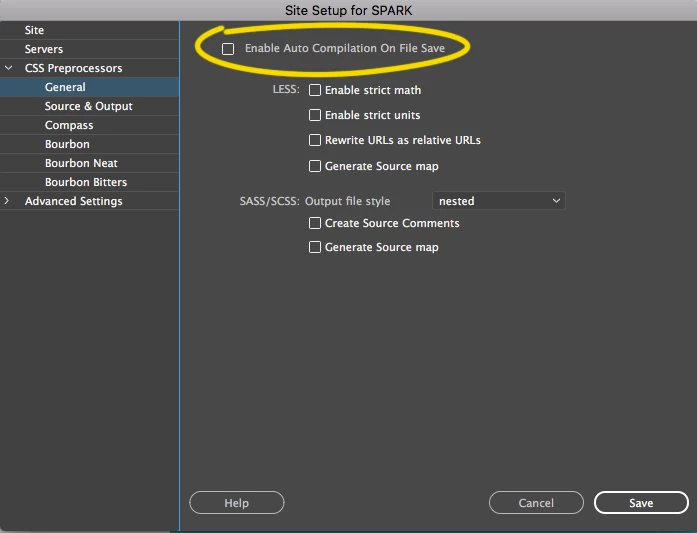
I switched off "Enable Auto Compilation On File Save" in the "CSS Preprocessors" section of the Site Management screen for the current site I'm working on - and it worked!!

When I switch it on, node goes to above 150% and when I switch it off the Dreamweaver node process(es) go to 0%.

I hope others have the same success.

28 replies

barbrab
Known Participant
January 23, 2018

Preran, I have to take issue with your response being marked as a correct answer. This problem is back, with a vengeance. The app is nearly useless and the lag runs to 30 seconds or more. It's actually dragging down my whole system right now. I reboot, everything is fine, I launch dreamweaver, the fan starts in overdrive and the system crawls.
This needs fixed. I pay WAY too much money for this.

fastasleep
Known Participant
January 24, 2018

No kidding. I had Dreamweaver open with two code editors only last night, the files pane wasn't even connected to the remote server or displaying any files, and walked away to go to bed and the fans were churning away. Logged back in and clicked the battery, and of course the apps using significant energy listed: Dreamweaver.

WHY WHY WHY does a code editor/file browser use significant energy for anything, in 2018? Time to go back to migrating to Coda.

barbrab
Known Participant
January 24, 2018

I just did a forum search for this issue across all CC applications. It appears consistently across Dreamweaver, Photoshop, and Illustrator, going back as long as 3 years. Considering I have been complaining for a year and they keep saying a fix is coming, but one clearly isn't, I'd have to say this is something Adobe has no plans to fix.

barbrab
Known Participant
December 20, 2017

And with the recent update to Dreamweaver 18, the problem has returned.
Wow, this is getting old.

crewmark
Known Participant
November 26, 2017

Almost December 2017 so am surprised Adobe has taken so long to fix this bug... have you only got 3 people working on this or something?

First thing I'd like to say is that I am amazed "node" can use 178% of my CPU... in math class I learned 100% was tops.

When starting Dreamweaver (and yes it's the latest as of todays date) the savapi starts first and chews up most of the CPU until DM has properly launched then "node" kicks in and the fans in my MacPro2013 almost launch it off the desk... I'm sure this is not good for my hardware.

So, local sites only, MacPro, 3 GHz 8-Core Intel Xeon E5, 64 GB 1866 MHz DDR3, OSX 10.12.6. Dreamweaver 18.0 10136 Build.

Come on Adobe, if you add up all the people having this problem, times it by the number of months people have been complaining about this and then times that by the monthly fee you charge, I'm sure there is enough capital there to warrant some actions here.

creativedigitalnz
Known Participant
November 9, 2017

Can confirm node process at 132% CPU for Dreamweaver 2018. No files open and no other Adobe software running. What is going on?

B i r n o u
Legend
November 9, 2017

here that seams normal...

11.09.2017-12.30.28

how long the last time that you have reboot DW ?

do you run node services from an external manner ?

did you proceed to a clean install of 2018 ?

Known Participant
October 20, 2017

Hello,

Just to add that even after Dreamweaver updated to its version 2018, I noticed this going on. Latest iMac, 40GB of RAM, "node" process using CPU 120-140+%.

Thanks

jpmejia
Participant
October 20, 2017

WOW.... this is disappointing. Just updated and again "node" CPU at 140%

Years of frustration ...

At least deleting node file works.

Any suggestions for a better HTML Editor?

Nancy OShea
Community Expert
Community Expert
October 20, 2017

Try Brackets.

http://brackets.io/

Nancy O'Shea— Product User & Community Expert
Participant
August 24, 2017

I guess I'm not adding much except to complain that node is taking up 100% of one CPU.  I was OK with my March 31 version of node until today.  I updated Dreamweaver and rebooted but I still have the problem.

After 10 months, I would have expected a summary of fixes that are worth trying.

I am disappointed. I have used Dreamweaver for 10 years.

Macbook Pro Early 2011, 8GB.

visual_laZza
Participant
August 14, 2017

Hallo People,

you still don't solve this problem?! How could it be? This issue impair my workflow. I'm thinking to change the program. It's really aggravating.

Inspiring
August 8, 2017

I've been doing my routine work in DW:  I leave it open all the time with "Site A" selected, and I haven't seen any sign of the  Node Process since I last posted (28 July 2017, #61, above).

Rather than wait any longer, I did what in #61 I thought would reproduce this issue:   I switched DW to rarely accessed "Site B".  Yes, that activates the Node Process.  In Mac's Activity Monitor, viewing CPU activity,  I see the Node Process at the top of the list, consuming 100+% of one CPU.

As before, I observe that this is apparently a series of processes named "node" with different process numbers.  Each instance runs only for only a few seconds.   If I'm quick enough to select the recently-spawned instance and click the Activity Monitor's "i" button (="See information about the selected process") and then switch to the "Open Files and Ports" pane quickly enough, I can view a log of everything the current instance of "node" has done.   Using "CMD-A" and "CMD-C" and I can select all the log text make a copy for leisurely examination.  Sometimes I can actually manage this before the current instance disappears (is Terminated).

What happens if I switch DW out of "Site B" and return to my usual work focus, "Site A"?  I tried that:  I no longer see "node" at or near the top of my task list.  A few seconds are required for the most-recent instance of "node" to finish, then no more are spawned.

Yes, if then I switch back to "Site B", the  Node Process  appears at the top of my task list as described above.   This appears to be entirely reproducible -- at least for now.  Whatever is triggering this activity might eventually be satisfied, as it is apparently  with my "Site A".

- - -

As before, none of my site files are on any kind of cloud storage.  All the files in "Site A" and "Site B" are local, on my Mac's HD.

- - -

What do I observe in the task log?

As before, near the top I see this entry:

/Applications/Adobe Dreamweaver CC 2017/Adobe Dreamweaver CC 2017.app/Contents/Resources/node-core/services/Compilers/node_modules/node-sass/vendor/darwin-ia32-node-0.10/binding.node

txt

This implicates SASS processing, right?  

After that I see a count-up from 0 on every other line;  I'm going to call these "step numbers" -- because that's what they look like.   I can't really say much about the early steps, but by step number 22, I see something very clear:  "Site B's" directory tree root.  After that, thru step 1844, the log lists what looks like an exhaustive scan of "Site B", including DW's internal-use subdirectories named '_notes'. 

I counted exactly 1239 .html files in this directory tree.  That looks like the maximum step number is the number of html files -- plus considerable, but not unreasonable, overhead.  (I use directories freely to structure my sites.)

- - -

To extend what I suggested before:  Maybe everything is operating normally -- almost.   For some reason, the reason for spawning the Node Process is not satisfied, so the process is spawned over and over again.

To repeat what I requested again:  I'm NOT using any of the mechanisms supported by the Note Process. Specifically, I have no interest in SASS. So: I think I should be able to opt out of this.

barbrab
Known Participant
July 16, 2017

Same issue here on Macbook Pro running 2017.5 build 9878.

Renaming Node doesn't help a bit.

cbielich1
Participating Frequently
July 12, 2017

Any new news? I have starting to resorting to notepad ++ in some instances lol

Niharika Jha
Adobe Employee
Adobe Employee
July 14, 2017

Hi,

We are investigating this issue at our end, we will update this thread once we have a fix in place.

Regards,

Niharika Gupta

Adobe Dreamweaver

Participating Frequently
July 14, 2017

Thanks, also please note this isn't a mac specific issue.  On windows it hits me too, I've made another thread about it. In my case I disabled the adobe cloud on startup, as a troubleshooting measure, so it seems to occur when I start dreamweaver.

Dreamweaver CC 2017 - 2017.5 build 9878 - node.exe killing my system