
Participant
November 29, 2016
Answered

Dreamweaver CC 2017 process "node" high CPU usage

  • November 29, 2016
  • 28 replies
  • 45026 views

I have installed Dreamweaver CC 2017 on a Macbook Pro (i7, 16 GB RAM) and the process "node", which seems to be connected to Dreamwaver shows a 100 to 120% CPU usage all the time and my fan is running at high spped all the time. Has anyone a suggestion how this can be fixed? Thanks!
This topic has been closed for replies.
Correct answer mig15

Thanks Jon Fritz II that is an answer - though not ideal, it would solve the problem.

I think I have found an answer that works in the current version!

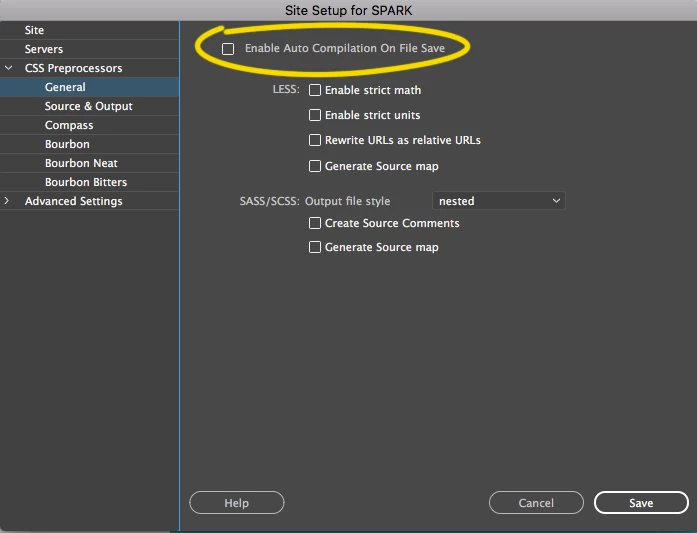
I switched off "Enable Auto Compilation On File Save" in the "CSS Preprocessors" section of the Site Management screen for the current site I'm working on - and it worked!!

When I switch it on, node goes to above 150% and when I switch it off the Dreamweaver node process(es) go to 0%.

I hope others have the same success.

28 replies

cbielich1
Participating Frequently
June 30, 2017

If you use Dropbox as a CDN or as your "Versioning" option please let us know here.

Participating Frequently
June 30, 2017

I do. But I have had syncing turned off while I work and the problem still persists.

cbielich1
Participating Frequently
June 30, 2017

I don't think that syncing is the issue. I think it has something to do with the Local Site Folder and how many folders are listed. My local site folder that I point to has 28,776 Files and 5,945 Folders in it. Its 2.45 GB

hnguyen2007
Participant
June 22, 2017

I've been having the same issues as well.

Here is what i did to fix it....

/Applications/Adobe Dreamweaver CC 2017/Adobe Dreamweaver CC 2017.app/Contents/MacOS

rename the node file to something else. Problem goes away.

Whatever that node file is for it doesnt seem to be something I need or utilize. Smooth sailing so far!

cbielich1
Participating Frequently
June 22, 2017

Dude I love you, that totally worked!

Known Participant
June 23, 2017

With the 2017 version I discovered that creating a new file ended the excessive node CPU usage.

With 2017.5 I discovered that I sometimes need to add a few characters to the new file and then the problem goes away after a few seconds. I can close the new file without saving it and the problem remains solved, afaik. You may also need to create a second new empty file. Try combinations of these.

I hope this continues to work!

BTW, I was considering reverting to an older version of Dw but CC doesn't have that option for Dw anymore? I've used that capability in the past with Dw, and I had up to three versions installed at the same time, which I needed for a specific reason. The Adobe web page with instructions on how to to revert does not look like the current UI that I have with respect to accessing prior versions of Dw, the option isn't there.

I'm on a 2.7 GHz Mac mini (mid 2011) 10.12.5 16GB RAM.

Niharika Jha
Adobe Employee
Adobe Employee
June 5, 2017

Hi,

Thanks for reporting the issue.

We use Node to compile less/sass files and for Device Preview, can you please send us a video clip demonstrating the issue when this is happening? Also, if you are able to send us the files that you have been working on which causes this issue to occur would be helpful.

Regards,

Niharika Gupta

Adobe Dreamweaver

cbielich1
Participating Frequently
June 6, 2017

I cannot send the actual files I am working on because of the sensitivity of them, but here is a few video's showing you how hard my laptop is working with using DW without even having any files open.

Just so you know none of these symptoms happen as soon as I open DW. As long as I do not have it running the computer runs great with no issues. As soon as I start DW they all start.

Niharika Jha
Adobe Employee
Adobe Employee
June 7, 2017

Hi,

Thank you so much for sharing the video clips, we are trying our best to reproduce the same scenario in our setups, will come back if we find something.

Request other users, if they can add their inputs to this post for our help.

Regards,

Niharika Gupta

Adobe Dreamweaver

cbielich1
Participating Frequently
June 3, 2017

Im having the same issue. Super high CPU usage, fan super loud, Battery dies in about an hour without being plugged in with Dreamweaver CC 2017. I really hope there will be a fix soon.

Participant
May 4, 2017

Did your issue get resolved? All of my applications are causing my computer to freeze requiring me to force restart. Dreamweaver, Illustrator, Indesign. MACBOOK 12" User here. Fully updated (re-installed) 2017 April releases of Creative Cloud. Never had an issue with my machine before.

Participant
May 4, 2017

I am still experiencing this issue. I just PM'd Preran this evening to try to get it resolved.

Participant
April 20, 2017

Preran

I have this issue, too... in my case node is using over 100% of CPU.

I just updated to the latest version of Dreamweaver this afternoon, but it doesn't seem to have incremented the version number in About Dreamweaver. Still says 2017.1 build 9583.

I'm in code view, and it kicks up when I open Dreamweaver and stays going until I close it.  Not sure if it is related to views or sass processing.

  Model Name: MacBook Pro

  Model Identifier: MacBookPro11,5

  Processor Name: Intel Core i7

  Processor Speed: 2.5 GHz

  Number of Processors: 1

  Total Number of Cores: 4

  L2 Cache (per Core): 256 KB

  L3 Cache: 6 MB

  Memory: 16 GB

This is basically making Dreamweaver unusable.  My machine works, but it's sluggish when DW is open.

Nancy OShea
Community Expert
Community Expert
April 20, 2017

Color me obvious  but did you restart your computer after the update? 

Nancy

Nancy O'Shea— Product User & Community Expert
Participant
April 21, 2017

I hadn't, but I have now... and no change. Node rises to the top when Dreamweaver is launched at over 100% CPU. Quitting Dreamweaver makes that go away.

Participating Frequently
April 10, 2017

Same happening for me unfortunately, since 2017.0.2

Preran
Community Manager
Community Manager
April 12, 2017

While this is no consolation, we haven't heard of many users with a similar issue with the latest update. Can you provide me with details about your OS as also ensure that your computer meets system requirements?

System requirements for Dreamweaver

Also, does this happen with all files or just some?

Thanks,

Preran

erwins79011132
Participant
April 12, 2017

Thank you Jon Fritz II, but this wont help.

@Peran: OS X - 10.11.6 - i7 2,5ghz - 16 GB - Macbook Pro Retina 15 inch

Just one Update at the moment available - Camera Raw

Dreamweaver stil on 2017.0.1

Logout/Login also doesnt help

erwins79011132
Participant
April 7, 2017

Hi there,

same Problem here, Dreamweaver CC 2017 -> process "node" runs with 100% CPU usage.

A solution/fix would be nice. Dreamweaver is unusable at the moment...

Thanks!

Preran
Community Manager
Community Manager
April 7, 2017

Are you facing this issue after updating to the latest version of DW (2017.0.2)?

If that is the case, can you try restarting your computer and let us know if that helps?

Thanks,

Preran

erwins79011132
Participant
April 10, 2017

Hi Preran,

a restart didnt solve the problem. Currently installed is the version 2017.0.1 build 9391.

Theres no update available in adobe creative cloud app.