Participating Frequently
May 26, 2019
Answered

Dreamweaver cc 2019 Save buttons

  • May 26, 2019
  • 2 replies
  • 913 views

Where did the save and save as buttons disappear to?  Why was such a stupid thing done?

I absolutely loved CS6.  Adobe pulled a Microsoft mistake.  Every time they update software, it gets worse.  I absolutely hate the CC products.  I run CS6 on my main development computer and love it.  Unfortunately, that computer is on it's death bed.  Creative cloud doesn't offer the download of older versions any more that I can find.  Only older CC versions. Now I'm going to get stuck using the crappy CC version.  I feel ripped off by Adobe. 

Is it possible to get back these ESSENTIAL buttons?

By the way, I have searched and read previous threads on this, but the answers posted there DO NOT WORK!!!!  I wasn't able to post in the other thread, so I posted this.

This topic has been closed for replies.
Correct answer Nancy OShea

psgd10man  wrote

What I need most is the save all button.  I don't see a shortcut available for save all.

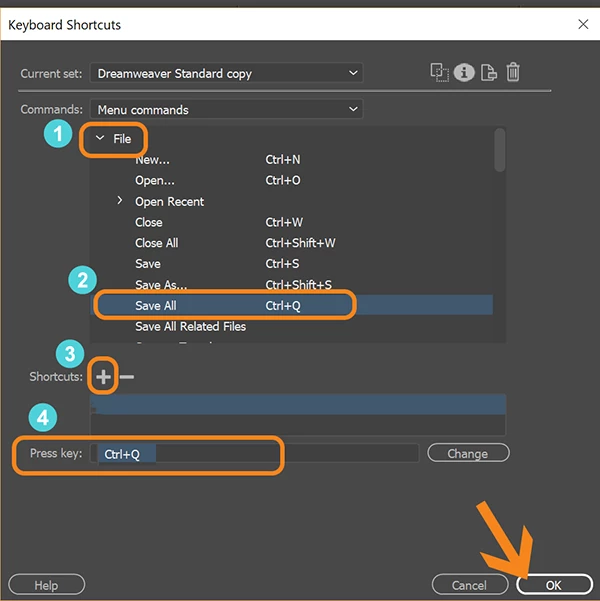
Create a custom shortcut by going to Edit > Keyboard Shortcuts.   See screenshot.

In this example I assigned my own key combination (Ctrl+Q) to the File > Save All function

2 replies

Abambo
Community Expert
Community Expert
May 26, 2019

Except for the changed libraries supported in Dreamweaver, I find the Dreamweaver in it's current situation very usable. But I need to say that I do not miss any save/save as buttons as I'm using ctrl/command s...

ABAMBO | Hard- and Software Engineer | Photographer
Nancy OShea
Community Expert
Community Expert
May 26, 2019

Abambo  wrote

I do not miss any save/save as buttons as I'm using ctrl/command s...

I confess I never use the Standard Toolbar or Insert Panel.  They take up too much workspace.

Nancy O'Shea— Product User & Community Expert
Nancy OShea
Community Expert
Community Expert
May 26, 2019

Moderator moved from Adobe Creative Cloud to Dreamweaver support forum​.

Go to Window > Toolbars > Standard.

Or use keyboard shortcuts:

Ctrl+S =  Save

Ctrl+Shift+S = Save As.

Nancy O'Shea— Product User & Community Expert
psgd10manAuthor
Participating Frequently
May 26, 2019

What I need most is the save all button.  I don't see a shortcut available for save all.

psgd10manAuthor
Participating Frequently
May 26, 2019

Are earlier versions of CC more user friendly?