
Inspiring
May 30, 2021
Answered

Find & Replace in DW 21.1

  • May 30, 2021
  • 3 replies
  • 716 views

Hi

I would like to clean up html code that includes tags such as

<p class="Paragraph-Style-14pt" id="u291729-41" style="user-select: auto;">  to replace it with just <p>


I can removed most of the  code, by F-R most of the repeating elements with a blank, to be left with just:

<p "uSOMENUMB-ER">

The problem is that this id number is variable with every entry. How do I find-replace to be left with just the <p> tag? The number varies with every entry.
This topic has been closed for replies.
Correct answer B i r n o u

nope, you didn't search the right place and the right query...

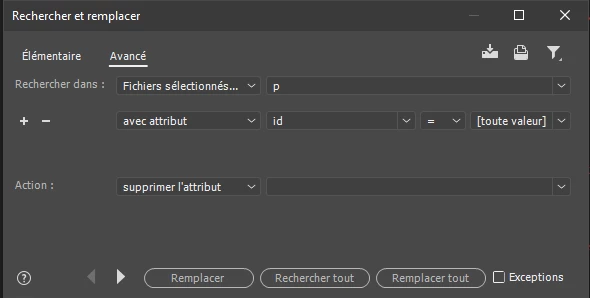
here is the search and reasearch dialog that you should have


3 replies

Nancy OShea
Community Expert
Community Expert
May 30, 2021

In case you're not fluent in French, See my F&R screenshot in English.  Click the Advanced tab. 

Find in Current Document all paragraphs with an ID of any value and remove the ID. 


Nancy O'Shea— Product User & Community Expert
B i r n o u
Legend
May 30, 2021

when you hit Find and replace in files (Ctrl Shift F) you will be able to get an advanced search and replace mode.

so now from the advanced TAB , you will have to set the dropdown menu to search for different attributes (ID, class, style), located in the target parent TAG (<p>) and simply remove them


Weat01Author
Inspiring
May 30, 2021

I tried this but the problem is it doesn't accept what I am  searching for - eg <p id="*"> Doesn't work -  what I need is a wildcard field of some kind?

B i r n o u
Legend
May 30, 2021

do you get the seame setting in the dialog ?

Ged_Traynor
Community Expert
Community Expert
May 30, 2021

Moving thread to the Dreamweaver forum from Using the Community