


Participant
August 9, 2017
Answered

Following a link in preview

  • August 9, 2017
  • 2 replies
  • 501 views

I used to build my website with a very old program (don't laugh: AOLPress) that's not working with actual OS.

Now I like to rebuild/relaunch my site with Dreamweaver.

What I liked very much on AOLPress: I was able to klick through my website like a browser and edit it at the same time.

A click on  a link opened the linked page and I could continue editing.

Is there a chance to edit Dreameaver's options so that I can jump to another page (f.ex) doubleclicking the link?

Can I edit shortcuts?

The patch I found is rightclicking the link and then chose "open linked page" (?) in a second click.
This does not seem to work within frames: DW opens a new page.

And yes: I will get rid of frames asap, but my first step will be learn more about handling DW.
So I have to handle my old framed-site for a while with Dreamweaver.

This topic has been closed for replies.
Correct answer Nancy OShea

r.schmeink  wrote

on AOLPress: I was able to klick through my website like a browser and edit it at the same time.

A click on  a link opened the linked page and I could continue editing.

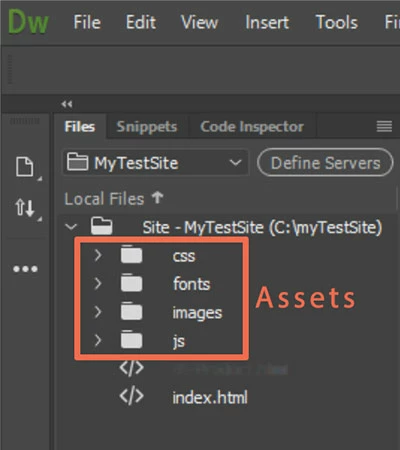
DW does not work that way.  In Live View, you can Ctrl+Click on links to other pages to ensure the links work but you cannot edit the 2nd page because technically you're still in the main document.  To edit files, you must first open them from your local Files Panel (F8) - see screenshot.

Nancy

2 replies

Nancy OShea
Community Expert
Nancy OSheaCommunity ExpertCorrect answer
Community Expert
August 9, 2017

r.schmeink  wrote

on AOLPress: I was able to klick through my website like a browser and edit it at the same time.

A click on  a link opened the linked page and I could continue editing.

DW does not work that way.  In Live View, you can Ctrl+Click on links to other pages to ensure the links work but you cannot edit the 2nd page because technically you're still in the main document.  To edit files, you must first open them from your local Files Panel (F8) - see screenshot.

Nancy

Nancy O'Shea— Product User & Community Expert
Participant
August 11, 2017

To the developers: why not add "open to edit" in a link's right-click-menu?

My whish to edit an existing page (with frames) may not be professional,

but this definitely is my most important problem now.

(I updatet it dayly till MS shut down a feature I payd for.)

Too poor an actual program can't do what freeware from 1995 does.

Am 10.08.2017 um 00:54 schrieb Nancy OShea:

>

Following a link in preview

created by Nancy OShea <https://forums.adobe.com/people/Nancy+OShea>

in /Dreamweaver support forum/ - View the full discussion

<https://forums.adobe.com/message/9756729#9756729>

Nancy OShea
Community Expert
Community Expert
August 11, 2017

You're using a last century approach to web design that's obsolete and no longer supported by modern code or tools.  The W3C saw fit to remove Frames from the  HTML5 web standards because Frames pose major  usability problems for people.   And MS discontinued FrontPage in 2003.  This is 2017.

The current DW CC does not support Frames.  And it never will.

Nancy

Nancy O'Shea— Product User & Community Expert
Nancy OShea
Community Expert
Community Expert
August 9, 2017

Preview your site in a real browser by right-clicking the open document Tab (or any HTML file in your Files Panel).  Select Open in Browser.   This is not the same as Real-Time Preview which is little dicey for some things. 

Frames are horrible for many reasons.  Getting rid of Frames should be your top priority as they are not web & mobile friendly. 

Nancy

Nancy O'Shea— Product User & Community Expert